
SkyLine HDSR 400 Bedienungsanleitung


Table Of Contents
Introduction ......................................................................................... 2
Front panel and rear panel illustration.............................................. 3
Front Panel....................................................................................... 3
Rear Panel........................................................................................ 3
Remote control.................................................................................... 4
Installing the batteries ........................................................................ 5
Connecting to equipments................................................................. 6
First time installation .......................................................................... 9
Basic Operation................................................................................. 13
Teletext and EPG Operation............................................................. 14
Menu Operation................................................................................. 15
Channel Editing ............................................................................. 15
System Setting............................................................................... 16
USB DEVICE................................................................................... 19
1. To Record Program....................................................................19
2. To Play or View Recorded Program ........................................20
System Information ....................................................................... 20
Trouble shooting............................................................................... 21
Technical specifications................................................................... 22

1
Safety Instructions
Notes
•Always read the safety instructions carefully
•Keep this User's Manual for future reference
•Keep this equipment away from humidity
•Lay this equipment on a reliable flat surface before setting it up.
•Do not stand it on soft furnishings.
•If any of the following situation arises, get the equipment checked by a service
technician:
- The equipment has been exposed to moisture.
- The equipment has been dropped and damaged.
- The equipment has obvious sign of breakage.
- The equipment has not been working well or you cannot get it work according to User's
Manual.
Cautions
•To prevent the risk of electric shock, do not open the cover or the back of the receiver.
•Do not block the ventilation holes of the device. Leave appropriate gap above and
around it to allow for adequate ventilation.
•Do not place the device in an unventilated cabinet or on top of a unit which emits heat.
•To reduce the risk of fire or electric shock, keep this product away from all liquids.
WARNING:
Throughout the whole manual, pay special attention to the following marks that indicate
hazardous situations.
To reduce the risk of electric shock, do not remove cover
(or back). No user serviceable parts inside. Refer
servicing to qualified service personnel.
This symbol indicates dangerous voltage inside the product that presents a
risk of electric shock or personal injury.
This symbol indicates important instructions accompanying the product.
This symbol indicates that this product incorporates double insulation between hazardous
mains voltage and user accessible parts. When servicing use only identical
replacement parts.
This symbol shown on the product or its literature, indicates that waste electrical
products should not be disposed of with household waste. Please recycle where
facilities exist. Check with your Local Authority for recycling advice.

2
Introduction
This high definition (HD) DVB-S2 receiver is suitable for the reception of FTA digital
satellite TV and radio programs with the best picture quality for your digital life.
Main Features
Fully DVB-S2 and DVB-S compliant
Support HDTV MPEG-2 & MPEG-4 H.264 decoding
Support DiSEqC 1.2 & 2.0
4 digits LED indicates channel number and time
OSD language: English and other languages as per request
Video format support 1080i, 720p, 576p, 576i
Variable aspect ratio (4:3, 16:9) 4:3 Pan & Scan or Letter Box modes
Easy-to-use menu system
Easy channel installation
Support EPG
Favourite Channel Edit
Support teletext/subtitle/audio language selection
Parental lock function
Capacity for storing up to 5000 channels
Automatic software upgrade via satellite
Ethernet for future use
Full remote control function
Package Contents
Before installation, please check the items of the package. The package should contain
the following items:
1. DVB-S2 receiver x1pcs
2.Remotecontrol x1pcs
3. Instruction manual x 1 pcs
The Satellite Dish
Your dish should be properly installed and azimuth and elevation must be precisely set up.
This unit works with 1.2 & 2.0 on a compatible antenna positioner. Ask your dealer for
information.

3
Front panel and rear panel illustration
Front Panel
1. STANDBY: To enter standby mode.
2. MENU: To enter the main menu.
3. OK: To confirm your selections.
4. VOL-: To decrease the volume level.
5. VOL+: To increase the volume level
6. CH- : Used to change channels.
7. CH+ : Used to change channels.
8. LED DISPLAY:Used to display the time or channel number.
Rear Panel
1. LNB IN: IF input from LNB to digital tuner.
2. LOOP OUT: IF loop-through output from digital tuner.
3.
4.
USB: Connects to hard disk USB 2.0.
5.
HDMI: Connects to the TV using an HDMI cable for High Definition viewing.
6.
COAXIAL: Digital audio output.
7.
S-VIDEO: Y/C output for a S-VHS or Hi-Fi Video Recorder.
8.
VIDEO output: This jack outputs composite video signal. Standard definition
i. Only (480i and 576i resolution).
9.
Y Pb Pr output: These jacks (Green, Blue and Red) output the component video
signal. i. 1080i, 720p resolutions supported.
10.
AUDIO L/R: This two jacks (white/black) output analog audio signal.
11.
TV SCART: Connects to the TV using a TV SCART cable.
12.
Power lead in :AC~ 110-240V (Auto-selectable), 50-60Hz
Mains power switch: To turn on/off the power.

4
Remotecontrol
Remote key functions:
1. STANDBY: To switch the set top box to on and off.
2. NUMERIC buttons: To select a channel by direct number
input.
3. REC: To start to record program.
4. REW: To scan backward when playing a recorded program
or time shift.
5. OK: To confirm a selection in a menu and enter the channel
list in normal viewing mode.
6.◄: To move around the menu screens and decrease the
volume level.
7. MENU: To enter the main menu.
8. INFO: To display current program information.
9. EPG: To provide the user with TV programming information.
10. FORMAT: To switch the video resolution 480i, 576i, 576p,
720p, 1080i.
11. FAV: To access your favourite channels list.
12. SUBT: To switch between different subtitles that are
broadcasted.
13. TTX: To turn on or off teletext this is available in the
broadcasted stream.
14. RECALL: To switch between the last viewed d channel and
the current channel being viewed.
15. PAUSE: To freeze the image being viewed.
16. AUDIO: To switch between different audio languages that
are broadcasted or set the sound mode.
17. ASPECT: To switch the video aspect ratio.
18. TV/RADIO: To switch between TV channels and Radio
channels.
19. EXIT: To exit to the previous screen or menu.
20. ▼: To move around the menu screens and select a
channel in normal TV view mode.
21. ►: To move around the menu screens and increase the volume level.
22. ▲: To move around the menu screens and select a channel in normal TV view mode.
23. FF: To scan forward when playing a recorded program or time shift.
24. Stop: To stop recording the program.
25. MUTE: To turn the sound on or off.

5
Installing the batteries
Remove the battery cover from the remote control and put two AAA size batteries inside
the compartment.
The diagram inside the battery compartment shows the correct way to install the batteries.
Caution:
1. Keep batteries out of children’s reach.
2. Don’t attempt to recharge, short-circuit, disassemble heat or throw the batteries into the
fire.
3. Always replace both batteries at the same time. Never mix new and old batteries or
batteries of a different type.
4. If you don’t intend to use the remote controller for an extended period, remove the
batteries to prevent possible leakage and corrosion.
5. Do not drop, apply shock or step on the remote control.
6. Do not spill water on the remote control.
Note: If the receiver does not operate when operating the remote control from a close
range, you need to replace the batteries.
Using the Remote Control
1. To use the remote control, point it towards the front of the digital set top box.
2. The remote control has a range of up to 7 metres from the set top box at an angle of up
to 60 degrees.
3. The remote control will not operate if its path is blocked.
Note: Sunlight or very bright light will decrease the sensitivity of the remote
control.

6
Connecting to equipments
In order to gain optimum signal quality, please read this chapter carefully before using and
select the most appropriate procedure depending on the equipment you have.
Note: If you encounter any problems setting up your product, please contact your local
product distributor.
Connections to a TV
1. Connect the receiver via HDMI /YPbPr output and Audio output
(for high definition viewing).
NOTE:
1). Recommend you to use HDMI connection if available on your TV set, as it ensures the
highest available video resolution for HD programs (and also upscaled SD broadcasts).
7
Connecting to equipment
2). HDMI cable also carry audio, so you will need to mute the TV volume if you are using
the Digital Audio Out (Optical out) connected through a HI-FI amplifier.
3). To get the best image quality, recommend to set the video output mode to HDTV, press
the “FORMAT” button to select video resolution 1080i or 720p.
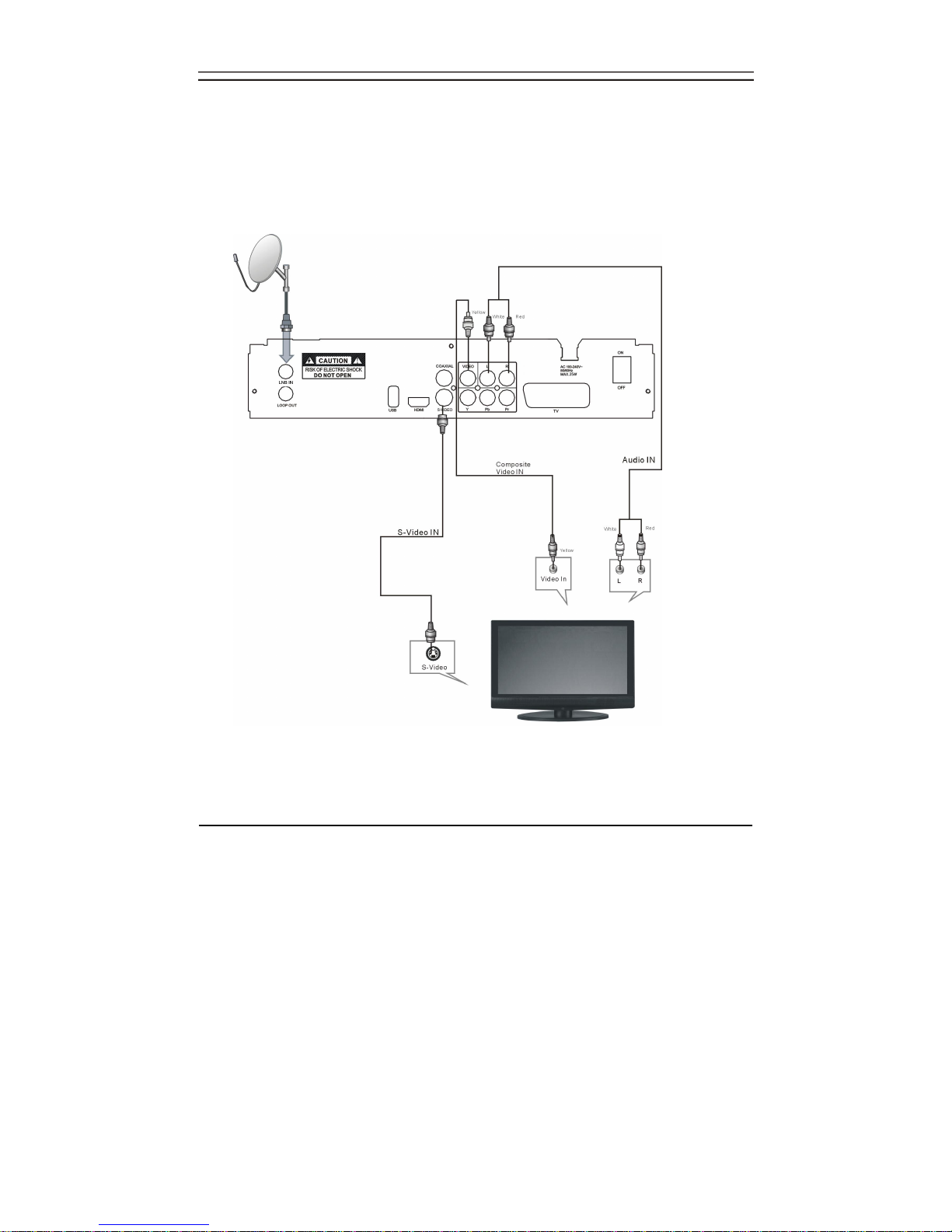
2. Connect the receiver via Video output and Audio output (for standard definition
viewing).
NOTE:
1. Composite video will provide only standard definition output at 576i. Set the video
output mode to RGB (for SCART connection) or CVBS (for composite video
connection) by pressing the 'OUTPUT' button on the remote control unit.

8
Connecting to equipment
3. Connect the receiver with TV via TV Scart.
NOTE:
1. SCART support will provide only standard definition output at 576i.This connection
enables you to record the program that you are watching.
Inhaltsverzeichnis
Andere SkyLine Empfänger Handbücher


