
Smart Park PDC125 PI Technisches Datenblatt
PDC125 PI
Operation Manual
Version 1.0
Installation Manual
Version 1.0

1. Introduction
Thank you for purchasing Smart Park®. Your Smart Park®
is a multifunction system, the system functions as a
supplemental feature on your vehicle to assist you in
avoiding obstacles while reversing and for low speed forward
movement (if additional module is installed).
The PDC system uses ultrasonic radar to alert you to the
distance to any potential obstacle.
..........................................................................................
The system has many advanced features including:
• Variable Detection Range
• Variable sensitivity
• Self-test at startup to ensure accurate function.
• Learning capability to ignore vehicle mounted obstacle
such as tow-bars and bicycle racks.
• Auto-mute option for use when towing or off-roading.
• Front system automatic activation system.
THE SYSTEM IS DESIGNED TO ASSIST YOU IN DETECTING OBSTACLES
AND WILL NOT REPLACE SAFE DRIVING PRACTICE.
We hope you enjoy using the most advanced parking sensor
system available. Please visit www.smartpark.net to view more
technologically advanced automotive accessories!
Table of Content
Operations Manual ................................... Pages 2 thru 6
Installation Manual ................................. Pages 7 thru 17
1

Operations Manual
2. User Adjustable Settings
i. Speaker Volume Control
The front system and the rear system have separate speakers.
To adjust the volume (or turn the system off), locate your
speaker and use the volume switch on the side.
ii. Auto-Mute Button
At any time the Smart Park® system can be muted by pressing
the automute button (see your installer for button location). This
will mute the system until the vehicle ignition is turned off.
2
Operation Manual
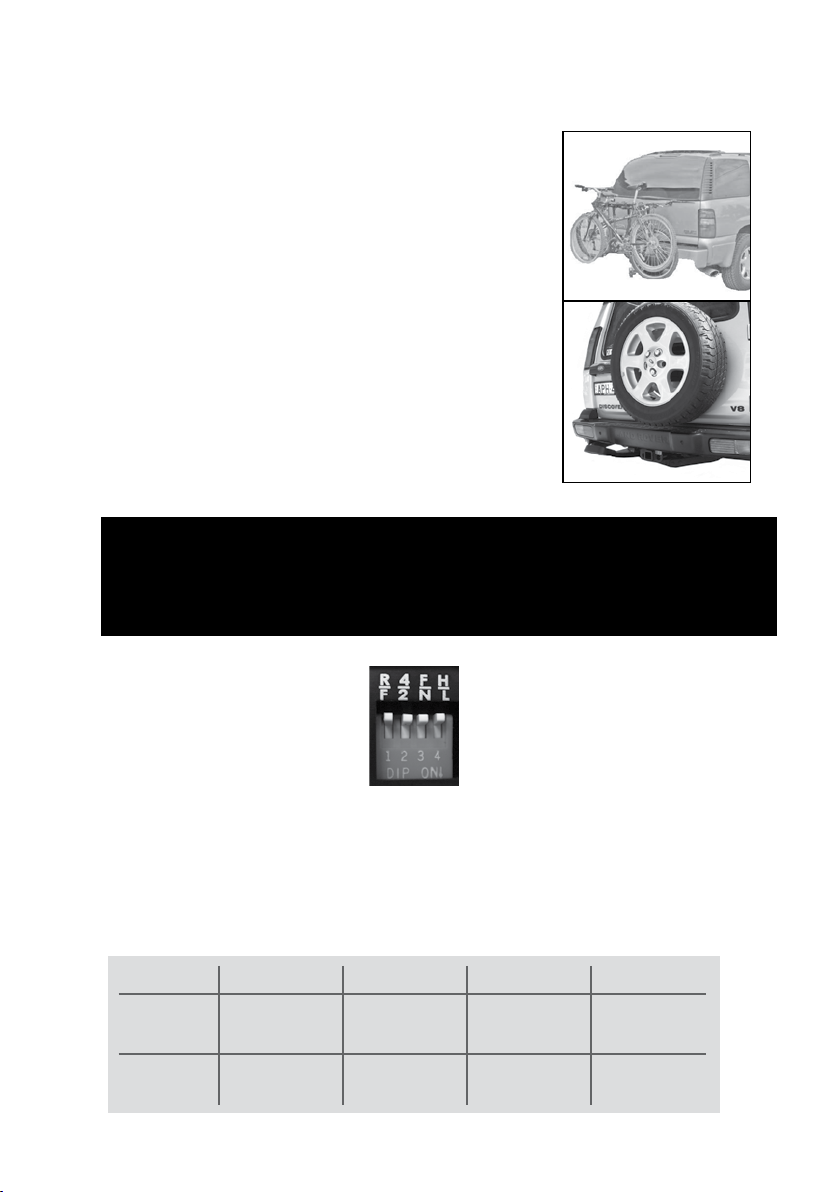
SETTING
UP – “OFF”
DOWN – “ON”
SWITCH 1
Rear Bumper
Front Bumper
SWITCH 2
4 Sensor
2 Sensor
SWITCH 3
Full Detection
(2.1m, 7ft)
Normal Detection
(1.5m, 5ft)
SWITCH 4
High Sensitivity
Low Sensitivity
iii. Learning Capability
Your Smart Park® system can learn to ‘ignore’
vehicle mounted obstacles (eg tow-hitch, low
rear-mounted tyre, bicycle rack etc..) that
would otherwise cause false alerts. To ‘teach’
your vehicle to ignore these obstacles place
the vehicle in reverse for 2 second. Place the
vehicle in park / neutral for 1 - 2 seconds.
Repeat 4 times. When learning has been
activated the LED will rotate in red-yellow-
green silently followed by a long beep to
confirm the training was successful.
To reset the system simply remove all obstacles
and follow the same learning procedure.
ATTENTION: Obstacles hidden from the sensor by a vehicle
mounted obstacle will not be detected. The object must be fixed
and not move in relation to the vehicle or it will be detected.
iv. Control Unit Switches
Your control unit will be mounted somewhere out of sight (ask you
installer where). On the side of the unit are some dip switches that
can change the function of your PDC system as outlined in the
chart below (only adjust Switches 3 & 4):
3
Operation Manual

4
Operation Manual
3. Basic Function
i) Rear Protection System
The rear sensors are activated when the vehicle is placed in reverse
gear. The system will beep once to confirm successful self-check and
then will remain silent unless an object is detected. On initial detection
of an obstacle the system will beep slowly and the green LED will flash.
As the vehicle nears the obstacle the beeping will increase and the
yellow LED will flash. When the obstacle is within 1.3ft (40cm) of the
vehicle a constant tone will be heard and the red LED will flash.
Zone 3:
7 ft ~ 3 ft / 2.1m ~ 1.0m
(Full Range)
5 ft ~ 2.5 ft / 1.5m ~ 0.8m
(Normal Range)
Zone 2:
3 ft ~ 1.3ft / 1.0m ~ 0.4m
(Full Range)
2.5 ft ~ 1.3ft / 0.8m ~ 0.4m
(Normal Range)
Zone 1:
1.3ft ~ 0 ft / 0.4m ~ 0m
ii) Front Protection System
The front system is designed to be on permanently. If required the system
can be turned off using the supplied on/off switch.
The system automatically reduces unwanted detection by going mute
(silent) whenever the detection area is unchanged for more than four
seconds. As soon as anything in the detection area (either the vehicle or
the detected object) moves, the system becomes active again.
When the vehicle is within 2.5ft (80cm) of an obstacle the LED will flash
yellow and the vehicle will begin beeping. When the vehicle is within 1.3ft
(40cm) the LED will flash red and a constant tone will be heard.

There are only two zones in the front system:
Zone 2:
0.8m – 0.4m
2.5ft – 1.3ft
Zone 1:
0.4m – 0m
1.3ft – 0 ft
4. Trouble Shooting
All problems with Smart Park® must be repaired by an authorized
provider. Should your Smart Park® unit not function correctly or
should you hear more than the standard one beep self-check tone
then immediately take the vehicle back for repair. Any unauthorized
or attempted repairs to a Smart Park® component will void your
warranty.
ATTENTION: DO NOT USE YOUR SMART PARK® SYSTEM IF YOU
DO NOT HEAR A SINGLE SUCCESSFUL SELF-CHECK BEEP AT
STARTUP.
5. Guarantee
This product is guaranteed by Zorg Industries for a period of three
years from the date of purchase against defects due to faulty
workmanship or materials. Service under guarantee is provided only
upon presentation of evidence of purchase date and receipt of your
warranty registration (see page 18).
This guarantee is not valid if the defect is due to accidental damage,
misuse or neglect and in case of alterations or repairs carried out by
unauthorized persons.
Service (during and after guarantee) is available at all outlets where the
product is sold by authorized retailers. This product is a parking and
distance aid. Zorg Industries is not responsible for any accident or injury
to persons or property arising from use or misuse of this product.
5
Operation Manual

Notes:
6
Operation Manual

Installation Manual
1. Required Tools List
Screwdrivers
Marker pencil
Electric Drill
Smart Park® SPC-3 Drill bit
Smart Park® SPC-4 Drill bit
Plyers
Panel Removal Tool
Soldering Iron & Solder
Voltmeter
Safety Glasses
2. Supplied Parts List
Control Module
Sensors x 4
Sensor extension cables x 4
0deg Sensor Supporters x 4
Speaker/LED Display x 1
Speaker LED Display extension cable x 1
Main wiring harness (Black,Red, Orange) x 1
On/Off/Mute Button x 1
Mounting Accessories (Tape, Screws, Fasteners)
Installation Manual
7
Installation Manual
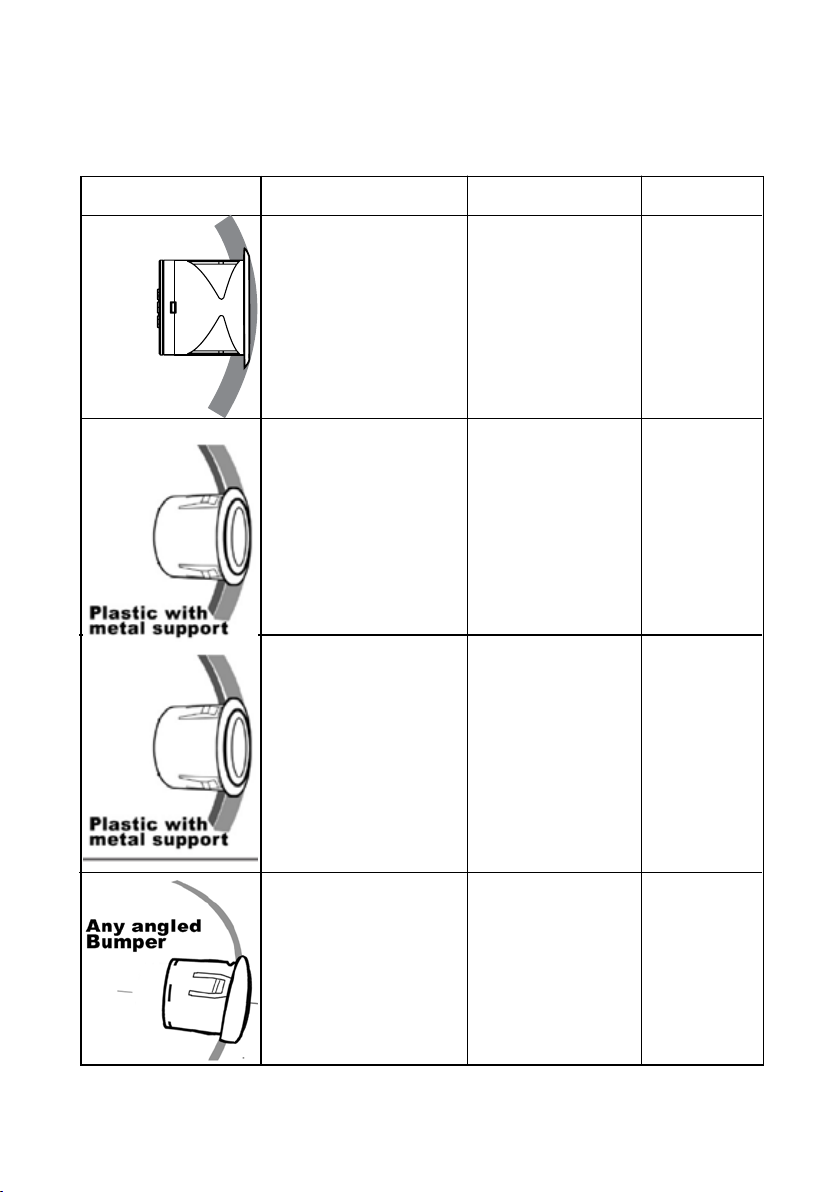
3. Application Guide
Bumper Type Bumper Angle Supporter Cutter
+2º - -2º
+2º - -2º
+2º - -2º
-2º - -10º
Not Required
Yes-Flat
Yes-Flat
Yes - Angled
SPC-3
SPC-4
SPC-4
SPC-4
8
Plastic

4. Painting Sensors & Supporter
5. Position and Mark Bumper for Drilling
9
Installation Manual
Inhaltsverzeichnis


