
Tricor 225 Bedienungsanleitung


TRICOR Systems Inc.
i
Contents
Section Page
1GENERAL DESCRIPTION.................................................................1.1
1.1 Supplied Items .......................................................................................1.1
1.2 Optional Items ........................................................................................1.2
1.3 Serviceable Items ..................................................................................1.2
1.4 Calibration..............................................................................................1.2
2MODEL 225 SETUP ............................................................................2.1
2.1 Equipment Location ..............................................................................2.1
2.2 Power Connection.................................................................................2.2
2.3 Internal Printer ........................................................................................2.2
2.4 External Print / Plot (Option) .................................................................2.3
2.5 TMDAS (Option) ....................................................................................2.5
2.6 PC Configuration...................................................................................2.6
2.6.1 Software Installation...............................................................................2.7
2.6.2 RS232 Connection................................................................................2.8
2.6.3 USB Connection....................................................................................2.9
3MODEL 225 OPERATIONAL PROCEDURES...............................3.1
3.1 Turning On The Model 225 ...................................................................3.1
3.2 Display Contrast ....................................................................................3.2
3.3 Initialization And Testing .......................................................................3.2
3.4 Running A Chocolate Sample ..............................................................3.4
3.5 Menu / Keyboard Operation .................................................................3.7
3.5.1 Passwords..............................................................................................3.8
3.5.2 User ID ....................................................................................................3.8
3.5.3 Print Result Data ....................................................................................3.9
3.5.4 Clear Test Memory..............................................................................3.11
3.5.5 Internal Printer ......................................................................................3.12
3.5.6 External Printer.....................................................................................3.12
3.5.7 Temperature Units ...............................................................................3.13
3.5.8 Set Clock/Calendar .............................................................................3.14
3.5.9 Run Time...............................................................................................3.15
3.5.10 Plot Baseline Temp .............................................................................3.16
3.5.11 History / Status .....................................................................................3.17
3.5.12 LCD Contrast .......................................................................................3.19
3.5.13 CTU Offset Adjust ................................................................................3.19
3.5.14 Cooler Set Point ..................................................................................3.20

Contents (Cont'd)
Section Page
3.5.15 Heater Set Point ..................................................................................3.21
3.5.16 Line Frequency ....................................................................................3.22
3.5.17 Self Test................................................................................................3.22
4CONFIGURATION SOFTWARE .......................................................4.1
4.1 Clock / Calendar Set (Option) ..............................................................4.2
4.2 Preferences............................................................................................4.3
4.2.1 Line Frequency ......................................................................................4.5
4.2.2 Change Password.................................................................................4.5
4.2.3 Sample Run Time (Option) ...................................................................4.6
4.2.4 User Text.................................................................................................4.6
4.2.5 Plot Baseline Temperature (Option) ....................................................4.7
4.2.6 CTU Offset..............................................................................................4.7
4.3 Display....................................................................................................4.8
4.3.1 Result Display Method ..........................................................................4.9
4.3.2 Temperature Units .................................................................................4.9
4.3.3 Internal Printer ........................................................................................4.9
4.3.4 External Printer (Option)......................................................................4.10
4.3.5 Clear Results........................................................................................4.10
4.4 Temperature Control ...........................................................................4.11
4.5 System Status ......................................................................................4.12
4.6 Status Bar.............................................................................................4.12
5CHOCOLATE TEMPER CURVE INTERPRETATION..................5.1
5.1 Temper Curve ........................................................................................5.1
5.2 Qualitative Method.................................................................................5.2
5.3 Analytical Method...................................................................................5.2
5.3.1 CTU and Slope Determination.............................................................5.2
5.3.2 CTU Criteria ...........................................................................................5.5
5.3.3 Slope Criteria.........................................................................................5.5
6TROUBLE SHOOTING.......................................................................6.1
6.1 No Power................................................................................................6.1
6.2 Blank LCD Display................................................................................6.2
6.3 Warning Messages ...............................................................................6.2
6.4 Stored Result Errors..............................................................................6.4
6.5 Temperature Stability............................................................................6.5
6.6 Non-Repeatable Results.......................................................................6.5
TRICOR Systems Inc.
ii

TRICOR Systems Inc.
Copyright© 2004 TRICOR Systems Inc.
All rights reserved
Printed in the United States of America
No part of this publication may be reproduced in any form by any
means without the express written permission of TRICOR
Systems Inc.
The information in this document is subject to change without
notice. TRICOR Systems Inc. makes no representations or
warranties with respect to the contents of this manual and
specifically disclaims any implied warranties of fitness for a
particular purpose. TRICOR Systems Inc. assumes no
responsibility for errors or omissions in this document.
TRICOR Systems Inc.
1650 Todd Farm Drive Elgin, Illinois 60123
Phone (847) 742-5542 • Fax (847) 742-5574

TRICOR Systems Inc.
IMPORTANT
TRICOR’s Mission Statement emphasizes Quality and
Customer Service. Should you encounter any problem with
yourModel225ChocolateTemperMeterordiscrepanciesin
this manual, please let us know at (847) 742-5542.
If TRICOR is made aware or discovers any discrepancies or
problems you will be notified and corrective action will be
taken as soon as possible.
To serve you better we request that primary and alternate
contact names be provided on the enclosed product contact
formandreturnedtoTRICORintheself-addressedenvelope.
This personalized approach will eliminate any delay in
providing you with potentially important information.

TRICOR Systems Inc.
WARRANTY INFORMATION FORM
Customer: ___________________________________________________
Address: ___________________________________________________
___________________________________________________
Please provide the following information for use by our hotline.
•The person(s) to contact with regard to theModel 225 Chocolate Temper Meter
and manual:
Name Telephone No. Email
Primary ____________________ _______________ _______________________
Alternate (1) ____________________ _______________ _______________________
(2) ____________________ _______________ _______________________
(3) ____________________ _______________ _______________________
•The person(s) to contact with regard toNew Product Releases:
Name Telephone No. Email
Primary ____________________ _______________ _______________________
Alternate (1) ____________________ _______________ _______________________
(2) ____________________ _______________ _______________________
(3) ____________________ _______________ _______________________

1.1
TRICOR Systems Inc.
SECTION 1
GENERAL DESCRIPTION
The Model 225 Chocolate Temper Meter provides a much more convenient and
accurate method of determining chocolate temper than the conventional “ice
bath” techniques. The 225 uses a solid-state, thermoelectric cooling unit with
state-o-the-art electronic control circuitry to precisely maintain and regulate the
cooling temperature of the chocolate sample.
The chocolate temperature-sensing probe is maintained at a controlled, fixed
temperature prior to chocolate sample testing to eliminate any errors due to
temperature variations. The 225 is also designed to maintain constant sample
size and temperature-sensing probe depth. These field proven features ensure
accuracy and repeatability in measuring chocolate temper.
The 225 is housed in a small, laboratory enclosure. All controls, indicators and
the internal printer are located on the front panel. The chocolate sample well and
cover door are found on the top of the unit. On the back of the model 225 is the
power entry module with the on/off switch and the RS232 and USB
communication ports.
1.1 Supplied Items
The Model 225 is supplied to the customer along with the following additional
items:
•Power Cord
•RS232 Serial Data Cable and 9-Pin Adaptor
•A spare Roll of Thermal Print Paper for the Internal Printer
•Temper Well Cleaning Tool (attached to Model 225)
•200 Sample Cups
•A CD with Microsoft Windows-Compatible Configuration Software
•Certificate of Calibration for this Model 225
•This Manual

1.2
TRICOR Systems Inc.
1.2 Optional Items
The following are optional items that may be purchased for the Model 225:
•Sample Cups (5000 / box)
•External Printer with Serial Cable Adaptor (plotting option)
•Temper Meter Data Acquisition Software (TMDAS)
•USB Communications Cable
•Calibration / Verification Fixtures
•Optional Software Features
1.3 Serviceable Items
There are no user serviceable parts and no adjustments in the Model 225.
Opening the Model 225 voids the warranty and the Certificate of Calibration.
WARNING
There are dangerous voltages inside the Model 225
which may cause injury or death. Service of the Model
225 should be performed only by a qualified service
technician.
1.4 Calibration
TRICOR Systems recommends a yearly calibration. Two separate calibrations
are performed on Temper Meters. The first is an electronic calibration/
verification of the electronics. This verification can be performed by your internal
personnel provided that they have been given the proper training and the
verification tools have been purchased.
The second part of the calibration is a check of the heat transfer coefficients
between the cooler well and the sample cups. This calibration is performed at
TRICOR using specially crafted tools and procedures to obtain repeatable/
consistent results. This procedure takes 3 days provided that no repairs are
needed and the unit has been scheduled. An electronic calibration is performed
at the same time.

1.3
TRICOR Systems Inc.
1.4 Calibration (Cont'd)
If you would like to schedule your Model 225 to be calibrated at TRICOR
Systems, please call TRICOR’s Contracts Department at (847) 742-5542 for a
Return Material Authorization (RMA#).
2.1
TRICOR Systems Inc.
SECTION 2
MODEL 225 SETUP
2.1 Equipment Location
The Model 225 uses a thermoelectric cooler to generate the cold temperature
well. To obtain the temperature reduction, a great amount of forced air must be
passed through the unit to remove the heat produced in the cooler. It is ideal that
the 225 be located in a spot where relatively cool, clean and dry air may pass
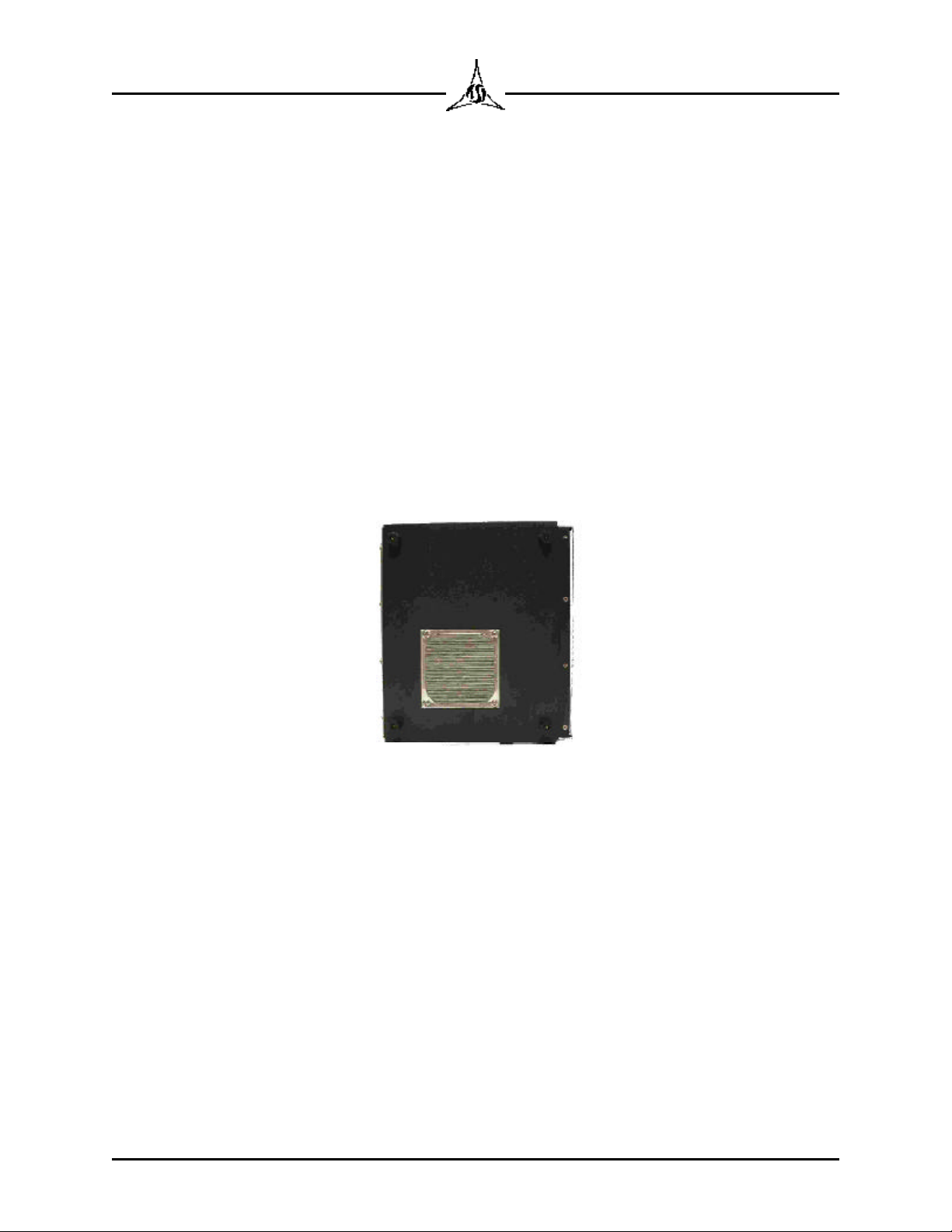
through the unit. The intake port on the bottom of the unit (shown below) as well
as the exit ports on the back must be kept unobstructed. Do not place papers
under the unit. The paper will be drawn up against the intake restricting air flow.
If the intake becomes clogged, the screen can be removed for cleaning by
removing the 4 screws which hold it to the base cover.
Figure 2.1 Bottom View Showing Fan Intake
The repeatability and precision of the chocolate temper is affected by the length
of time it takes to get the chocolate sample from the source to the Model 225
temperature well and to get the sample door closed. It is recommended that the
unit be placed in close proximity to the chocolate so that this transfer can be
minimized. If excessive cooling takes place before the measurement process
begins, inaccurate result may result.
The Model 225 is a precision measurement instrument. It is important that a
clean, uninterrupted supply of electrical power be provided to the unit. If
unexpected problems occur, please verify your power source or move the Model
225 to a location where good power is assured. Noise filtering and transient
suppression may be beneficial.
Inhaltsverzeichnis
Andere Tricor Messgerät Handbücher


