TSL 2173 Bedienungsanleitung

USER GUIDE:
2173 WEARABLE
BLUETOOTH
®
HF/LF RFID READER
www.tsl.com
Design • Development • Manufacture

2173 HF/LF RFID Reader - User Guide V1.01Copyright © 2019 Technology Solutions (UK) Ltd 2
TERMS & CONDITIONS
Copyright © 2019 Technology Solutions (UK) Ltd. All rights reserved.
No part of this publication may be reproduced or used in any form, or by any electrical or mechanical means,
without permission in writing from Technology Solutions (UK) Ltd. This includes electronic or mechanical means,
such as photocopying, recording, or information storage and retrieval systems. The material in this manual is
subject to change without notice.
Technology Solutions (UK) Ltd (TSL®) reserves the right to make changes to any product to improve reliability,
function, or design. TSL®does not assume any product liability arising out of, or in connection with, the application
or use of any product, circuit, or application described herein. No license is granted, either expressly or by
implication, estoppel, or otherwise under any patent right or patent, covering or relating to any combination,
system, apparatus, machine, material, method, or process in which TSL®products might be used. An implied
license exists only for equipment, circuits, and subsystems contained in TSL®products. TSL®and the TSL®logo are
registered trademarks of TSL®. Other product names mentioned in this manual may be trademarks or registered
trademarks of their respective companies and are hereby acknowledged.
All software is provided strictly on an “as is” basis. All software, including firmware, furnished to the user is on
a licensed basis. TSL®grants to the user a non-transferable and non-exclusive license to use each software or
firmware program delivered hereunder (licensed program). Except as noted below, such license may not be
assigned, sublicensed, or otherwise transferred by the user without prior written consent of TSL®. No right to
copy a licensed program in whole or in part is granted, except as permitted under copyright law. The user shall
not modify, merge, or incorporate any form or portion of a licensed program with other program material, create
a derivative work from a licensed program, or use a licensed program in a network without written permission
from TSL®. The user agrees to maintain TSL’s copyright notice on the licensed programs delivered hereunder, and
to include the same on any authorized copies it makes, in whole or in part. The user agrees not to decompile,
disassemble, decode, or reverse engineer any licensed program delivered to the user or any portion thereof.
TSL®reserves the right to make changes to any software or product to improve reliability, function, or design.
TSL®does not assume any product liability arising out of, or in connection with, the application or use of any
product, circuit, or application described herein.
iPad, iPad Air, iPad mini, iPad Pro, iPhone, iPod, iPod touch are trademarks of Apple Inc., registered
in the U.S. and other countries. IOS is a trademark or registered trademark of Cisco in the U.S. and other countries
and is used under license.
Use of the Made for Apple badge means that an accessory has been designed to connect specifically to the Apple
product(s) identified in the badge and has been certified by the developer to meet Apple performance standards.
Apple is not responsible for the operation of this device or its compliance with safety and regulatory standards.
The
Bluetooth
®word mark and logos are registered trademarks owned by Bluetooth SIG, Inc. and any use of
such marks by Technology Solutions (UK) Ltd is under license. Other trademarks and trade names are those of
their respective owners.
www.tsl.com

2173 HF/LF RFID Reader - User Guide V1.01Copyright © 2019 Technology Solutions (UK) Ltd 3
CONTENT
Introduction 4
Parts of the 2173 HF/LF Reader 4
Using the 2173 HF/LF Reader 5
Battery Installation or Removal 5
Locking the Battery Cover (Optional) 9
Button Operation 11
Reading Transponders 12
Status LED 13
Connections 14
Comparison of
Bluetooth
®Operating Modes 15
Changing the
Bluetooth
®Operating Mode 16
Setting up a
Bluetooth
®Connection with an Apple Product 18
Micro SD Card 20
Location and Installation 20
Auto Run File (AUTO.TXT) 21
Log File (LOG.TXT) 21
Software Development 22
Troubleshooting and Maintenance 23
Maintenance 23
Troubleshooting 23
Regulatory information 24
Information to the User – FCC 24
Laser Warning 24
Health and Safety Recommendations 25
Waste Electrical and Electronic Equipment (wEEE) 26
Warranty 26
About TSL®28
About 28
Contact 28
www.tsl.com

2173 HF/LF RFID Reader - User Guide V1.01Copyright © 2019 Technology Solutions (UK) Ltd 4
Technology Solutions’ 2173 HF/LF Reader provides High Frequency (HF) and Low Frequency (LF) Radio Frequency
Identification (RFID), with optional barcode scanning functionality. The unit can be used stand alone or paired with
a
Bluetooth
®wireless technology enabled host device.
INTRODUCTION
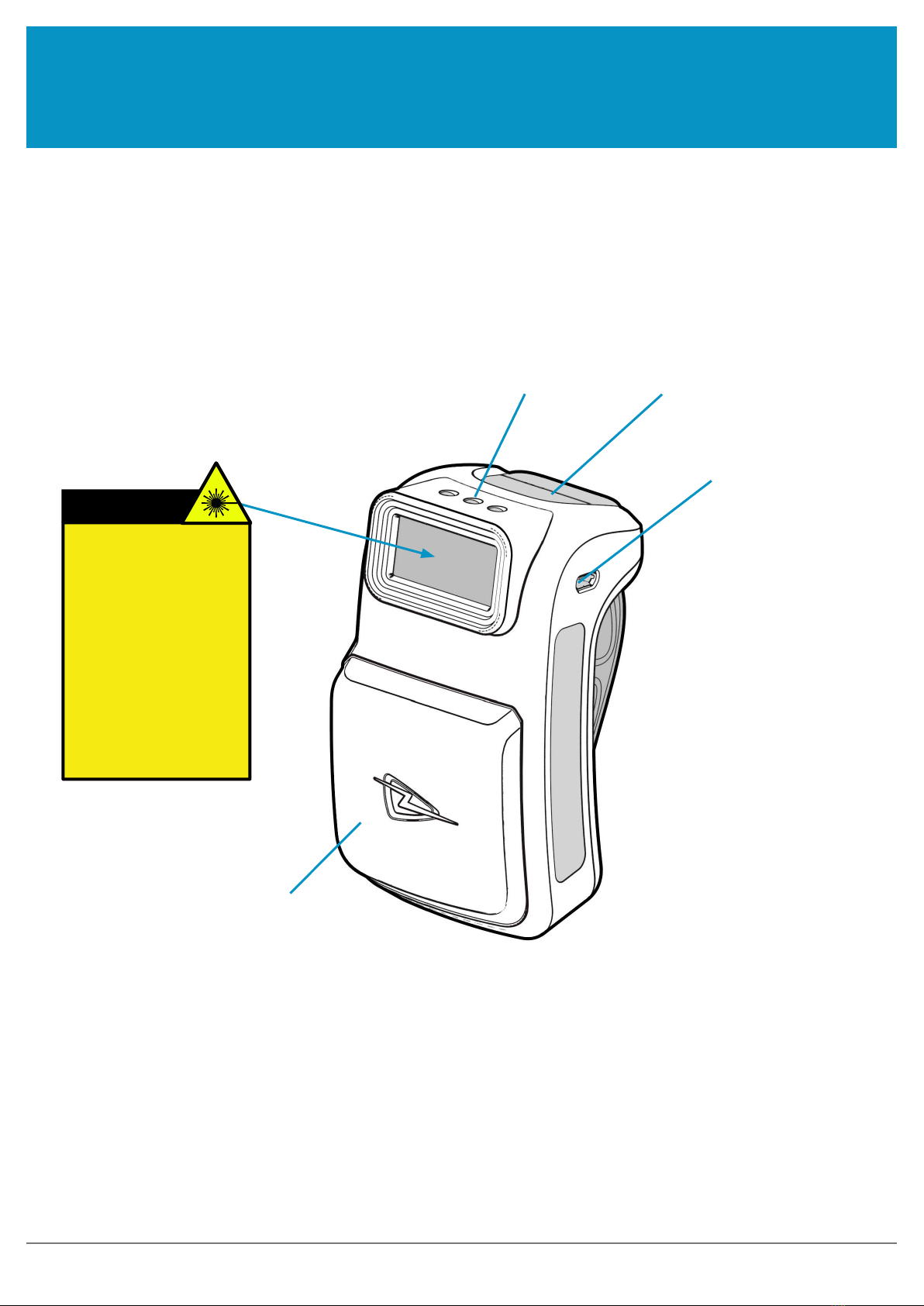
Micro USB connector
Status LEDs Trigger Button
HF/LF Antenna
figure 1: Parts of the 2173 HF/LF Reader
WARNING!
LASER LIGHT. DO NOT
STARE INTO BEAM. CLASS
2 LASER PRODUCT.
LASERSTRAHLUNG NICHT
IN DEN STRAHL BLICKEN.
LASER KLASSE 2.
LUMIÈRE LASER - NE
PAS REGARDER DANS LE
FAISCEAU. APPAREIL À
LASER DE CLASSE 2.
630-680nm, 1mW
PARTS OF THE 2173 HF/LF READER
www.tsl.com

2173 HF/LF RFID Reader - User Guide V1.01Copyright © 2019 Technology Solutions (UK) Ltd 5
USING THE 2173 HF/LF READER
BATTERY INSTALLATION OR REMOVAL
The battery is charged using the supplied micro USB lead and therefore is unlikely to need to be changed once
installed. To access the battery compartment a slider switch must be moved. The battery compartment cover has
a release latch. To access the battery compartment, move the battery cover release slider to the position shown in
the diagram below.
Figure 3: Battery cover release slider in unlocked position
Figure 2: Battery cover release slider in locked position
‘Unlocked’ warning label
Battery cover
release slider
www.tsl.com

2173 HF/LF RFID Reader - User Guide V1.01Copyright © 2019 Technology Solutions (UK) Ltd 6
USING THE 2173 HF/LF READER
Figure 5: Remove battery cover in this direction
Figure 4: Removeable battery cover
Once the battery cover release slider has been moved to the unlocked position, the battery cover can be removed
by simply pulling away from the 2173 body:
www.tsl.com

2173 HF/LF RFID Reader - User Guide V1.01Copyright © 2019 Technology Solutions (UK) Ltd 7
USING THE 2173 HF/LF READER
The battery contacts need to be face down at the top of the battery to meet the contacts shown in the image below.
Battery contacts
Figure 6: Battery placement
Figure 7: Battery in position
CAUTION!
RISK OF EXPLOSION IF
BATTERY IS REPLACED BY
AN INCORRECT TYPE.
DISPOSE OF USED
BATTERIES ACCORDING
TO THE INSTRUCTIONS.
Battery
www.tsl.com

2173 HF/LF RFID Reader - User Guide V1.01Copyright © 2019 Technology Solutions (UK) Ltd 8
Figure 8: Replace battery cover
USING THE 2173 HF/LF READER
Once the battery is installed the actions to replace the cover are:
●Align the top edge of battery cover with the 2173 body
●Push the battery cover down into position
●Slide the locking switch into position
Figure 9: Move battery cover release slider to locked position
www.tsl.com

2173 HF/LF RFID Reader - User Guide V1.01Copyright © 2019 Technology Solutions (UK) Ltd 9
USING THE 2173 HF/LF READER
LOCKING THE BATTERY COVER (OPTIONAL)
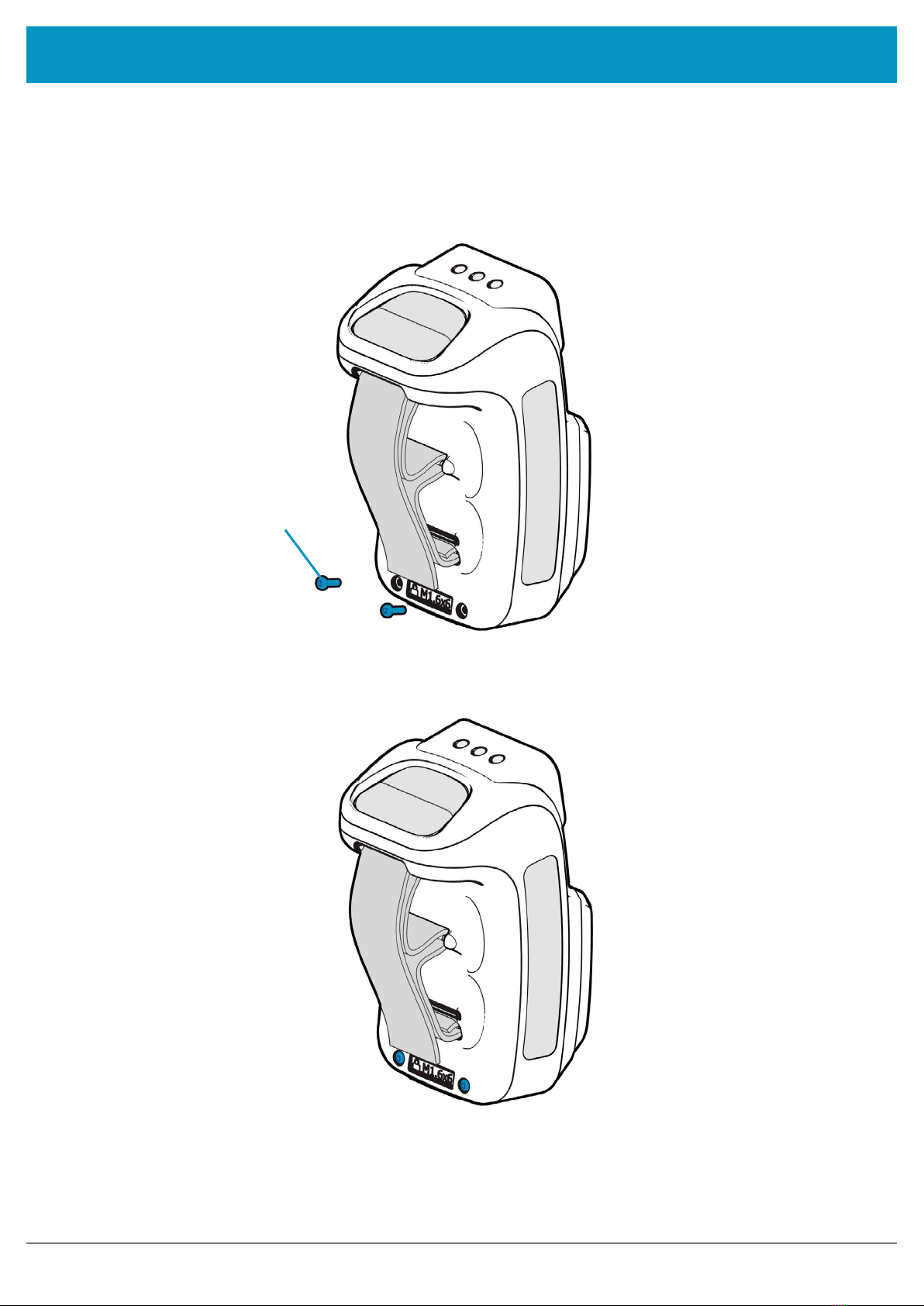
The battery cover can be locked into position using two M1.6x6mm Torx pan head screws.
M1.6x6mm Torx pan head screw.
Figure 10: Battery cover locking screw location
Figure 11: Battery cover fully locked
www.tsl.com

2173 HF/LF RFID Reader - User Guide V1.01Copyright © 2019 Technology Solutions (UK) Ltd 10
USING THE 2173 HF/LF READER
CHARGING AND MICRO USB CONNECTION
CONNECTING THE MICRO USB CABLE
The 2173 HF/LF Reader is supplied with a micro USB lead for charging and synchronisation. A USB PSU is also
supplied for independent charging of the 2173 HF/LF Reader. The Micro USB connector is inserted into the 2173
HF/LF Reader as shown below.
Figure 13: Attaching the Micro USB cable
Figure 12: Location of Micro USB socket
www.tsl.com
Inhaltsverzeichnis