
Antelope ANTELOPE.2C-BOOSTER Bedienungsanleitung

ANTELOPE.CALF-GUARDS
USER MANUAL

2
TABLE OF CONTENTS
1. Introduction ..................................................... 3
2. Contact customer care.................................... 3
3. Intended use..................................................... 4
4. Intended purpose............................................. 4
5. Indications ....................................................... 4
6. Contraindications ............................................ 4
7. Technology........................................................ 4
8. Scope of supply................................................. 5
8.1 ANTELOPE.CALF-GUARDS ..............................5
8.2 ANTELOPE.2C-BOOSTER ................................5
8.3 Connecting cable.............................................5
8.4 Charging cable................................................. 5
9. Instructions for use ......................................... 6
9.1 Putting on the ANTELOPE.CALF-GUARDS .... 6
9.2 Wiring CALF-GUARDS and BOOSTER............6
9.3 Starting the ANTELOPE.APP and
connecting the BOOSTER .............................. 7
10. The training programs................................... 10
10.1 Warm up ........................................................ 10
10.2 Endurance......................................................10
10.3 Strength .........................................................11
10.4 Recovery/Massage........................................ 11
11. Use of the ANTELOPE.BOOSTER.................... 12
11.1 Switch on/o ................................................. 12
11.2 Battery status ................................................ 12
11.3 Bluetooth connection...................................12
11.4 General functions ........................................12
11.5 Charging the BOOSTER ................................ 12
12. FAQs: Frequently Asked Questions............. 13
13. Safety instructions......................................... 14
14. Care and maintenance .................................. 14
15. Disposal........................................................... 14
16. Guarantee ....................................................... 15
17. Packaging........................................................ 15
18. Technical specications ................................ 15
19. Contact............................................................ 16
3
1. INTRODUCTION
Congratulations for your purchase of the ANTELOPE.
CALF-GUARDS. Now you are an ocial member of
the ANTELOPE.CLUB. Before you can start with your
training, please read this manual carefully. The AN-
TELOPE.CALF-GUARDS work with electrical muscle
stimulation (EMS). This highly ecient and eective
technology must be used responsibly.
IMPORTANT: Please always refer to this user manual
in order to avoid malfunctions and injuries
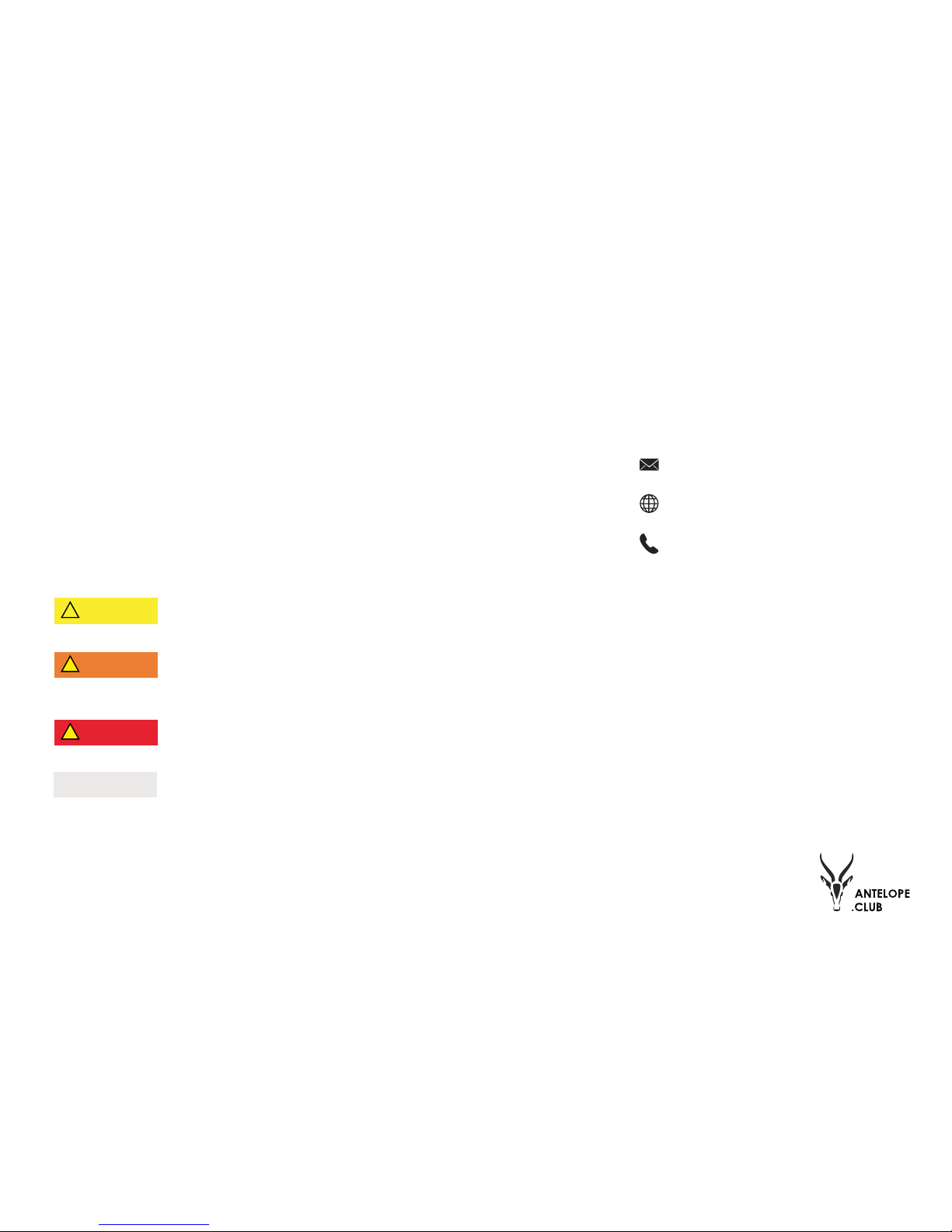
Symbol | Explanation:
Indicates a hazard with a low level of
risk which, if not avoided, could result
in minor or moderate injury.
Indicates a hazard with a medium lev-
el of risk which, if not avoided, could
result in serious injury and equipment
damage.
Indicates a hazard with a high level of
risk which, if not avoided, will result in
death or serious injury.
Helpful information to aid in the
particular area or function being de-
scribed
The ANTELOPE system consists of:
ANTELOPE.CALF-GUARDS
Textile with integrated electrodes that connects with
the BOOSTER via external cable.
ANTELOPE.2C-BOOSTER
BOOSTER provides the electrodes with the required
power. The two channels (2C) enable you to control
two pairs of electrodes at the same time.
ANTELOPE.APP
Smartphone application that connects with the
BOOSTER via Bluetooth.
2. CONTACT CUSTOME CARE
In case you have any more questions or problems re-
garding setting your device up after reading this manu-
al, please contact our Customer Care:
Internet: www.antelope.club
Phone: +49 (0) 69 795 888 95
! CAUTION
! WARNING
! DANGER
NOTE

4
3. INTENDED USE
The device is intended to be used for electrical muscle
stimulation.
4. INTENDED PURPOSE
The ANTELOPE series stimulates the healthy muscles to
improve performance of human body or general well be-
ing. It is intended to be used by healthy adults.
5. INDICATIONS
The ANTELOPE.CALF-GUARDS are intended to stimulate
healthy muscles in order to improve or facilitate muscle
performance. It is to be used by adults only.
Depending on the parameters of the electrical impuls-
es (pulse frequency, duration of contraction, duration
of rest, total session duration), dierent types of muscle
work can be imposed on the stimulated muscles.
Only use the ANTELOPE.CALF-GUARDS when fully regen-
erated. Follow our workout instructions and also work
out without the ANTELOPE.CALF-GUARDS regularly (at
least every fth session).
6. CONTRAINDICATIONS
Before using the ANTELOPE.CALF-GUARDS please consult
a physician to make sure you are in good health and t.
The following points should be taken into account. If one
or even more of these apply to you, you must not use the
ANTELOPE.CALF-GUARDS for safety reasons:
• You have a cardiac pacemaker or other electrical
implant(s)
• You are pregnant
• You have a severe neurological, cardiovascular
or tumour diseases
• You have a serious disease (i.e. fever, infections,
inammations)
• You have muscle ache / soreness
• You have muscle spasms
Do not use the ANTELOPE.CALF-GUARDS on injured
skin or to stimulate the muscles of an aicted limb or
joint.
A possible side-eect of unfamiliar and intensive train-
ing is damage to the muscle tissue. This comes with the
partial loss of strength, delayed muscle soreness and a
signicant increase of muscle protein levels (e.g. cre-
atine kinase levels) found in the blood. Especially after
the rst intense training sessions with the ANTELOPE.
CALF-GUARDS there is a heightened risk of muscular
damage.
These problems shall not occur if you closely follow our
workout instructions.
The following points may indicate serious damage to
the muscle tissue (rhabdomyolysis). If you nd your-
self displaying one of these symptoms please contact
a physician:
• Brown urine
• Myalgia (severe muscular pain)
• Extreme swelling of the muscle
7. TECHNOLOGY
The ANTELOPE.CALF-GUARDS are the evolution of the
already proven EMS technology. The natural muscle
contraction is supported by electrical impulses with
this training method. Muscle contractions are triggered
by an external electric stimulus transmitted via the
electrodes which are integrated into the ANTELOPE.
CALF-GUARDS.
! CAUTION

5
8. SCOPE OF SUPPLY
8.1 ANTELOPE.CALF-GUARDS
The fabric of the ANTELOPE.CALF-GUARDS consists
of 54% polyamide, 36% polypropylene and 10% elas-
tane. Each pair of CALF-GUARDS includes two silicone
electrodes integrated into the compression fabric. The
textile aligns ideally to the body shape thanks to the
elasticity of the fabric. Furthermore, due to the com-
pressive eect it can be ensured that the electrodes
will stay in the right position, providing functional and
comfortable stimulation. A magnetic button connects
the textile with the ANTELOPE.2C-BOOSTER via the
connecting cable. ANTELOPE.CALF-GUARDS are only
intended for training your calf muscles.
8.2 ANTELOPE.2C-BOOSTER
The ANTELOPE.2C-BOOSTER
is the energy source of the
system and connects with the
ANTELOPE.CALF-GUARDS via
an external cable. It triggers
the electrical impulses which
enhance the natural muscle
contraction. To control the
whole system in a convenient
way, the BOOSTER is connect-
ed to the ANTELOPE.APP via
Bluetooth. With this APP you
can choose a suitable stim-
ulation program before you start your workout and
regulate each channel independently. The impulse in-
tensity of all channels can also be controlled with the
BOOSTER. This device can control up to two muscle
groups at the same time and is compatible with other
2C-products in the ANTELOPE series.
8.3 Connecting Cable
The cable connects the BOOST-
ER with the CALF-GUARDS. The
end of each magnetic head
needs to be attached to one
of the metallic buttons on
the CALF-GUARDS. The plug
should be inserted into one
of the two channels of the
BOOSTER.
NOTE: The ANTELOPE.CALF-GUARDS have only one
electrode each, whereas, the 2C-BOOSTER is able to
stimulate four electrodes simultaneously. Therefore,
only one channel is used when stimulating one pair of
CALF-GUARDS.
8.4 Charging Cable
The BOOSTER can be charged
easily with a micro USB ca-
ble when it is plugged into a
computer or laptop or with an
adapter into an outlet.
Please ensure that the outlet
or any other power source is
not stronger than one ampere
before using a charger with it.
! CAUTION

6
9. INSTRUCTIONS FOR USE
The ANTELOPE.CALF-GUARDS are equipped with elec-
trodes placed on your calves. Especially runners and
athletes that train their tness with their own body-
weight are able to increase their core performance
during training. Strength athletes, too, greatly rely on
their leg stability to eciently perform exercises with
proper form.
The system is controlled by the ANTELOPE.APP through
a smartphone or tablet. Please ensure that you have
downloaded the APP before you start your training.
9.1 Putting on the ANTELOPE.CALF-GUARDS
1. Open the zippers of the CALF-GUARDS
2. Put on the CALF-GUARDS and make sure that
the electrodes lie at on your skin without folds
or wrinkles.
3. Close the zippers.
NOTE: The electrodes must be placed directly onto the
skin. Excessive hair growth or extremely dry skin can
aect the stimulation.
9.2 Wiring CALF-GUARDS and BOOSTER
1. Attach both magnetic ends of the cable to the
metallic buttons on the CALF-GUARDS.
2. Plug the other end of the cable into one of the
two channels of the ANTELOPE.BOOSTER.
NOTE: The BOOSTER consists of two channels (labelled
on the device). Whether you use channel I or channel II
will only be important in the next step. In the APP you
select the corresponding channel in which you plugged
in the cable.
3. Controlling the APP (see 9.3)
4. Start your ANTELOPE Workout
Program
Connected Booster: 0
warm up endurance
Recovery
Massage
strength
1. 3.
2. 4.3 Seconds
7
9.3 Starting the ANTELOPE.APP and Connecting the
BOOSTER
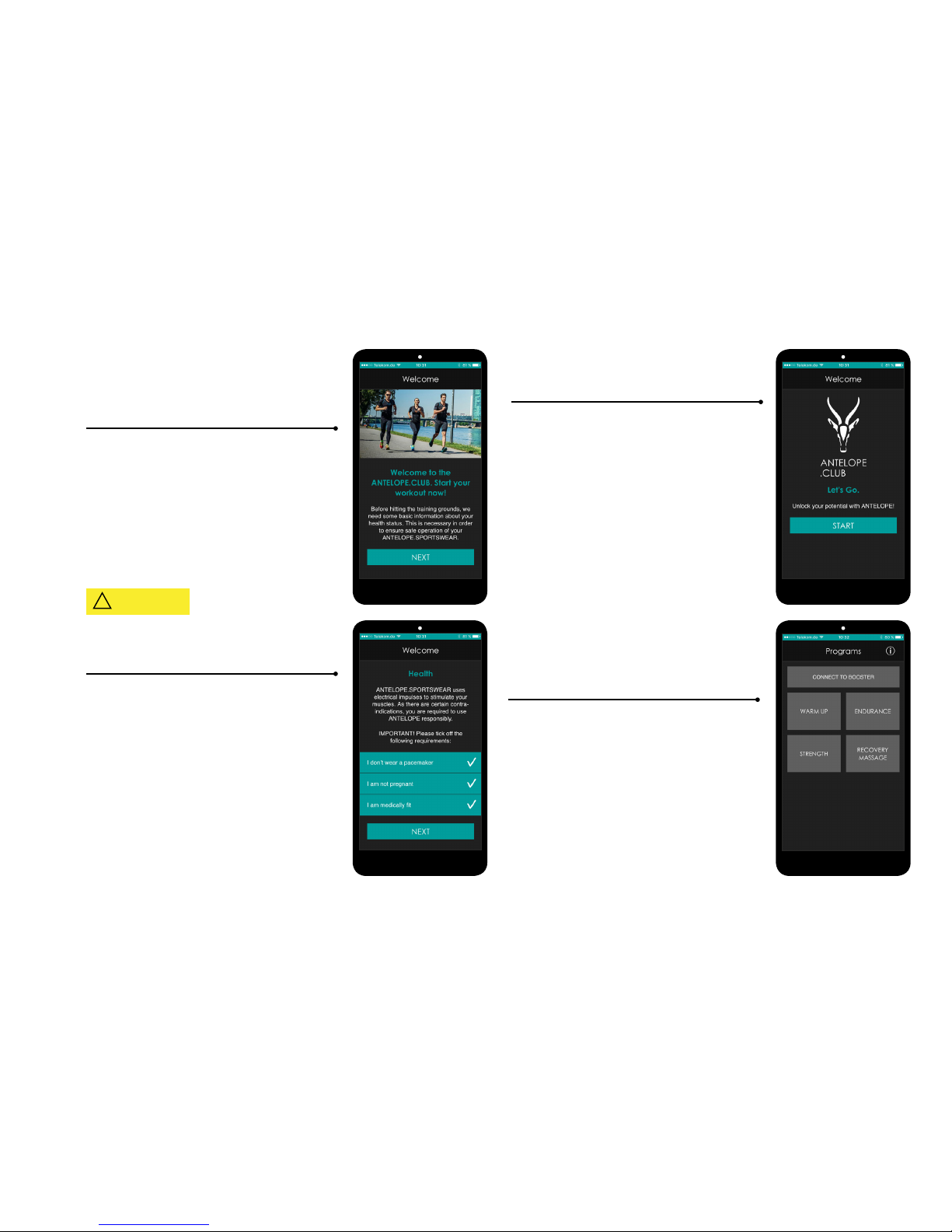
1. When you open the APP an info screen appears.
Read the information and click “next”.
2. Read this screen carefully as you need to make sure
that you full the health requirements. If so, please
conrm the three points and click “next”.
3. Now you are ready to unlock your potential! Please
click “start” in order to begin to set up your training
program.
4. On this screen you see an overview about the dier-
ent workout programs you can choose from. But be-
fore you can start your workout, you need to connect
your phone to the ANTELOPE.2C-BOOSTER. Please
click “CONNECT TO BOOSTER” in order to do so.
! CAUTION

8
5. As soon as the new screen appears your phone will
start scanning for devices.
Now take your ANTELOPE.2C-BOOSTER and press and
hold the “[+] button“ for three seconds until the LED
light ashes green. Now the BOOSTER is switched on
and the LED light begins to slowly ash blue. This in-
dicates that the device is searching for Bluetooth de-
vices.
You can see all available Bluetooth devices in the list.
You can select your BOOSTER by clicking on the device
“EMS-[your BOOSTER number]”. After a few seconds
the number of your device name will turn turquoise
showing that your phone is now connected to your
BOOSTER.
The LED on your BOOSTER will now change from a
ashing blue light to a constant blue light.
Now hit the arrow in the top left corner in order to go
back to the program selection screen.
6. Instead of showing the “CONNECT TO BOOST-
ER”-button, you can now see to which BOOSTER your
phone is connected. In order to decide which program
you want to use please click the white “info”-button in
the top right corner of the screen.
7. On this screen you are provided with an overview of
the four dierent training programs that you can use.
Besides a short intro text about the purpose of the
certain program and an explanation of how to use it,
you are also informed about the specic parameters
each of the programs uses.
As soon as you have chosen a program, click the arrow
in the top left corner of the screen to go back to the
program selection screen.

9
8. Now click on the training program of your choice
9. Now you have arrived on your workout screen.
Again you should check whether the BOOSTER name
displayed on this screen matches the number on your
device. As soon as you click the “start”-button the
time starts running and the stimulation begins with
an intensity of 1%. Only after pushing the “start”-but-
ton can you adjust the intensity of your workout. By
either pushing the “+”-button (in order to increase)
or the “-”-button (in order to decrease) you can ad-
just the intensity of each channel separately. You can
also increase the intensity of both channels at the
same time by pushing the “+’” button on the ANTE-
LOPE.2C-BOOSTER, or decrease with the “-“ button.
The channels shown in the APP express the current
intensity compared to the maximum intensity in “%”.
Please double-check which channel you connected
Please always increase the intensity slowly and check
whether it starts to tingle on your muscle. If it begins
to feel uncomfortable please immediately decrease
the intensity by either pushing the “-” button in the
APP or on the BOOSTER.
After setting up the right intensity for your workout,
you can click the reset button in order to reset the tim-
er and to be able to track the duration of your workout
correctly. Pressing “reset” will not stop the stimulation
nor reset the intensity.
NOTE: By hitting the pause button you will not aect
the intensity and when you continue the stimulation
by pressing “start” again the stimulation will immedi-
ately continue on the same percentage you used prior
to the interruption.

10
10. THE TRAINING PROGRAMS
10.1 Warm Up
In order to optimally prepare for your training, we’ve
created this warm up program. This program can be
used while you’re moving or passively while you’re sit-
ting. Just 10 minutes with this low intensity program
and you’re ready to go.
How to use this program:
• Exercises: loose movements, for example:
5 minutes light jogging (to get circulation going)
5 minutes mobilisation and dynamic stretching
• Suggested training time: 10 minutes before
every training session
• After Warm Up: Use “Strength” or “Endurance”
training program with your ANTELOPE.CALF-
GUARDS
Parameters:
• Frequency: 60 Hz
• Impulse Width: 250 µs
• Impulse Type: constant impulse
• Strength of stimulation feels like: approx. 5/10
NOTE: This program is designed to prepare your body
for an intense workout, so the stimulation intensity in
general feels signicantly lower than the intensity in
the training programs.
10.2 Endurance
5km, 10km or even a marathon – no matter what your
goals are, this training program will help you improve
your endurance. The scientically optimized stimula-
tion parameters are set up to ensure that your move-
ments won’t be too strongly inuenced by the stimula-
tion. This allows you to continue your workout without
compromising movement quality, enabling optimal
adaptation.
How to use this program:
• Exercises: Endurance training, primarily
through walking/jogging/running
• Suggested training time: 10 minutes for the
rst 3 training sessions. After that, you can in-
crease the training time each time you workout
by 10 minutes until you reach a total of 60 min-
utes.
• Cool Down: relaxed jogging or walking without
any stimulation (5-10 minutes), where appro-
priate followed by stretching.
• After using the Endurance program: Use the
Recovery/Massage Program
• Suggested number of training sessions per
week: depending on the intensity and duration,
up to 4 training sessions are possible (as a
general rule, every fth workout should be con-
ducted without electrical stimulation)
Parameters:
• Frequency: 40 Hz
• Impulse Width: 400 µs
• Impulse Type: constant impulse
• Strength of stimulation feels like: ca. 6/10
NOTE: If you can not make it to your workout one day,
you can use this program as an alternative, even just
lying on the couch or sitting at your desk. Various ad-
justments to this stimulation program (even without
any movement) will help improve functions related to
endurance.
Inhaltsverzeichnis
Andere Antelope Zubehör Handbücher

Antelope
Antelope Zen Tour Bedienungsanleitung

Antelope
Antelope Zen Tour Synergy Core Bedienungsanleitung

Antelope
Antelope Goliath Bedienungsanleitung

Antelope
Antelope Orion 32 HD Bedienungsanleitung

Antelope
Antelope Discrete 4 Synergy Core Bedienungsanleitung

Antelope
Antelope Orion32 HD Bedienungsanleitung

Antelope
Antelope Zen Go Synergy Core Bedienungsanleitung

Antelope
Antelope Orion Studio Thunderbolt Bedienungsanleitung

Antelope
Antelope GOLIATH HD Bedienungsanleitung

Antelope
Antelope Orion Bedienungsanleitung


