Audiophile Systems Audiophile 192 Bedienungsanleitung

High-Definition 4-in/4-out Audio Card with Digital I/O and MIDI
user guide

Table of Contents
English . . . . . . . . . . . . . . . . . . . . . . . . . . . . . . . . . . . . . . . . . . . . . . . . . . . . . . . . . . . . . . . . . . . . . . . . . . . . . . . . . . . . . . . . . . . . . . . . . . . . . . . . . . . . . . . . 3
Introduction . . . . . . . . . . . . . . . . . . . . . . . . . . . . . . . . . . . . . . . . . . . . . . . . . . . . . . . . . . . . . . . . . . . . . . . . . . . . . . . . . . . . . . . . . . . . . . . . . . . . . . . . . . 3
Overview . . . . . . . . . . . . . . . . . . . . . . . . . . . . . . . . . . . . . . . . . . . . . . . . . . . . . . . . . . . . . . . . . . . . . . . . . . . . . . . . . . . . . . . . . . . . . . . . . . . . . . . . . . . . . 3
Features . . . . . . . . . . . . . . . . . . . . . . . . . . . . . . . . . . . . . . . . . . . . . . . . . . . . . . . . . . . . . . . . . . . . . . . . . . . . . . . . . . . . . . . . . . . . . . . . . . . . . . . . . . . . . 3
What’s in the Box . . . . . . . . . . . . . . . . . . . . . . . . . . . . . . . . . . . . . . . . . . . . . . . . . . . . . . . . . . . . . . . . . . . . . . . . . . . . . . . . . . . . . . . . . . . . . . . . . . . . . . 3
Minimum System Requirements . . . . . . . . . . . . . . . . . . . . . . . . . . . . . . . . . . . . . . . . . . . . . . . . . . . . . . . . . . . . . . . . . . . . . . . . . . . . . . . . . . . . . . . . . . 3
Copyrights, etc . . . . . . . . . . . . . . . . . . . . . . . . . . . . . . . . . . . . . . . . . . . . . . . . . . . . . . . . . . . . . . . . . . . . . . . . . . . . . . . . . . . . . . . . . . . . . . . . . . . . . . . 4
Installation Procedures . . . . . . . . . . . . . . . . . . . . . . . . . . . . . . . . . . . . . . . . . . . . . . . . . . . . . . . . . . . . . . . . . . . . . . . . . . . . . . . . . . . . . . . . . . . . . . . . . 4
Connecting the Audiophile 192 . . . . . . . . . . . . . . . . . . . . . . . . . . . . . . . . . . . . . . . . . . . . . . . . . . . . . . . . . . . . . . . . . . . . . . . . . . . . . . . . . . . . . . . . . . 10
Using the Control Panel . . . . . . . . . . . . . . . . . . . . . . . . . . . . . . . . . . . . . . . . . . . . . . . . . . . . . . . . . . . . . . . . . . . . . . . . . . . . . . . . . . . . . . . . . . . . . . . . .11
Contact Us . . . . . . . . . . . . . . . . . . . . . . . . . . . . . . . . . . . . . . . . . . . . . . . . . . . . . . . . . . . . . . . . . . . . . . . . . . . . . . . . . . . . . . . . . . . . . . . . . . . . . . . . . . 14
Specifications . . . . . . . . . . . . . . . . . . . . . . . . . . . . . . . . . . . . . . . . . . . . . . . . . . . . . . . . . . . . . . . . . . . . . . . . . . . . . . . . . . . . . . . . . . . . . . . . . . . . . . . . 15
Warranty Terms & Registration . . . . . . . . . . . . . . . . . . . . . . . . . . . . . . . . . . . . . . . . . . . . . . . . . . . . . . . . . . . . . . . . . . . . . . . . . . . . . . . . . . . . . . . . . . 15
Français . . . . . . . . . . . . . . . . . . . . . . . . . . . . . . . . . . . . . . . . . . . . . . . . . . . . . . . . . . . . . . . . . . . . . . . . . . . . . . . . . . . . . . . . . . . . . . . . . . . . . . . . . . . . . . 17
Introduction . . . . . . . . . . . . . . . . . . . . . . . . . . . . . . . . . . . . . . . . . . . . . . . . . . . . . . . . . . . . . . . . . . . . . . . . . . . . . . . . . . . . . . . . . . . . . . . . . . . . . . . . . 17
Présentation générale . . . . . . . . . . . . . . . . . . . . . . . . . . . . . . . . . . . . . . . . . . . . . . . . . . . . . . . . . . . . . . . . . . . . . . . . . . . . . . . . . . . . . . . . . . . . . . . . . 17
Caractéristiques . . . . . . . . . . . . . . . . . . . . . . . . . . . . . . . . . . . . . . . . . . . . . . . . . . . . . . . . . . . . . . . . . . . . . . . . . . . . . . . . . . . . . . . . . . . . . . . . . . . . . . 17
Contenu de la boîte . . . . . . . . . . . . . . . . . . . . . . . . . . . . . . . . . . . . . . . . . . . . . . . . . . . . . . . . . . . . . . . . . . . . . . . . . . . . . . . . . . . . . . . . . . . . . . . . . . 17
Configuration minimale requise . . . . . . . . . . . . . . . . . . . . . . . . . . . . . . . . . . . . . . . . . . . . . . . . . . . . . . . . . . . . . . . . . . . . . . . . . . . . . . . . . . . . . . . . . 18
Copyrights, etc. . . . . . . . . . . . . . . . . . . . . . . . . . . . . . . . . . . . . . . . . . . . . . . . . . . . . . . . . . . . . . . . . . . . . . . . . . . . . . . . . . . . . . . . . . . . . . . . . . . . . . . 18
Procédures d’installation . . . . . . . . . . . . . . . . . . . . . . . . . . . . . . . . . . . . . . . . . . . . . . . . . . . . . . . . . . . . . . . . . . . . . . . . . . . . . . . . . . . . . . . . . . . . . . . 18
Connexions de l’Audiophile 192 . . . . . . . . . . . . . . . . . . . . . . . . . . . . . . . . . . . . . . . . . . . . . . . . . . . . . . . . . . . . . . . . . . . . . . . . . . . . . . . . . . . . . . . . . 24
Utilisation du Panneau de configuration . . . . . . . . . . . . . . . . . . . . . . . . . . . . . . . . . . . . . . . . . . . . . . . . . . . . . . . . . . . . . . . . . . . . . . . . . . . . . . . . . . 25
Nous contacter . . . . . . . . . . . . . . . . . . . . . . . . . . . . . . . . . . . . . . . . . . . . . . . . . . . . . . . . . . . . . . . . . . . . . . . . . . . . . . . . . . . . . . . . . . . . . . . . . . . . . . 29
Spécifications . . . . . . . . . . . . . . . . . . . . . . . . . . . . . . . . . . . . . . . . . . . . . . . . . . . . . . . . . . . . . . . . . . . . . . . . . . . . . . . . . . . . . . . . . . . . . . . . . . . . . . . . 30
Garantie . . . . . . . . . . . . . . . . . . . . . . . . . . . . . . . . . . . . . . . . . . . . . . . . . . . . . . . . . . . . . . . . . . . . . . . . . . . . . . . . . . . . . . . . . . . . . . . . . . . . . . . . . . . . 30
Deutsch . . . . . . . . . . . . . . . . . . . . . . . . . . . . . . . . . . . . . . . . . . . . . . . . . . . . . . . . . . . . . . . . . . . . . . . . . . . . . . . . . . . . . . . . . . . . . . . . . . . . . . . . . . . . . . 31
Einführung . . . . . . . . . . . . . . . . . . . . . . . . . . . . . . . . . . . . . . . . . . . . . . . . . . . . . . . . . . . . . . . . . . . . . . . . . . . . . . . . . . . . . . . . . . . . . . . . . . . . . . . . . . 31
Eigenschaften . . . . . . . . . . . . . . . . . . . . . . . . . . . . . . . . . . . . . . . . . . . . . . . . . . . . . . . . . . . . . . . . . . . . . . . . . . . . . . . . . . . . . . . . . . . . . . . . . . . . . . . . 31
Produktmerkmale . . . . . . . . . . . . . . . . . . . . . . . . . . . . . . . . . . . . . . . . . . . . . . . . . . . . . . . . . . . . . . . . . . . . . . . . . . . . . . . . . . . . . . . . . . . . . . . . . . . . 31
Lieferumfang . . . . . . . . . . . . . . . . . . . . . . . . . . . . . . . . . . . . . . . . . . . . . . . . . . . . . . . . . . . . . . . . . . . . . . . . . . . . . . . . . . . . . . . . . . . . . . . . . . . . . . . . 31
Mindestsystemanforderungen . . . . . . . . . . . . . . . . . . . . . . . . . . . . . . . . . . . . . . . . . . . . . . . . . . . . . . . . . . . . . . . . . . . . . . . . . . . . . . . . . . . . . . . . . . 32
Copyright, usw. . . . . . . . . . . . . . . . . . . . . . . . . . . . . . . . . . . . . . . . . . . . . . . . . . . . . . . . . . . . . . . . . . . . . . . . . . . . . . . . . . . . . . . . . . . . . . . . . . . . . . . 32
Installation . . . . . . . . . . . . . . . . . . . . . . . . . . . . . . . . . . . . . . . . . . . . . . . . . . . . . . . . . . . . . . . . . . . . . . . . . . . . . . . . . . . . . . . . . . . . . . . . . . . . . . . . . . 32
Anschluss der Audiophile 192-Karte . . . . . . . . . . . . . . . . . . . . . . . . . . . . . . . . . . . . . . . . . . . . . . . . . . . . . . . . . . . . . . . . . . . . . . . . . . . . . . . . . . . . . . 38
Das Control Panel . . . . . . . . . . . . . . . . . . . . . . . . . . . . . . . . . . . . . . . . . . . . . . . . . . . . . . . . . . . . . . . . . . . . . . . . . . . . . . . . . . . . . . . . . . . . . . . . . . . . 39
Kontaktieren Sie uns! . . . . . . . . . . . . . . . . . . . . . . . . . . . . . . . . . . . . . . . . . . . . . . . . . . . . . . . . . . . . . . . . . . . . . . . . . . . . . . . . . . . . . . . . . . . . . . . . . . 43
Technische Daten . . . . . . . . . . . . . . . . . . . . . . . . . . . . . . . . . . . . . . . . . . . . . . . . . . . . . . . . . . . . . . . . . . . . . . . . . . . . . . . . . . . . . . . . . . . . . . . . . . . . . 44
Garantie . . . . . . . . . . . . . . . . . . . . . . . . . . . . . . . . . . . . . . . . . . . . . . . . . . . . . . . . . . . . . . . . . . . . . . . . . . . . . . . . . . . . . . . . . . . . . . . . . . . . . . . . . . . . 44
Español . . . . . . . . . . . . . . . . . . . . . . . . . . . . . . . . . . . . . . . . . . . . . . . . . . . . . . . . . . . . . . . . . . . . . . . . . . . . . . . . . . . . . . . . . . . . . . . . . . . . . . . . . . . . . . . 45
Introducción . . . . . . . . . . . . . . . . . . . . . . . . . . . . . . . . . . . . . . . . . . . . . . . . . . . . . . . . . . . . . . . . . . . . . . . . . . . . . . . . . . . . . . . . . . . . . . . . . . . . . . . . . 45
Características generales . . . . . . . . . . . . . . . . . . . . . . . . . . . . . . . . . . . . . . . . . . . . . . . . . . . . . . . . . . . . . . . . . . . . . . . . . . . . . . . . . . . . . . . . . . . . . . 45
Características . . . . . . . . . . . . . . . . . . . . . . . . . . . . . . . . . . . . . . . . . . . . . . . . . . . . . . . . . . . . . . . . . . . . . . . . . . . . . . . . . . . . . . . . . . . . . . . . . . . . . . . 45
¿Qué hay dentro de la caja? . . . . . . . . . . . . . . . . . . . . . . . . . . . . . . . . . . . . . . . . . . . . . . . . . . . . . . . . . . . . . . . . . . . . . . . . . . . . . . . . . . . . . . . . . . . 45
Requisitos mínimos del sistema . . . . . . . . . . . . . . . . . . . . . . . . . . . . . . . . . . . . . . . . . . . . . . . . . . . . . . . . . . . . . . . . . . . . . . . . . . . . . . . . . . . . . . . . . 46
Copyrights, etc . . . . . . . . . . . . . . . . . . . . . . . . . . . . . . . . . . . . . . . . . . . . . . . . . . . . . . . . . . . . . . . . . . . . . . . . . . . . . . . . . . . . . . . . . . . . . . . . . . . . . . 46
Instalación . . . . . . . . . . . . . . . . . . . . . . . . . . . . . . . . . . . . . . . . . . . . . . . . . . . . . . . . . . . . . . . . . . . . . . . . . . . . . . . . . . . . . . . . . . . . . . . . . . . . . . . . . . 46
Conexión de la Audiophile 192 . . . . . . . . . . . . . . . . . . . . . . . . . . . . . . . . . . . . . . . . . . . . . . . . . . . . . . . . . . . . . . . . . . . . . . . . . . . . . . . . . . . . . . . . . . 52
Uso del Panel de control . . . . . . . . . . . . . . . . . . . . . . . . . . . . . . . . . . . . . . . . . . . . . . . . . . . . . . . . . . . . . . . . . . . . . . . . . . . . . . . . . . . . . . . . . . . . . . . 53
Contactos . . . . . . . . . . . . . . . . . . . . . . . . . . . . . . . . . . . . . . . . . . . . . . . . . . . . . . . . . . . . . . . . . . . . . . . . . . . . . . . . . . . . . . . . . . . . . . . . . . . . . . . . . . . 57
Especificaciones . . . . . . . . . . . . . . . . . . . . . . . . . . . . . . . . . . . . . . . . . . . . . . . . . . . . . . . . . . . . . . . . . . . . . . . . . . . . . . . . . . . . . . . . . . . . . . . . . . . . . . 58

Garantía . . . . . . . . . . . . . . . . . . . . . . . . . . . . . . . . . . . . . . . . . . . . . . . . . . . . . . . . . . . . . . . . . . . . . . . . . . . . . . . . . . . . . . . . . . . . . . . . . . . . . . . . . . . . 58

Italiano . . . . . . . . . . . . . . . . . . . . . . . . . . . . . . . . . . . . . . . . . . . . . . . . . . . . . . . . . . . . . . . . . . . . . . . . . . . . . . . . . . . . . . . . . . . . . . . . . . . . . . . . . . . . . . . 59
Introduzione . . . . . . . . . . . . . . . . . . . . . . . . . . . . . . . . . . . . . . . . . . . . . . . . . . . . . . . . . . . . . . . . . . . . . . . . . . . . . . . . . . . . . . . . . . . . . . . . . . . . . . . . . 59
Informazioni generali . . . . . . . . . . . . . . . . . . . . . . . . . . . . . . . . . . . . . . . . . . . . . . . . . . . . . . . . . . . . . . . . . . . . . . . . . . . . . . . . . . . . . . . . . . . . . . . . . . 59
Caratteristiche . . . . . . . . . . . . . . . . . . . . . . . . . . . . . . . . . . . . . . . . . . . . . . . . . . . . . . . . . . . . . . . . . . . . . . . . . . . . . . . . . . . . . . . . . . . . . . . . . . . . . . . 59
Contenuto della confezione . . . . . . . . . . . . . . . . . . . . . . . . . . . . . . . . . . . . . . . . . . . . . . . . . . . . . . . . . . . . . . . . . . . . . . . . . . . . . . . . . . . . . . . . . . . . 59
Requisiti minimi del sistema . . . . . . . . . . . . . . . . . . . . . . . . . . . . . . . . . . . . . . . . . . . . . . . . . . . . . . . . . . . . . . . . . . . . . . . . . . . . . . . . . . . . . . . . . . . . 60
Informazioni di copyright, ecc. . . . . . . . . . . . . . . . . . . . . . . . . . . . . . . . . . . . . . . . . . . . . . . . . . . . . . . . . . . . . . . . . . . . . . . . . . . . . . . . . . . . . . . . . . . 60
Procedure di installazione . . . . . . . . . . . . . . . . . . . . . . . . . . . . . . . . . . . . . . . . . . . . . . . . . . . . . . . . . . . . . . . . . . . . . . . . . . . . . . . . . . . . . . . . . . . . . . 60
Collegamento di Audiophile 192 . . . . . . . . . . . . . . . . . . . . . . . . . . . . . . . . . . . . . . . . . . . . . . . . . . . . . . . . . . . . . . . . . . . . . . . . . . . . . . . . . . . . . . . . . 66
Utilizzo del Pannello di controllo . . . . . . . . . . . . . . . . . . . . . . . . . . . . . . . . . . . . . . . . . . . . . . . . . . . . . . . . . . . . . . . . . . . . . . . . . . . . . . . . . . . . . . . . . 67
Pagina About (Informazioni su) . . . . . . . . . . . . . . . . . . . . . . . . . . . . . . . . . . . . . . . . . . . . . . . . . . . . . . . . . . . . . . . . . . . . . . . . . . . . . . . . . . . . . . . . . . 70
Contatti . . . . . . . . . . . . . . . . . . . . . . . . . . . . . . . . . . . . . . . . . . . . . . . . . . . . . . . . . . . . . . . . . . . . . . . . . . . . . . . . . . . . . . . . . . . . . . . . . . . . . . . . . . . . . 71
Specifiche tecniche . . . . . . . . . . . . . . . . . . . . . . . . . . . . . . . . . . . . . . . . . . . . . . . . . . . . . . . . . . . . . . . . . . . . . . . . . . . . . . . . . . . . . . . . . . . . . . . . . . . . 72
Garanzia . . . . . . . . . . . . . . . . . . . . . . . . . . . . . . . . . . . . . . . . . . . . . . . . . . . . . . . . . . . . . . . . . . . . . . . . . . . . . . . . . . . . . . . . . . . . . . . . . . . . . . . . . . . . 72
日本語 . . . . . . . . . . . . . . . . . . . . . . . . . . . . . . . . . . . . . . . . . . . . . . . . . . . . . . . . . . . . . . . . . . . . . . . . . . . . . . . . . . . . . . . . . . . . . . . . . . . . . . . . . . . . . . . . 73
はじめに . . . . . . . . . . . . . . . . . . . . . . . . . . . . . . . . . . . . . . . . . . . . . . . . . . . . . . . . . . . . . . . . . . . . . . . . . . . . . . . . . . . . . . . . . . . . . . . . . . . . . . . . . . . . 73
Audiophile192について . . . . . . . . . . . . . . . . . . . . . . . . . . . . . . . . . . . . . . . . . . . . . . . . . . . . . . . . . . . . . . . . . . . . . . . . . . . . . . . . . . . . . . . . . . . . . 73
特徴 . . . . . . . . . . . . . . . . . . . . . . . . . . . . . . . . . . . . . . . . . . . . . . . . . . . . . . . . . . . . . . . . . . . . . . . . . . . . . . . . . . . . . . . . . . . . . . . . . . . . . . . . . . . . . . . 73
製品パッケージ内容 . . . . . . . . . . . . . . . . . . . . . . . . . . . . . . . . . . . . . . . . . . . . . . . . . . . . . . . . . . . . . . . . . . . . . . . . . . . . . . . . . . . . . . . . . . . . . . . . . 73
動作環境 . . . . . . . . . . . . . . . . . . . . . . . . . . . . . . . . . . . . . . . . . . . . . . . . . . . . . . . . . . . . . . . . . . . . . . . . . . . . . . . . . . . . . . . . . . . . . . . . . . . . . . . . . . . 73
著作権等 . . . . . . . . . . . . . . . . . . . . . . . . . . . . . . . . . . . . . . . . . . . . . . . . . . . . . . . . . . . . . . . . . . . . . . . . . . . . . . . . . . . . . . . . . . . . . . . . . . . . . . . . . . 74
インストールの手順 . . . . . . . . . . . . . . . . . . . . . . . . . . . . . . . . . . . . . . . . . . . . . . . . . . . . . . . . . . . . . . . . . . . . . . . . . . . . . . . . . . . . . . . . . . . . . . . . . . 74
Audiophile192の接続 . . . . . . . . . . . . . . . . . . . . . . . . . . . . . . . . . . . . . . . . . . . . . . . . . . . . . . . . . . . . . . . . . . . . . . . . . . . . . . . . . . . . . . . . . . . . . . 80
コントロールパネル・ソフトウェアを使用する . . . . . . . . . . . . . . . . . . . . . . . . . . . . . . . . . . . . . . . . . . . . . . . . . . . . . . . . . . . . . . . . . . . . . . . . . . . . 81
お問い合わせ先 . . . . . . . . . . . . . . . . . . . . . . . . . . . . . . . . . . . . . . . . . . . . . . . . . . . . . . . . . . . . . . . . . . . . . . . . . . . . . . . . . . . . . . . . . . . . . . . . . . . . . 84
技術仕様 . . . . . . . . . . . . . . . . . . . . . . . . . . . . . . . . . . . . . . . . . . . . . . . . . . . . . . . . . . . . . . . . . . . . . . . . . . . . . . . . . . . . . . . . . . . . . . . . . . . . . . . . . . . 85
製品保証 . . . . . . . . . . . . . . . . . . . . . . . . . . . . . . . . . . . . . . . . . . . . . . . . . . . . . . . . . . . . . . . . . . . . . . . . . . . . . . . . . . . . . . . . . . . . . . . . . . . . . . . . . . . 85

3
Introduction
Thank you for choosing the M-Audio Audiophile 192 PCI interface, your professional solution for audio and MIDI performance with your computer
and Digital Audio Workstation software. The Audiophile 192 provides your computer with a high-resolution four-input, four-output audio interface,
as well as sixteen channels of MIDI in and out. The Audiophile 192 is the latest in M-Audio’s acclaimed Delta series of digital recording interfaces,
based on a proven solid hardware design and innovative software driver technology.
Even if you are an experienced computer user and digital recording enthusiast, we suggest you take the time to read this brief user’s manual. It
will help to streamline the installation procedure, and acquaint you with the Audiophile 192’s superior feature set, allowing you to quickly realize
the full potential of this powerful audio tool.
Overview
The Audiophile 192 is a professional quality audio and MIDI interface based on a low-profile PCI card, offering two analog inputs and four analog
outputs (balanced or unbalanced TRS) on a robust breakout cable. The Audiophile 192 also offers independent S/PDIF coaxial I/O.
The Audiophile 192 supports a wide range of internal sampling rates, from 8kHz up to 192kHz, for clean, high-resolution 24-bit audio performance.
It can also sync to external devices via S/PDIF at sampling rates from 32kHz to 192kHz. The Audiophile 192 runs under Windows XP, Windows
2000, and Mac OS X, and includes ultra-low latency drivers for the most popular audio protocols, including Windows WDM, ASIO II, GSIF II
(backward-compatible) and Mac CoreAudio.
The Audiophile 192 also offers a highly flexible software mixer, giving you zero-latency input monitoring. As part of the Delta series of M-Audio
interfaces, the Audiophile 192 can be used together with other Delta series devices (or with multiple Audiophile 192’s), and can be synchronized
via the control panel’s multiple card sync page in Windows XP (multiple card support is planned for Mac OS X in a future software update). MIDI
I/O is also included, making the Audiophile 192 a total studio solution.
Features
< Frequency response 20Hz – 80kHz
< 24-bit, 192kHz audio interface with an exceptional 113dB dynamic range
< Supports internal sample rates of 8kHz to 192kHz, and will sync via S/PDIF to external sample rates of 32kHz to 192kHz
< Supports Windows XP (SP1), Windows2000 (SP2) and Mac OS X (10.2.8, 10.3.4 and higher)
< Extremely low latency ASIO II and WDM drivers, as well as GSIF II and Mac CoreAudio drivers
< Two balanced/unbalanced analog inputs on 1/4” TRS connectors
< Two balanced/unbalanced analog Main outputs on 1/4” TRS connectors
< Two balanced/unbalanced analog Monitor outputs on 1/4” TRS connectors
< Stereo S/PDIF inputs and outputs on RCA coaxial connectors
< MIDI I/O
< Software-controllable analog mixer provides monitoring of input signals to Monitor outputs
< User-friendly Control Panel offers control of mixing, routing, and master clock settings
< Support for VST System Link and WMA Pro
What’s in the Box
< One Audiophile 192 PCI Card
< One Audiophile 192 breakout cable for analog audio and MIDI connections
< M-Audio Driver CD with PDF manual
< M-Audio Warranty Registration Card
< Adobe Acrobat Reader
Minimum System Requirements
Windows
< Pentium 3 – 700 MHz or higher, 256 MB RAM (192 and 96kHz operation)
< Pentium 3 – 500 MHz or higher, 128 MB RAM (48kHz operation)
< DirectX 9.0b or higher
< Windows XP (SP1) or Windows 2000 (SP4)
< Available PCI slot
English

4
Macintosh
< Macintosh G4 733 MHz or higher
< 512MB RAM
< Mac OS X Jaguar (10.2.8 or later) or Panther (10.3.4)
< Available PCI slot
Copyrights, etc
Windows, Windows XP, and Windows 2000 are trademarks of Microsoft Corporation.
Macintosh, Mac OS, Mac OS X and CoreAudio are trademarks of Apple Computer.
All other trademarks are property of their respective holders.
Installation Procedures
To Install the Audiophile 192
In all operating systems, begin by inserting the M-Audio Audiophile 192 driver CD-ROM into your computer’s CD-ROM drive, then browse to the
installer file for your particular operating system. If your system has AUTORUN CD enabled, the installation wizard will take you through the install
process step by step. Refer to the section below for Windows or Mac specific instructions on running the installer software.
Once the software has been installed, open your computer and physically insert the Audiophile 192 firmly into an available PCI slot.
When hardware installation is complete, restart your computer and follow the instructions on completing the driver software installation.
Refer to the following sections for your particular hardware and operating system.
Windows XP/2000
Begin by inserting the M-Audio Audiophile 192 driver CD-ROM into your computer’s CD-ROM drive and browsing to the installer file for your
particular operating system. If your system has AUTORUN CD enabled, the installation wizard (pictured) will take you through the install process
step by step.
Running the installer application by clicking “Next” will copy the necessary driver files to your computer’s hard drive.

5
When the installer has completed copying the files, you will be prompted to power your computer off and install the hardware. Select the middle
option, “Yes, Power off my computer to install hardware.”
• Hardware Installation
Turn OFF the power to your computer system and disconnect the power cords.
Touch a metal plate on your computer system chassis to ground yourself and discharge any static electricity. (This is not dangerous if the system
is unplugged!)
Remove the cover from your computer chassis and select an empty PCI slot in your computer.
You should refer to your computer system documentation for any special instructions on installing expansion cards and peripheral equipment.
Unscrew and remove the slot cover for your selected PCI slot.
Insert the Audiophile 192 PCI into the selected PCI slot and press it down so that the contacts are securely seated all the way into the slot.
Secure the bracket of the Audiophile 192 PCI card to the computer chassis using a chassis screw or retaining bracket.
Replace the computer chassis cover and reconnect the power cords.
Connect the Audio cables to the Audiophile 192 PCI. See the External Connections section for more information.
• Driver Installation
Restart your computer. The New Hardware Wizard will open and prompt you to select a path for the driver files installation. Select the recommended
default “Install the software automatically” setting, then click “Next.”
Windows will copy the driver files to your hard disk.

6
During the installation, you will be prompted with a message warning that the driver software has not passed Windows Logo testing. Select
“Continue Anyway” and proceed with the installation.
NOTE: In Windows 2000, this message will refer instead to the drivers not passing Windows Logo testing. Again, it is safe to select Continue
Anyway and proceed with the installation.
The Wizard will then report that Windows has finished installing the software. Click “Finish.”
Once the installer has finished copying the files, you will be prompted to reboot your computer. When your computer restarts, you will see the
M-Audio mixer icon in your system tray.
(Note that in some cases you may not be prompted to restart. In order to make certain all files have been copied to their proper directories, it is
always advisable to restart your computer again.)
Your Audiophile 192 is now ready to use
Mac OS X version 10.2.x (Jaguar)
Insert the Audiophile 192 driver CD into your CD-ROM drive and open the CD to view its contents. Double-click the .dmg file, which contains the
M-Audio Audiophile 192 Installer. An M-Audio volume icon will appear on your desktop. If necessary, double-click on the M-Audio volume icon to
open, then click on the M-Audio installer to launch it.

7
You will need your Administrator Password for the next step. Enter your password and click “OK.”
You will be greeted with the Welcome dialog of the installer application. Click “Continue.”
The Read Me box will appear next. This box contains important information on changes that may have occurred since the writing of this manual,
so be certain to read through it.
You will then be presented with the License Agreement. Click “Continue,” and then click “Agree” if you agree with the License Agreement.
Select a destination disk for the installation, and then click “Continue.”
On the Easy Install box, click “Install.”

8
On the following box, click “Continue Installation.”
Your M-Audio drivers will install. You will then see the Installation Completed box, and be prompted to click “Restart” and reboot your computer.
After the computer has rebooted, you may shut down the computer completely, disconnect your power cords, open the computer chassis and
install the Audiophile 192 into an available PCI slot.
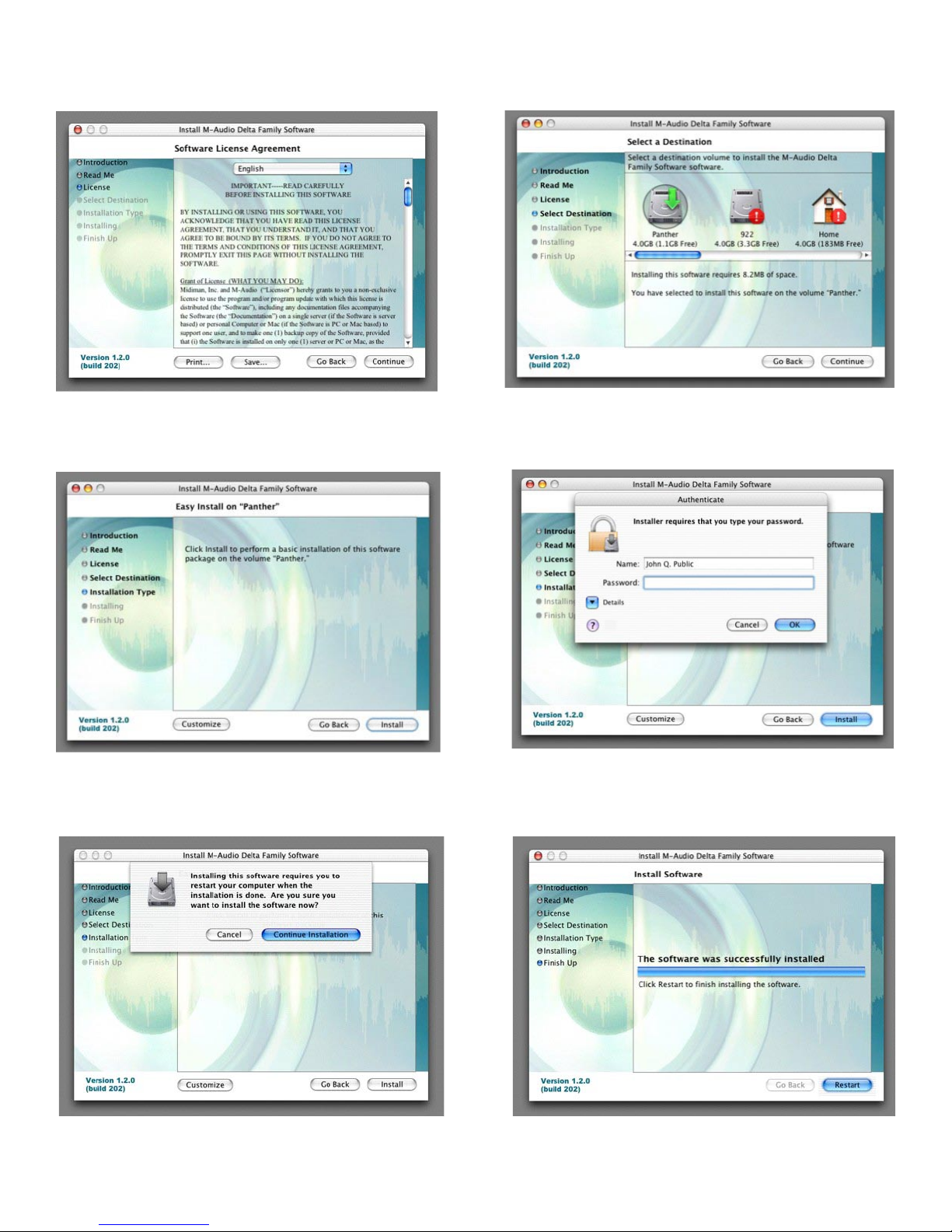
Mac OS X version 10.3.x (Panther)
Insert the Audiophile 192 driver CD into your CD-ROM drive and open the CD to view its contents. Double-click the .dmg file, which contains the
M-Audio Audiophile 192 Installer. An M-Audio volume icon will appear on your desktop. If necessary, double-click on the M-Audio volume icon
to open it.
Click on the installer icon and you will be greeted with the Welcome dialog of the installer application. Click “Continue.”
The Read Me box will appear next. This box contains important information on changes that may have occurred since the writing of this manual,
so be certain to read through it.

9
You will then be presented with the License Agreement. Click “Continue,” then click “Agree” if you agree with the License Agreement.
Select a destination disk for the installation, and then click “Continue.”
In the Easy Install box, click ’Install.”
You will need to type in your Administrator Password for the next step.
In the following box, click “Continue Installation.”
Your M-Audio drivers will install. You will then see the Installation Completed box, and be prompted to restart your computer.
After the computer has rebooted, you may shut down the computer completely, disconnect your power cords, open the computer chassis and
install the Audiophile 192 into an available PCI slot.
Inhaltsverzeichnis
Sprachen: