DAB DDR-4200 Bedienungsanleitung

1
User’s Guide manual
DAB & FM Receiver & Digital Voice Recorder &
Audio Player
Product name: DAB Receiver & Voice Recorder
Model name: DDR-4200
Thank you for purchasing PORTABLE DIGITAL AUDIO PLAYER from DIASONIC.
Please carefully Read the Instruction manual for safe use of the product. We
recommend you to keep this instruction manual for future reference.

2
Information to User
This equipment has been tested and found to comply with the limits for a Class B
digital device, Pursuant to part 15 of the FCC Rules. These limits are designed to
provide reasonable protection against harmful interference in a residential
installation.
This equipment generates, uses and can radiate radio Frequency energy and, if not
installed and used in accordance with the instructions, may cause harmful
interference to radio communications.
However, there is no guarantee that interference will not occur in a particular
installation. If this equipment does cause harmful interference to radio or television
reception, which can be determined by turning the equipment off and on, the user is
encouraged to try to correct the interference by one or more of the following
measures:
▪ Reorient or relocate the receiving antenna.
▪ Increase the separation between the equipment and receiver
▪ Connect the equipment into an outlet on a circuit different from that to which the
receiver is connected.
Consult the dealer or an experienced radio/TV technician for help.
INFORMATION TO THE USER
※ WARNING
Changes or modifications not expressly approved by the manufacturer could void the
user’s authority operate the equipment.
This device com
p
lies with Part 15 of the FCC Results. O
p
eration is sub
j
ect to the
following two conditions:
(1) This Device may not cause harmful interface, and
(2) This device must accept any interference received, including interference that
may cause undesired operation.

3
● Do not drop DAB Receiver, it may cause a malfunction.
● Do not leave DAB Receiver in the following areas:
- Place of high temperature (above 60℃)
- Exposed to direct sunlight or near heating appliances.
- Inside a car; especially in the summer
- High humidity area like a bathroom
● Avoid any impact to the LCD Display
● Do not place credit cards, phone cards, bank books or subway tickets near
DAB Receiver. The magnetism of the player may damage the data stored in
the magnetic strip.
● We are not responsible for any damage or claims from a third party resulting
from the use of DAB Receiver.
● We are not responsible for any loss of files caused by any reason.
● Do not repair, disassemble or make modifications to DAB Receiver.
● Do not use DAB Receiver in any area designated No Electronic Devices like
airports or medical facilities.
● Do not operate while driving.
● If DAB Receiver is misused by the user, subjected to static electricity or
electrical shock even if just changing the battery, the files stored in the
memory may be lost or corrupted.
Backup all important data!
● Only insert a memory card when the unit is off or a malfunction may occur
DAB Receiver is manufactured under strict quality control procedures to ensure the
best performance and customer experience.
● Elegant Design and Exterior Finishing
DAB Receiver is designed with the customer in mind. Using a wide LCD Screen and half
miller window to eliminate the closeness of a small display and show off a high class
image to enhance the user’s experience.
● DAB/FM/Voice Recording and MP3 PLAYER
DAB Receiver can record DAB/FM/Voice and play MP3 files.
● External memory
DAB Receiver has the ability to expand the memory capacity using SD or MMC memory
Safety Precautions
Functions and Features

4
cards.
● Record DAB/FM RECEIVER
With DAB Receiver you can record live or future DAB/FM broadcasts.
● RYW-EXPLORER
With DAB Receiver you can transmit data between the device and your PC and even send
those files to a friend using E-mail.
● Recording Timer
DAB Receiver can be programmed to record voice or Receiver at a later time with its built in
timer.
● USB Interface
● Displays file/frequency/current time on the wide LCD Screen
● Built-in calendar up to the year 2099
● Elegant Design and Exterior Finishing
● Built-in microphone
● Separate and record files up to a high tone quality of 99
● Lock (HOLD) function to prevent unnecessary battery consumption caused by an
accidental key press.
● TIMER recording function to allow voice or Receiver recording at a later time/date.
● REPEAT PLAY allows a message to be played repeatedly
● Resume Playback Function
● Section Repeat Play (A↔B REPEAT PLAY)
● Automatic power OFF after manual setting of no use.(SLEEP MODE)
● MONITOR Function allows the user to listen to what is being recorded using an earphone
(MONITOR)
● Volume adjustable 30 levels
● EQ equalizer modes (NORMAL,ROCK,JAZZ,CLASSIC,POP)
● Repeat (NORMAL/SECTION REPEAT/1 TRACK/ALL TRACK)
● Download and playback of MP3 Files
● Real time or reserved FM RECEIVER RECORDING function
● Real time or reserved DAB RECEIVER RECORDING function
● DAB/FM PRESET CH function
● DAB Region setting EUROPE (9) or USA (10)
● Setting up to 10 reserved recordings is possible
● S-FORWARD and S-REWIND Searching function (10 times/100 times searching)
● External memory slot (SD-CARD/MMC)
● Built-in high-power speaker
● Easy recording from external audio devices
● Recover time and settings after replacing the battery (BACK-UP Function)

5
1) MAIN SET
Internal Microphone
LED Lamp
External Display
Microphone Jack Vol +/-
Ear phone Mode File Up
REC Hold On/Off
External Timer
Memory Slot Menu Erase
Rewind Forward
Reset
Speed A↔B/Repeat
File Down Play/Stop
USB Jack
2) LCD
Memory Type DAB Received Indicator
Mode Selection Battery Strength
Date & Weekdays
Ensemble
File Info/Frequency
Parts and Components

6
/Station Name
Current Time
Memory Space
3) Battery Use and Description of Components
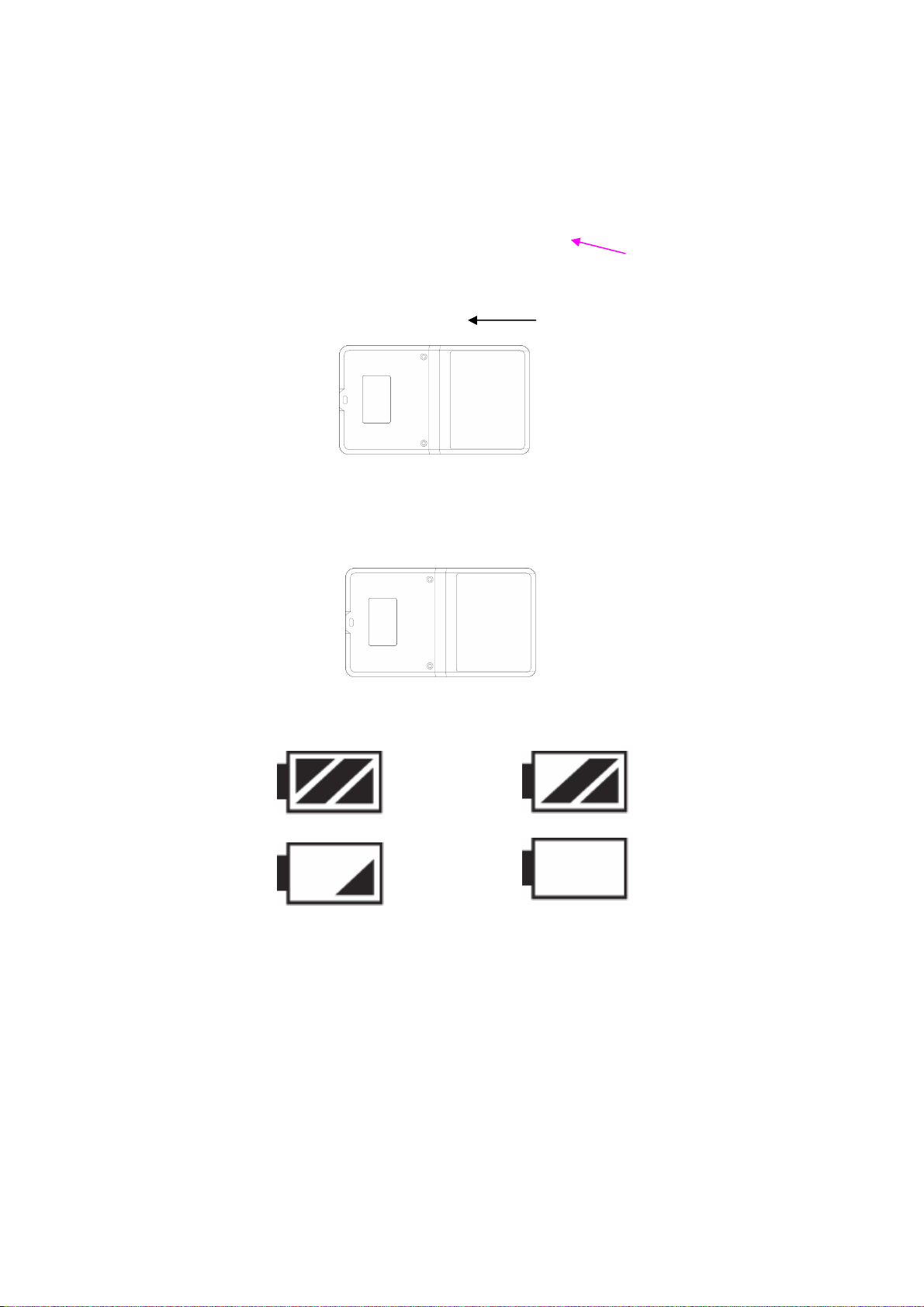
① Open the Battery Cover.
Open
② Close the cover after inserting Rechargeable Li-Polymer Battery(3.7V/1500mAH)to the
correct (+) (-) polarities.
Battery : Rechargeable Li-Polymer Battery(3.7V/1500mAH)
③ Check the battery strength by pressing the PLAY/STOP or record mode button.
Battery strength is strong. Battery is partially run down.
Battery is almost run down. Replace the battery.
※ Caution
Check the polarities of the batteries if the LCD Display doesn’t turn ON after inserting new
batteries.
※ Note
If you do not use DAB Receiver for a long time, the batteries may be run down naturally.
Take out the batteries if you do not plan on using DAB Receiver for a long time.
④ Battery Life

7
Battery Type Recording Playback via Speaker
(Volume: Middle) Playback via Ear phone
Li-Polymer Approx 12hr Approx 12hr Approx 18hr
⑤ Caution when Using the Battery
● Do not use other battery.
● If you do not use this recorder & player for a long time, take the batteries out of the
body.
● When using rechargeable batteries, carefully read the manual of the battery and
charger before using them.
⑥ Components
Stereo Earphone, Line-in Cable, USB Cable, Adaptor, External ANT, Cradle.
5) Basic Functions
● Turning the Power ON/OFF
To turn the player on, hold the PLAY button for 1-3 seconds.
If no key is pressed for more than 3 minutes, the power is automatically shut OFF.
To turn the player off, hold the STOP button for 1-3 seconds.
If you put in the provided batteries after purchasing DAB Receiver, the Power should turn
ON and the initial display screen appears. When the power is OFF, you may turn the power
ON by pressing the PLAY Button.
● How to Use the HOLD function
When the lock button is in the upper position, the player is in HOLD and will not
operate. Use this recorder & player only after checking the lock switch is released from
the HOLD position.
HOLD OFF HOLD ON
Released Player not operable
● VOICE MODE (VOICE)
VOICE/DAB/FM/MP3 Buttons

8
Upon operating the keys, ㅡ means a short press and ㅡㅡ means pressing and
holding (longer than 1 sec).
● DAB/FM Receiver Domain (RECEIVER/KEY Operation)
Buttons Key
Operations Stopped Upon Recording Playing
ㅡ
ㅡㅡ
Plays the beginning of file
/Stop status
Power off
X
X
/Stops recording
Power off
ㅡ Moves to the next file X Beings to play the next file
ㅡ
ㅡㅡ Moves to the previous file X Plays the previous file
If key held down more than 5 second
ㅡ S-Forward current file very fast X S-Forward current file
MODE ㅡ VOICE/DAB/FM/MP3 X VOICE/DAB/FM/MP3
TIMER
ㅡ
ㅡㅡ
Checks the time and sets the
timer for a future recording
Modifies the time setting
X X
A↔B ㅡ Selects from the external/
internal memories X Repeats the playing section between
A↔B
REPEAT ㅡ Change the repeat setting X Change the repeat setting
ERASE
ㅡ
ㅡㅡ
Deletes the current file
(push erase to confirm when
blinking)
Deletes all files
(push erase to confirm when
blinking)
X X
REMAIN ㅡ Showa remaining record time in
voice mode
Showa remaining
record time in
voice mode
X
VOL+ Volume+ Volume+ Volume+
VOL- Volume- Volume- Volume-
HOLD ON/OFF ON/OFF ON/OFF

9
Buttons Key
Operations Receiving Upon Recording
ㅡ
ㅡㅡ
PRESET the station /Stop
Power off
X/ Stops recording
Power OFF
ㅡ Changes to the next preset X
ㅡ Changes to the previous preset X
ㅡ,
ㅡㅡ
SEEK TUNNING
AUTO TUNNING X
ㅡ
ㅡㅡ SEEK TUNNING/AUTO TUNNING X
MODE ㅡ VOICE/DAB/FM/MP3 X
TIMER ㅡ
ㅡㅡ
Checks TIME and reserved settings
Sets and modifies TIME X
VOL+ VOLUME+ VOLUME+
VOL- VOLUME- VOLUME-
HOLD ON/OFF ON/OFF
Note) The earphone plays the role of the antenna in the FM Receiver.
If the earphone wire is longer, receiving sensitivity is improved.
● MP3 FILE Domain (MP3)
Buttons Key
Operations Upon Stopping Upon Playing
ㅡ
ㅡㅡ
Play the current file/Stop
Power OFF
Pauses the file/ Stops playing file
Power OFF
ㅡ Move to the next file Begins to play the next file
ㅡ
ㅡㅡ
Moves to the previous file
Plays the previous file
If key held down more than 5 seconds, goes
to the beginning of the file
ㅡ S-FORWARD current file
very fast S-FORWARD current file
ㅡ S-REWIND current file very
fast S-REWIND current file
MODE ㅡ VOICE/DAB/FM/MP3 VOICE/DAB/FM/MP3
TIMER ㅡ
ㅡㅡ
Checks TIME
Modifies TIME Setting X

10
A-B ㅡ Selects from the
external/internal memory Repeats playing section between A-B
REPEAT ㅡ Changes repeat setting Changes repeat setting
ERASE ㅡ
ㅡㅡ
Deletes the current file
Deletes all files X
EQ ㅡ ROCK/CLASSIC/NORMAL
/POP/LIVE ROCK/CLASSIC/NORMAL/POP/LIVE
VOL+ VOLUME+ VOLUME+
VOL- VOLUME- VOLUME-
HOLD ON/OFF ON/OFF
Inhaltsverzeichnis
Andere DAB Empfänger Handbücher