
Elsys ERS Eye Bedienungsanleitung
Elektroniksystem i Umeå AB Industrivägen 12, 90130 Umeå, Sweden
E-mail: suppo[email protected] ǀWeb: www.elsys.se
Specifications in this document are subject to change without notice.
©Elektroniksystem i Umeå AB 2021
2
Elektroniksystem i Umeå AB Industrivägen 12, 90130 Umeå, Sweden
E-mail: suppo[email protected] ǀWeb: www.elsys.se
Important safety information
Read this manual before attempting to install the device!
Failure to observe recommendations included in this manual may be
dangerous or cause a violation of the law. The manufacturer, Elektroniksystem i
Umeå AB will not be held responsible for any loss or damage resulting from not
following the instructions of this operating manual.
•The device must not be dismantled or modified in any way.
•The device is only intended for indoor use. Do not expose it to moisture.
•The device is not intended to be used as a reference sensor, and
Elektroniksystem i Umeå AB will not be held liable for any damage which
may result from inaccurate readings.
•The battery should be removed from the device if it is not to be used for
an extended period. Otherwise, the battery might leak and damage
the equipment. Never leave a discharged battery in the battery
compartment.
•The device must never be subjected to shocks or impacts.
•To clean the device, wipe with a soft moistened cloth. Use another soft,
dry cloth to wipe dry. Do not use any detergent or alcohol to clean the
device.
Disposal note in accordance with ElektroG and WEEE Directive
2012/19/EU
The device, as well as all the individual parts, must not be disposed of
with household waste or industrial waste. You are obliged to dispose of the
device at the end of its service life in accordance with the requirements of
ElektroG in order to protect the environment and to reduce waste through
recycling. For additional information and how to carry out disposal, please
contact the certified disposal service providers. The sensors contain a lithium
battery, which must be disposed of separately.

3
Elektroniksystem i Umeå AB Industrivägen 12, 90130 Umeå, Sweden
E-mail: suppo[email protected] ǀWeb: www.elsys.se
Contents
Important safety information.......................................................................................................... 2
Description......................................................................................................................................... 4
Main features of ERS Eye............................................................................................................................. 5
Installation.......................................................................................................................................... 6
Service and maintenance................................................................................................................ 7
Sensor configuration........................................................................................................................ 8
NFC Configuration.......................................................................................................................................... 8
Over the air configuration............................................................................................................................. 9
Application parameters ................................................................................................................................. 9
Sensor behavior................................................................................................................................ 9
NFC Read / Write........................................................................................................................................... 9
Sensor startup ..............................................................................................................................................10
Sampling mode / Periodic measurement................................................................................................11
Schedule Transmission ...............................................................................................................................11
Motion detection range...............................................................................................................................12
PIR Lens detection pattern ........................................................................................................................12
Traffic light LED............................................................................................................................................13
Grid-Eye..........................................................................................................................................................14
Specifications ..................................................................................................................................16
Sensor payload format................................................................................................................................16
Regulations......................................................................................................................................17
Legal Notices ................................................................................................................................................17
Federal Communication Commission Interference Statement............................................................17
Declaration of conformity ...........................................................................................................................18
4
Elektroniksystem i Umeå AB Industrivägen 12, 90130 Umeå, Sweden
E-mail: suppo[email protected] ǀWeb: www.elsys.se
Description
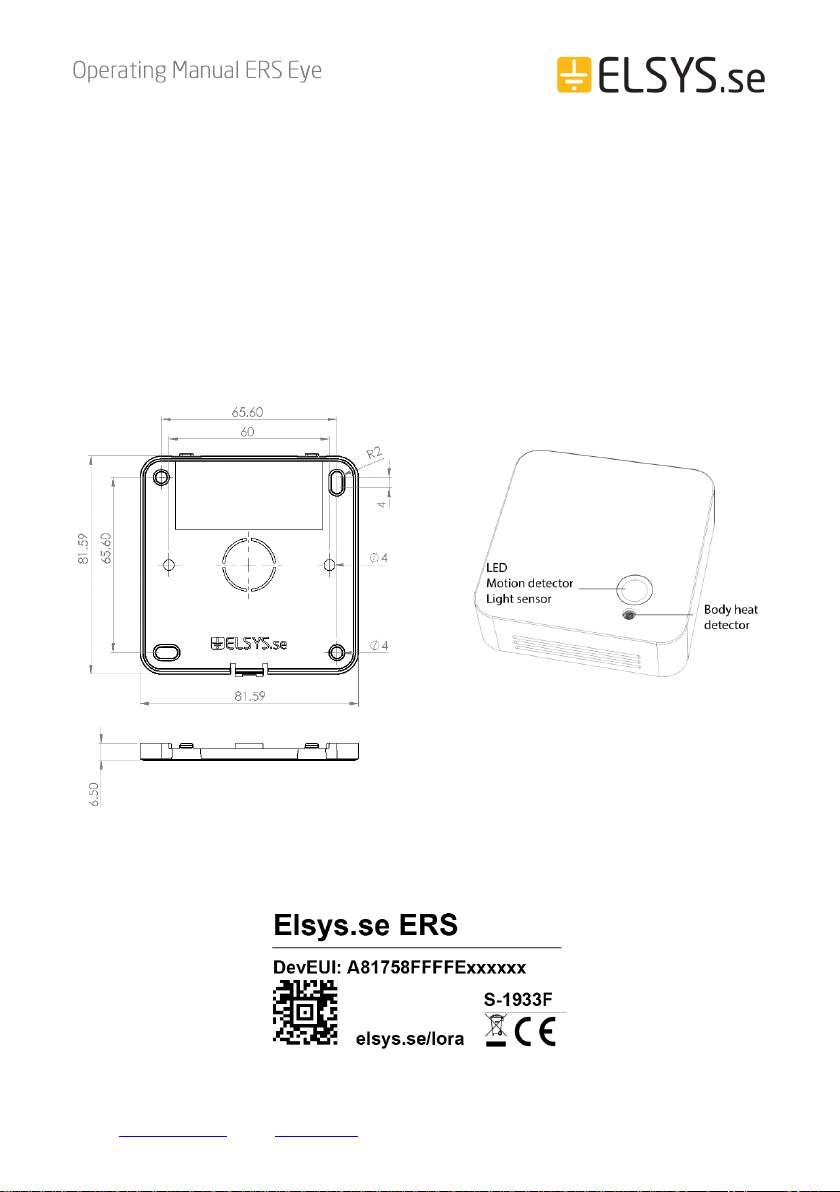
ERS Eye is an advanced room occupancy and indoor climate sensor for
LoRaWAN® wireless network. The sensor measures temperature, humidity, light
intensity, and detects occupancy. It can detect occupancy based on body heat,
not only by movement. ERS Eye is a battery-powered device and is designed to
be mounted on the ceiling. It is equipped with NFC (Near Field Communication)
and can easily be configured from a smartphone.
The barcode contains DevEUI and sensor type. This label is located at the back
of your device,

5
Elektroniksystem i Umeå AB Industrivägen 12, 90130 Umeå, Sweden
E-mail: suppo[email protected] ǀWeb: www.elsys.se
Main features of ERS Eye
•Compatible with LoRaWAN® specification 1.0.3
•Measures ambient temperature
•Measures ambient humidity
•Measures light intensity
•Detects motion using a passive IR sensor
•Detects occupancy using a Grid-Eye infra-red sensor
•Can detect occupancy even if people are sitting/standing still
•Indicates high or low values with a LED light
•Easy installation
•Easy configuration
•May be installed on a ceiling or any surface
•Battery-powered
•Long-range communication
•Configurable over NFC
•Configurable over the air
•Five years of battery life*
•Supported channel plans: US902-928, EU863-870, AS923, AU915-
928, KR920-923, RU864, IN865 & HK923
•CE Approved and RoHS compliant
*Depending on settings and environmental factors
6
Elektroniksystem i Umeå AB Industrivägen 12, 90130 Umeå, Sweden
E-mail: suppo[email protected] ǀWeb: www.elsys.se
Installation
This device is designed to be mounted in the ceiling, directly above the presence
detection area. The field of view is 60°, the higher mounted, the smaller area for
possible detection.
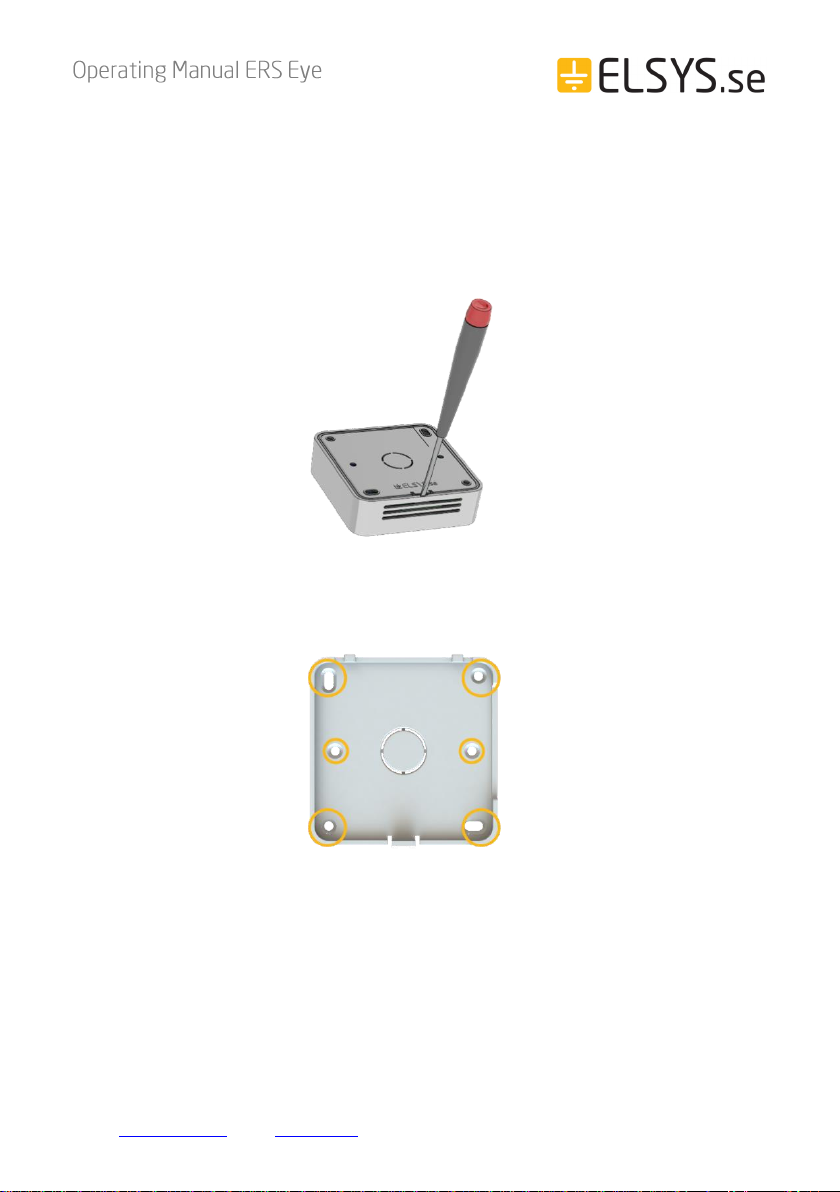
1. Remove the back panel of the sensor with a small screwdriver.
2. Mount the back panel securely to the wall with at least 2 appropriate
screws, using some of the six mounting holes.
Note: ERS Eye will calculate its first background picture 15s after inserting the batteries.
It is preferable if the room is unoccupied at this time. Otherwise, it will take maximum
24h to recalibrate the background if the first background picture is inaccurate.
7
Elektroniksystem i Umeå AB Industrivägen 12, 90130 Umeå, Sweden
E-mail: suppo[email protected] ǀWeb: www.elsys.se
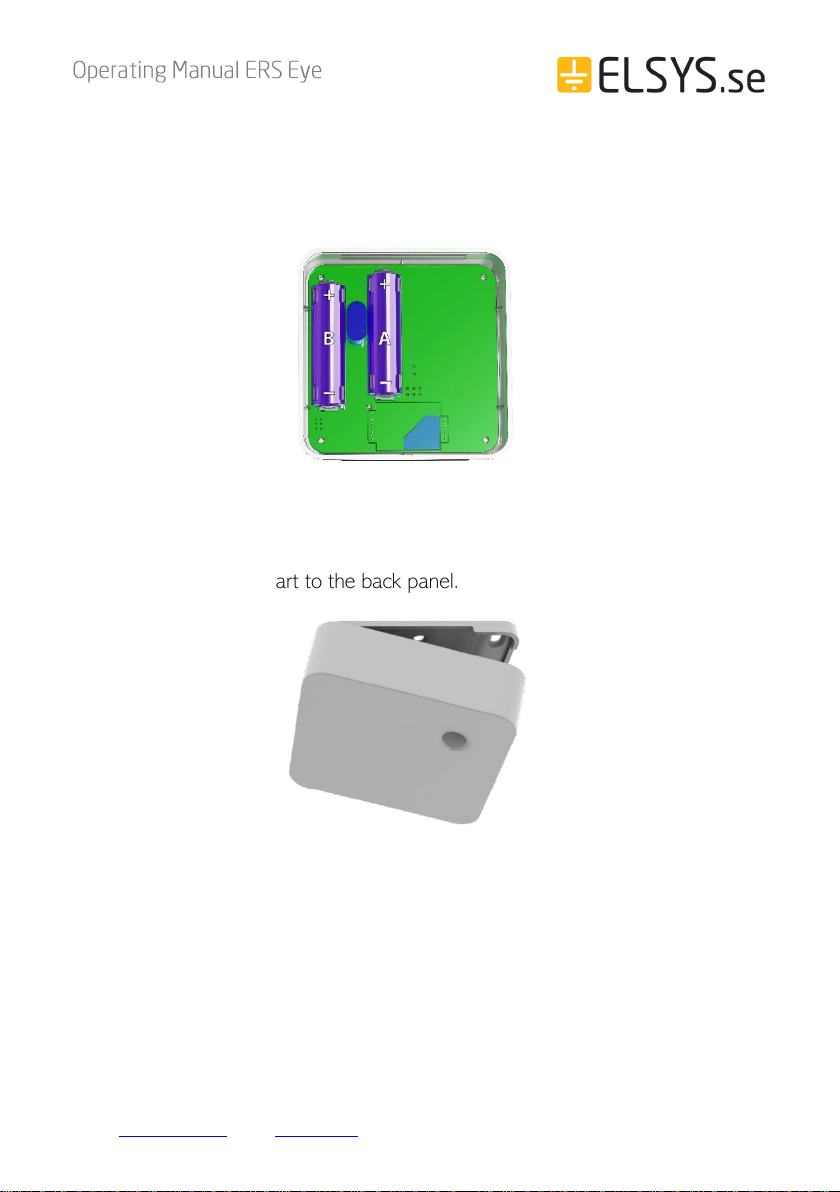
3. Install the batteries. The ERS Eye requires one or two AA batteries. The
battery type is 3.6V Lithium Battery (ER14505). You can use one battery,
but it’s recommended that you use two for best performance and battery
life. Use battery slot A if only one battery is used.
Caution: Using batteries other than the ones provided may result in loss of performance and
battery life, and also damage to the device. Dispose of properly, observing environmental
protection rules.
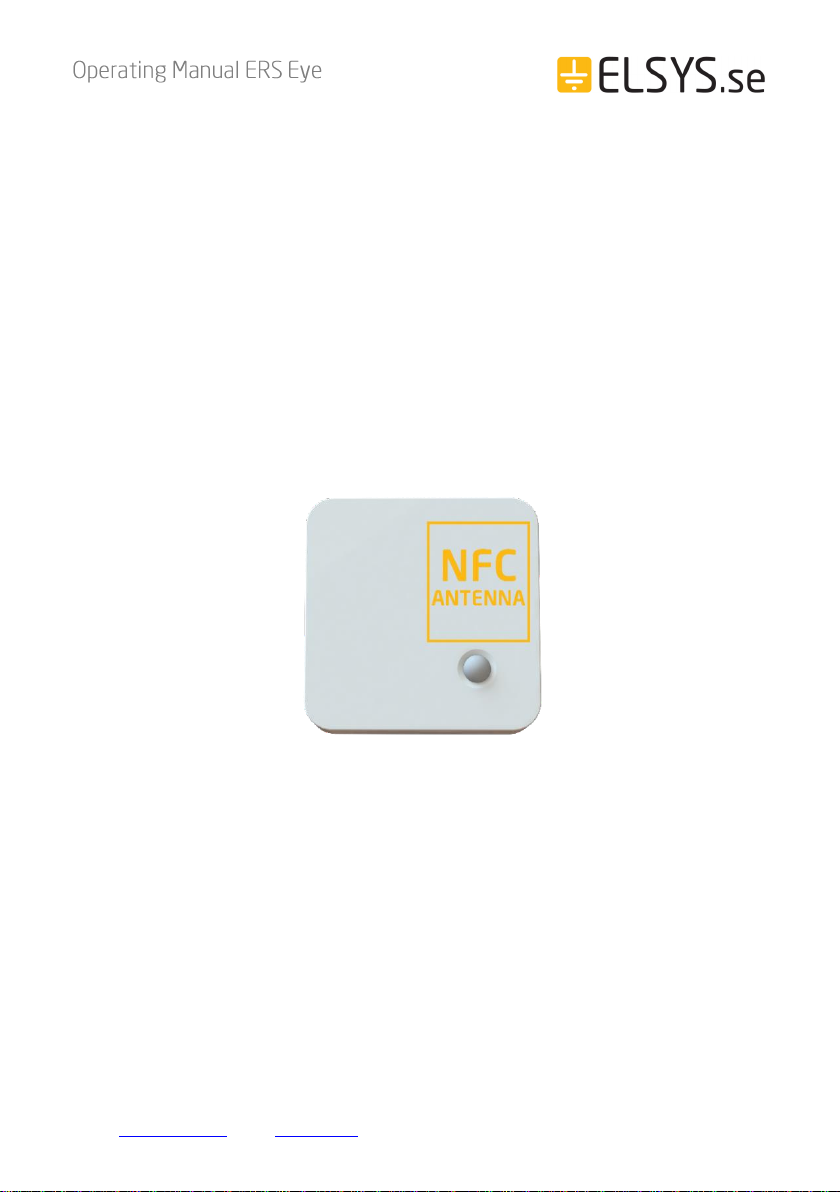
4. Attach the sensor part to the back panel.
Service and maintenance
No serviceable parts inside. If service is needed other than battery replacement,
please contact your distributor.
8
Elektroniksystem i Umeå AB Industrivägen 12, 90130 Umeå, Sweden
E-mail: suppo[email protected] ǀWeb: www.elsys.se
Sensor configuration
All sensor settings can be configured via a smartphone application with NFC
(Near Field Communication) or over the air via the network server and downlink
data to the sensor. The sampling rate, spreading factor, encryption keys, port,
and modes can be changed. All sensor settings can be locked from the server or
NFC to make end-users unable to read or change settings on the sensor.
NFC Configuration
1. Download ELSYS “Sensor Settings”application from Google Play and install
it on a smartphone or tablet. The device must support NFC.
2. Enable NFC on the device and start the application.
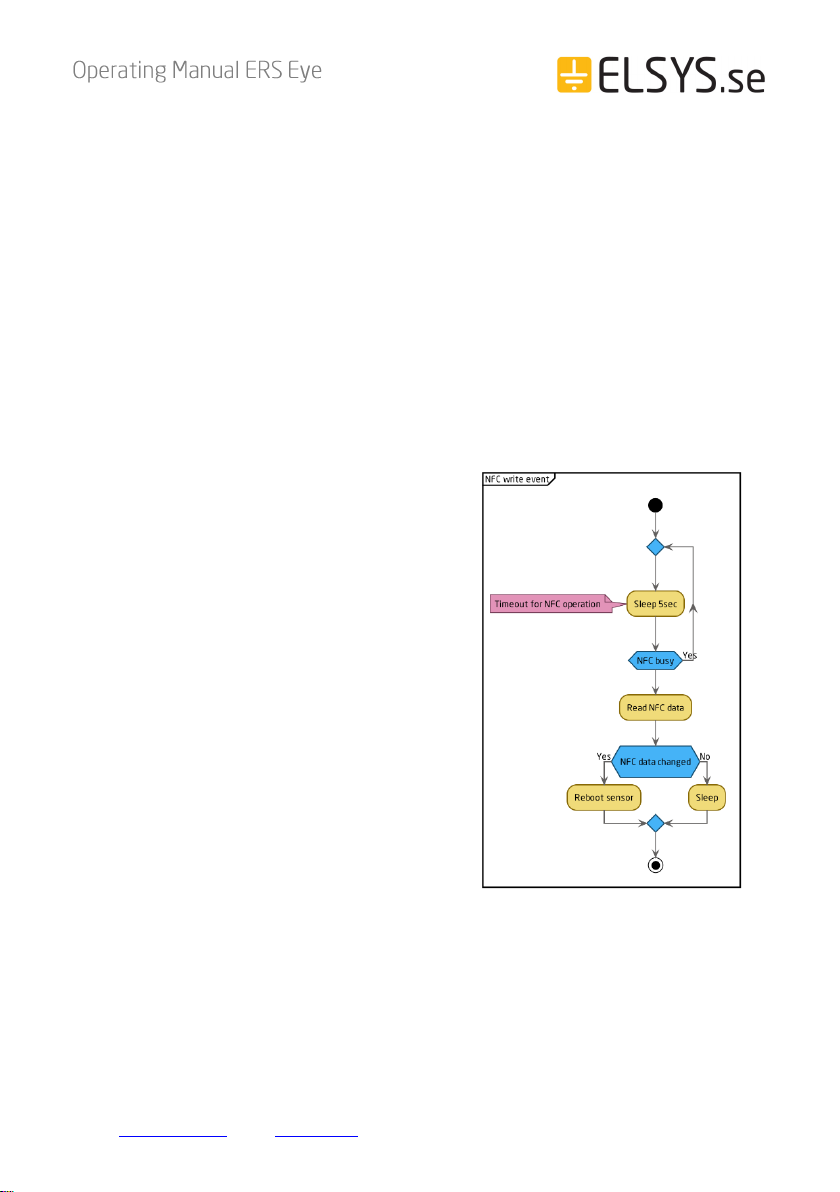
3. Place your device on top of the NFC antenna on the sensor.
4. Remove the device. Current settings will be displayed in the application.
5. Use the application to change any settings if needed.
6. Quickly tap the device on top of the NFC antenna to give the new settings
to the sensor. Make sure that the application confirms your new settings.
7. Wait for the sensor to reboot (5 sec), indicated by the LED flashing. Sensor
settings have been updated.
See the section “Help”in the application for more information.
9
Elektroniksystem i Umeå AB Industrivägen 12, 90130 Umeå, Sweden
E-mail: suppo[email protected] ǀWeb: www.elsys.se
Over the air configuration
All settings may be configured over the air via your LoRaWAN® infrastructure.
Please visit the support section on our webpage for more information regarding
downlink protocol.
Application parameters
All parameters for the “Sensor settings” application can be found in our settings
document. Please visit the support section on our webpage for more information.
Sensor behavior
NFC Read / Write
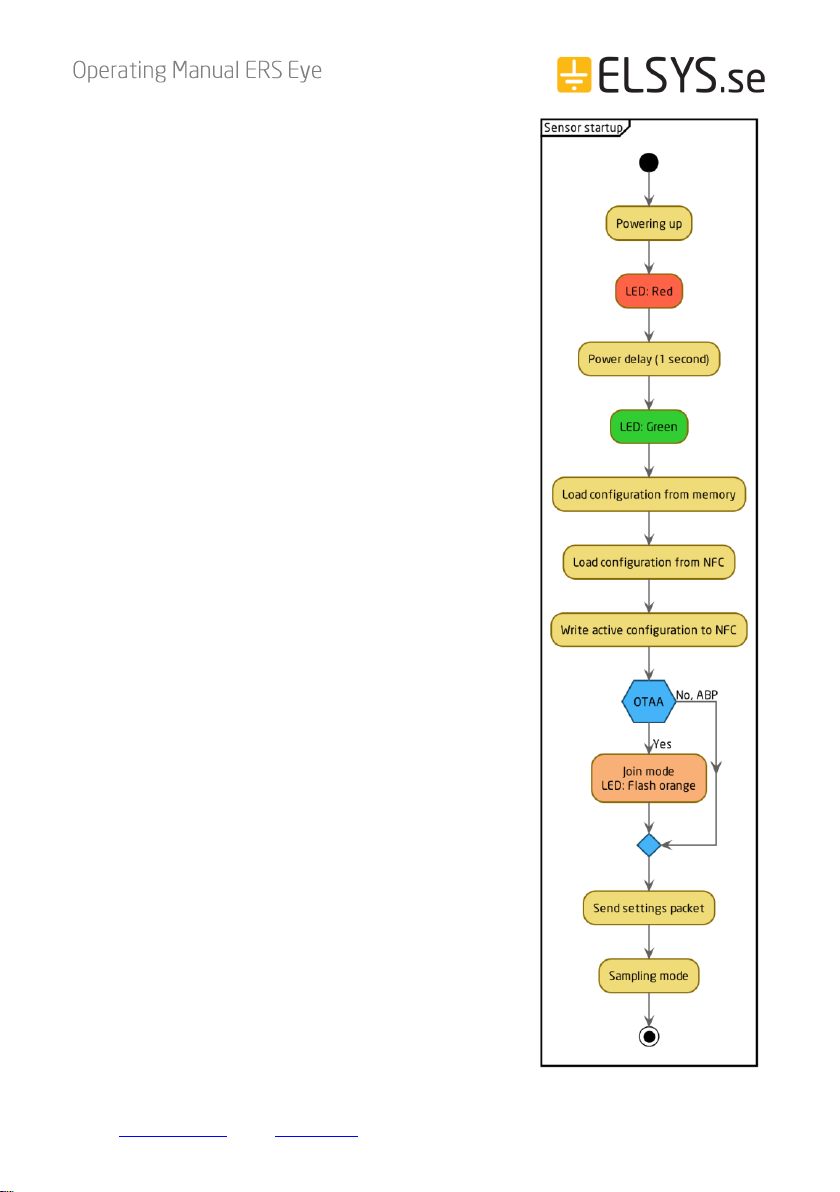
1. When reading or writing NFC
configuration data to the sensor, it starts
a timer and delays its action 5 seconds.
2. After the delay, the sensor determines if
the NFC data has changed or not. If it
has changed, the sensor reboots and
starts from power-up.
3. Write your settings in the application
and then locate the NFC antenna of the
phone and sensor. Keep the two
devices close and don’t move them to
get the best connectivity as possible
when writing or reading data to the
sensor. Bad connection can be caused
by long distance, wrong location, or
rapid movement.
4. When you have written data to the sensor, let the sensor reboot and restart
before trying to write again.
You should always validate your settings by reading the NFC data after the
sensor has restarted.
10
Elektroniksystem i Umeå AB Industrivägen 12, 90130 Umeå, Sweden
E-mail: suppo[email protected] ǀWeb: www.elsys.se
Sensor startup
1. When the sensor starts up, it loads
configuration from the internal memory and
merges it with user configuration.
2. When the configuration is done, the sensor
writes the new settings to the NFC chip. The
sensor always writes new configurations to the
NFC chip when something changes in the
sensor or if NFC data is corrupted by an NFC
writer or phone. The sensor always writes the
new configuration to NFC chip at startup.
3. When the configuration is done, the sensor
tries to join the network if OTAA (Over the Air
Activation) is enabled.
4. The sensor LED flashes orange when it tries to
join a network. It will try to join every 10
seconds initially. This interval will increase to
save battery, at most up to one time per hour.
5. After successful connection to a network, the
sensor sends a settings packet and enters
sampling mode.
Inhaltsverzeichnis
Andere Elsys Zubehör Handbücher

Elsys
Elsys EMS Door Bedienungsanleitung

Elsys
Elsys ELT-2 Bedienungsanleitung

Elsys
Elsys ERS Bedienungsanleitung

Elsys
Elsys EMS Series Bedienungsanleitung

Elsys
Elsys EMS Desk Bedienungsanleitung

Elsys
Elsys ELT-2 HP Bedienungsanleitung

Elsys
Elsys ECO Series Bedienungsanleitung

Elsys
Elsys ERS Bedienungsanleitung

Elsys
Elsys ERS2 Series ERS2 Lite Bedienungsanleitung

Elsys
Elsys ERS CO2 Bedienungsanleitung


