
ELTEX WOP-2ac-LR2 Bedienungsanleitung

IP address:192.168.1.10
Username:admin
Password:password
Base station
WOP-2ac-LR2
User manual
Firmware version1.6.0

WOP-2ac-LR2. User manual
2
Contents
1 Annotation.................................................................................................................................4
1.1 Symbols ......................................................................................................................................4
2 Device description....................................................................................................................5
2.1 Purpose.......................................................................................................................................5
2.2 Device specification ...................................................................................................................5
2.3 Technical features......................................................................................................................6
2.4 Design .........................................................................................................................................9
2.5 Light indication ........................................................................................................................10
2.6 Reset to the default settings....................................................................................................11
2.7 Delivery package......................................................................................................................11
3 Installation order ...................................................................................................................12
3.1 Safety rules...............................................................................................................................12
3.2 Installation recommendations................................................................................................12
3.2.1 Frequency bands and channels in the range of 2.4 GHz for Wi-Fi .................................. 12
3.3 WOP-2ac-LR2 mounting...........................................................................................................13
4 Managing the device through web interface......................................................................15
4.1 Getting started .........................................................................................................................15
4.2 Applying configuration and discarding changes....................................................................16
4.3 Test changes mode ..................................................................................................................17
4.4 Main elements of the web interface........................................................................................18
4.5 The 'Monitoring' menu ............................................................................................................19
4.5.1 The 'Wi-Fi Clients' submenu ............................................................................................. 19
4.5.2 The 'WDS' submenu .......................................................................................................... 20
4.5.3 The 'Traffic Statistics' submenu....................................................................................... 22
4.5.4 The 'Scan Environment' submenu................................................................................... 23
4.5.5 The 'Events' submenu....................................................................................................... 24
4.5.6 The 'Network Information' submenu............................................................................... 25
4.5.7 The 'Radio Information' submenu ................................................................................... 27
4.5.8 The 'Device Information' submenu.................................................................................. 28
4.6 The 'Radio' menu .....................................................................................................................29
4.6.1 The 'Radio' submenu ........................................................................................................ 29
4.6.2 The 'QoS' submenu........................................................................................................... 31
4.7 The 'VAP' menu ........................................................................................................................32
4.7.1 The 'Summary' submenu ................................................................................................. 32

WOP-2ac-LR2. User manual
3
4.7.2 The 'VAP' submenu ........................................................................................................... 33
4.8 The 'WDS' menu .......................................................................................................................36
4.8.1 The 'WDS' submenu .......................................................................................................... 36
4.9 The 'Network Settings' menu..................................................................................................37
4.9.1 The 'System Configuration' submenu ............................................................................. 37
4.9.2 The 'Access' submenu....................................................................................................... 38
4.10 The 'System' menu ..................................................................................................................40
4.10.1 The 'Device Firmware Upgrade' submenu....................................................................... 40
4.10.2 The 'Configuration' submenu........................................................................................... 41
4.10.3 The 'Reboot' submenu...................................................................................................... 42
4.10.4 The 'Password' submenu ................................................................................................. 42
4.10.5 The 'Log' submenu............................................................................................................ 43
4.10.6 The 'Date and Time' submenu ......................................................................................... 43
5 Spectrum Analyzer.................................................................................................................45
6 System recovering after firmware update failure.............................................................46
7 List of changes ........................................................................................................................47

WOP-2ac-LR2. User manual
4
1 Annotation
Modern tendencies of telecommunication development necessitate operators to search for the most optimal
technologies, allowing you to satisfy drastically growing needs of subscribers, maintaining at the same time
consistency of business processes, development flexibility and reduction of costs of various services
provision. Wireless technologies are spinning up more and more and have paced a huge way for short time
from unstable low-speed communication networks of low radius to broadband networks equitable to speed of
wired networks with high criteria to the quality of provided services.
WОP-2ac-LR2 is designed to organize Broadband wireless networks in private housing, that provide broadband
access to the Internet in the range of 3 km. The device is a good choice for wireless network construction in a
difficult climatic conditions. WOP-2ac-LR2 operates well in a wide operating temperature range and in high
humidity (different climatic zones). The device allows connecting different sector antennas.
This manual specifies intended purpose, main technical parameters, design, installation procedure, safe
operation rules and installation recommendations forWOP-2ac-LR2.
1.1 Symbols
Notes and warnings
Notes contain important information, tips or recommendations on device operation and setup.
Warnings are used to inform the user about harmful situations for the device and the user alike,
which could cause malfunction or data loss.

WOP-2ac-LR2. User manual
5
•
•
•
•
•
•
•
•
•
•
•
•
•
•
•
•
•
•
•
•
•
•
•
•
2 Device description
2.1 Purpose
The base station WOP-2ac-LR2 (herein after 'the device') is designed to provide broadband Internet access to
subscribers within a range of up to 3 kmand to organize wireless bridges (WDS).
The base station – an up-to-date flexible solution that provides extending coverage zone due to its power of
the transmitter (up to 26 dBm) and sectoral antennas. It is possible to deploy wireless IT infrastructure fast
and easily by virtue of high-performance hardware, scalability and intuitive interface.
The PoE+ technology makes it possible to install the equipment virtually anywhere, regardless of the power
supply location, reduces total cost by discarding power cables and performs the installation easier and faster.
2.2 Device specification
Interfaces:
1 Combo port 10/100/1000BASE-T (Ethernet)/100/1000Base-X (SFP);
2 SMA (female) connectors for connecting external antennas. The choice of model depends on the use
of the access point: for wireless bridges, it is preferable to choose narrowly oriented antennas, and in
base station mode, sector antennas with a wider radiation pattern;
Wi-Fi 2.4 GHz IEEE 802.11b/g/n.
The power is supplied via PoE injector (IEEE 802.3at-2009).
Functions:
WLAN capabilities:
support for IEEE 802.11b/g/n;
data aggregation, including A-MPDU (Tx /Rx) and А-MSDU (Rx);
WMM-based priorities and packet planning;
support for hidden SSID;
4 virtual access points;
MAC ACL;
external access point detection;
APSD;
spectrum analyzer;
support for wireless bridges (WDS);
Polling;
support for fixed center frequency.
Network functions:
autonegotiation of speed, duplex mode and switching between MDI and MDI-X modes;
support for VLAN (Access, Trunk, General);
DHCP client;
support for NTP;
support for Syslog.
QoS functions
bandwidth limiting for each SSID;
client data rate limiting for each SSID;
changing WMM parameters for each radio interface;
support for prioritization by CoS and DSCP;

WOP-2ac-LR2. User manual
6
•
•
•
Security:
centralized authorization via RADIUS server (WPA Enterprise);
WPA/WPA2 data encryption;
64/128/152-bit WEP data encryption;
Fig.1 shows an equipment operation diagram for WOP-2ac-LR2.
Figure 1 –WOP-2ac-LR2 operation diagram
2.3 Technical features
Table 1 shows main specifications of the device.
Table 1 — Main specifications
Ethernet interface parameters
Number of ports 1
Electrical connector RJ-45/SFP
Data rate, Mbps 10/100/1000, auto-negotiation
Standards BASE-T/BASE-X

WOP-2ac-LR2. User manual
7
Port features Combo port
Wireless interface parameters
Standards 802.11b/g/n
Frequency range 2402–2482 MHz
Modulation DSSS, ССK, BPSK, QPSK, 16QAM, 64QAM
Data transfer rate1802.11b: up to 11 Mbps
802.11g: up to 54 Mbps
802.11n: up to 300 Mbps
Maximum transmitter output power22.4 GHz:26 dBm
Receiver sesitivity 2.4 GHz: up to -98 dBm
Security 64/128/152- bit WEP encryption, WPA/WPA2,
centralized authorization via RADIUS server (WPA/
WPA2 Enterprise)
Control
Remote control Web interface, CLI, Telnet, SSH, SNMP (monitoring),
NETCONF
Access restriction by password
General parameters
Processor Realtek RTL8197FS 1GHz
RAM 128 MB
Flash 32 MB
Power supply PoE+ (IEEE 802.3at-2009)
Power consumption up to 13 W
Operating temperature from -45 to +65°С

WOP-2ac-LR2. User manual
8
Relative humidity at 25°Сup to 95%
Ingress Protection Marking IP54
Dimensions 88x232,5x47 mm
Weight 0,32 kg
1The maximum wireless data rate is defined according to IEEE 802.11b/g/n standard. The real bandwidth can
be different. Conditions of the network, environment, the amount of traffic, building materials and
constructions and network service data can decrease the real bandwidth.The environment can influence on
the network coverage range.
2The number of channels and the value of the maximum output power will vary according to the rules of radio
frequency regulation in your country.

WOP-2ac-LR2. User manual
9
2.4 Design
WOP-2ac-LR2 housed in a plastic case, industrial version. The size of the device: 88x232.5x47 mm. The layout
of WOP-2ac-LR2 is shown in the Fig. 2.
Figure 2 – WOP-2ac-LR2 layout
Combo port 10/100/1000Base-T (Ethernet)/100/1000Base-X (SFP) for local network connection and power
supply via PoE, grounding connector and the button for resetting to factory settings (F) are located on the
bottom panel of the device, Fig. 3.
Figure 3 – WOP-2ac-LR2 ports
WOP-2ac-LR2. User manual
10
2.5 Light indication
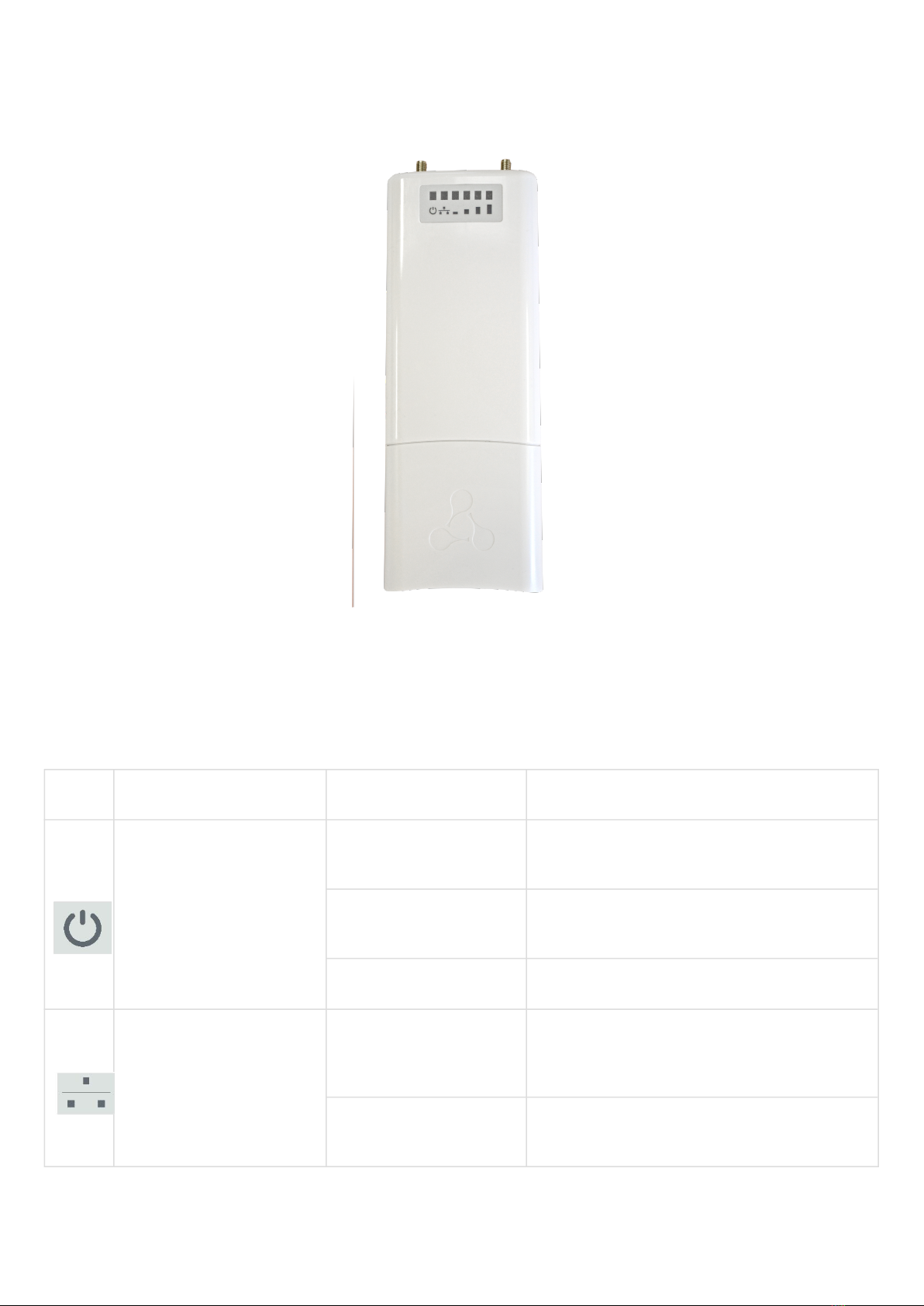
The layout of WOP-2ac-LR2 indication panel is shown in the Fig. 4 .
Figure 4 – WOP-2ac-LR2 indication panel layout
The current state of the device is shown with the help of light indicators located on the front panel of
WOP-2ac-LR2. The list of indicators and their description is shown in the table below.
Table 2 – Indicator description
LED LED status Description
Power – power and
operation status indicator
solid green the device power supply is enabled, normal
operation
solid orange the device is loaded but IP address is not
received via DHCP
solid red the device is loading
LAN – Ethernet interface
port indicator
solid green (10, 100
Mbps)/solid orange (1000
Mbps)
the channel between Ethernet interface of
WOP-2ac-LR2 and connected device is active
мигает packet data transmission between Ethernet
interface of WOP-2ac-LR2 and connected device
Inhaltsverzeichnis
Andere ELTEX Zubehör Handbücher


