
lefant N1K Bedienungsanleitung

User manual
Lefant Robot Vacuum Cleaner N1K


1
Congratulations on the purchase of your Lefant ROBOTS!
We hope it brings you satisfaction. We trust your purchase will keep your home clean and provide you a high-quality life.
Should you encounter situations that have not been properly addressed in this User Manual, please contact our Customer Service
Center, we will solve your specific problem.For more information, please visit the Lefant ROBOTICS official website: www.lefant.com or
The Company reserves the right to make technological and/or design changes to this product for continuous improvement.

2
IMPORTANT SAFETY INSTRUCTIONS
READ ALL INSTRUCTIONS BEFORE USING THIS APPLIANCE.
For Household use only
When using an electrical appliance, basic precautions should always be followed, including the following:
WARNING: Read all safety warnings and instructions. Failure to follow the warnings and instructions may result in electric shock, fire
or serious injury.
1. The robot must be used in accordance with the directions in
this User Manual. Our company cannot be held liable or respon-
sible for any damages or injuries caused by improper use.
2. Do not allow to be used as a toy. Close attention is necessary
when used by or near children.x
Do not allow children to sit on the vacuum.
3. Clear the area to be cleaned. Remove power cords and small
objects from the floor that could entangle the Robot. Tuck rug
fringe under the rug base, and lift items such as curtains and
table cloths off the floor.
4. If there is a drop offin the cleaning area due to a step or stairs,
you should operate the Robot to ensure that it can detect the
step necessary to place a physical barrier at the edge to keep
the unit from falling. Make sure the physical barrier is not a trip
hazard.
5. Only use as described in this manual. Only use attachments
recommended or sold by the manufacturer.
6. Please make sure your power supply voltage matches the
power voltage marked on the Docking Station.
7. Do not handle or plug appliance with wet hands.
8. Non-rechargeable batteries are prohibited.
9. Do not use without dust bin and/or filters in place.
10. Do not operate the robot in an area where there are lit
candles or fragile objects on the floor to be cleaned.
11. Do not use and store in extremely hot or cold environments
(below -5°C /23°F or above 40°C/104°F). Please charge the
robot in temperature above 0°C/32°F and below 40°C/104°F.Fol-
low all charging instructions and do not charge the battery pack
or appliance outside of the temperature range specified in the
instructions. Charging improperly or at temperatures outside of
the specified range may damage the battery and increase the
risk of fire.
12. Keep hair, loose clothing, fingers, and all parts of body away
from any openings and moving parts.
13. Do not operate the robot in a room where an infant or child is
sleeping.
14. For INDOOR use ONLY. Do not use the robot in outdoor,
commercial or industrial environments. Do not use Appliance on
wet surfaces or surfaces with standing water.

3
15. Do not allow the robot to pick up large objects like stones, large
pieces of paper or any item that may clog the robot.
16. Do not use the robot to pick up flammable or combustible
materials such as gasoline, printer or copier toner, or use in areas
where they may be present.
17. Do not use the robot to pick up anything that is burning or
smoking, such as cigarettes, matches, hot ashes, or anything that
could cause a fire.
18. Do not put any object into openings. Do not use with any
opening blocked; keep free of dust, lint, hair, and anything that
may reduce air flow.
19. Take care not to damage the power cord. Do not pull on or
carry the robot or the Docking Station by the power cord, use the
power cord as a handle, close a door on the power cord, or pull
power cord around sharp edges or corners. Do not run the robot
over the power cord.Keep power cord away from hot surfaces. Do
not unplug by pulling on cord, To unplug, grasp the plug, not the
cord.
20. If the power cord is damaged, it must be replaced by the
manufacturer or its service agent in order to avoid a hazard.
21. Do not use the Docking Station if it is damaged.
22. Do not use the robot or the Docking Station if it is not working
properly, has been dropped, damaged, left outdoors, or come in
contact with water. It must be repaired by the manufacturer or its
service agent in order to avoid a hazard.
23. Turn OFF the power switch before cleaning or maintaining the
robot. Turn offall controls
24. The plug must be removed from the receptacle before cleaning
or maintaining the Docking Station.
25. Remove the robot from the Docking Station, and turn OFF the
power switch to the Appliance before removing the battery for
disposal of the robot.
26. The battery must be removed and discarded according to local
laws and regulations before disposal of the robot.
27. Please dispose of used batteries according to local laws and
regulations.
28. Do not incinerate the robot even if it is severely damaged. The
batteries can explode in a fire.
29. When not using the Docking Station for a long period of time,
please unplug it.
30. Prevent unintentional starting. Ensure the switch is in the off
position before connecting to battery pack, picking up or carrying
the appliance. Carrying the robot with your finger on the switch or
energizing the robot that have the switch on invites accidents.
31. When battery pack is not in use, keep it away from other metal
objects, like paper clips, coins,keys, nails, screws,ect, that can make
a connection from one terminal to another. Shorting the battery
terminals together may cause burns or a fire.
32. Under abusive conditions, liquid may be ejected from the
battery; avoid contact. If contact accidentally occurs, flush with
water. If liquid contacts eyes, additionally seek medical help. Liquid
ejected from the battery may cause irritation or burns.
33. Do not use a battery pack that is damaged or modified.
Damaged or modified batteries may exhibit unpredictable behav-
ior resulting in fire, explosion or risk of injury.

4
34. Do not expose a battery pack or appliance to fire or
excessive temperature. Exposure to fire or temperature
above 130°C/265°F may cause explosion.
35. Have servicing performed by a qualified repair person
using only identical replacement parts.
36. Do not modify or attempt to repair the robot or the
battery pack (as applicable) except as indicated in the
instructions.
37. Do not operate the robot in a room that has lit candles
on furniture that the vacuum may accidentally hit or bump
into.
38. Recharge only with the charger specified by the
manufacturer. A charger that is suitable for one type of
battery pack may create a risk of fire when used with
another battery pack.
39. Use the robot only with specifically designated battery
packs. Use of any other battery packs may create a risk of
injury and fire.
40. The robot contains batteries that are only replaceable
by skilled persons. To replace the robot's battery, please
contact Customer Service.
41. If the robot is not going to be used for a long time, fully
charge the robot, power it OFF, and unplug the Docking
Station.
SAVE THESE INSTRUCTIONS
Short-circuit-proof safety isolating transformer
Switch mode power supply
For indoor use only
Direct current
Alternating current
detachable supply unit
S

5
Federal Communications Commission (FCC) Interference Statement
This device complies with Part 15 of the FCC Rules.
Operation is subject to the following two conditions:
(1) This device may not cause harmful interference,
and (2) this device must accept any interference received,
including interference that may cause undesired operation.
FCC Caution:
Any changes or modifications not expressly approved by the
party responsible for compliance could void the user 5s
authority to operate this equipment.
RF exposure warning
This equipment complies with FCC radiation exposure limits
set forth for an uncontrolled environment.This equipment
must be installed and operated in accordance with provided
instructions and the antenna(s) used for this transmitter
must be installed antenna(s) used for this transmitter must
be installed to provide a separation distance of at least 20
cm from all persons and must not be collocated or operating
in conjunction with any other antenna or transmitter.
This equipment has been tested and found to comply with the
limits for a Class B digital device, pursuant to Part 15 of the
FCC Rules.
These limits are designed to provide reasonable protection
against harmful interference in a residential installation. This
equipment generate, uses and can radiate radio frequency
energy and, if not installed and used in accordance with the
instructions, may cause harmful interference to radio commu-
nications.
However, there is no guarantee that interference will not occur
in a particular installation. If this equipment does cause
harmful interference to radio or television reception, which can
be determined by turning the equipment off and on, the user is
encouraged to try to correct the interference by one of the
following measures:
• Reorient or relocate the receiving antenna.
• Increase the separation between the equipment and
receiver.
• Connect the equipment into an outlet on a circuit different
from that to which the receiver is connected.
• Consult the dealer or an experienced radio/TV technician for
help.

6
Contents
1. Product introduction 7
1.1 Packing list
1.2 Part name
························································
2. Preparation 10
2.1 Assemble and charge
2.2 Using environment preparation
·····························································
4. Abnormal symptoms
4.1 Symptom prompts
17
4.2 Troubleshooting
························································
5. Technical parameters 19
·······················································
3. Using the product 12
3.1 How to use buttons
3.3 App download and configuration
3.4 Maintenance
3.2 Floor-mopping functions
·························································

7
Robot vacuum cleaner
X 1
Note: Figures and illustrations are for reference only and may differ from actual product appearance. Product design and specifications are subject to
changes without notice.
High Efficient Particulate Air
(HEPA) Filter
X 1
1. Product introduction / 1.1 Packing list
User manual
Lefant Robot Vacuum Cleaner N1K
Docking Station
X 1
Dust bin
X 1
Mop support
X 1
User manual
X 1
Side brush
X 2
AC Adapter
X 1
Cleaning tool
X 1
Re-usable mop
X 1
8
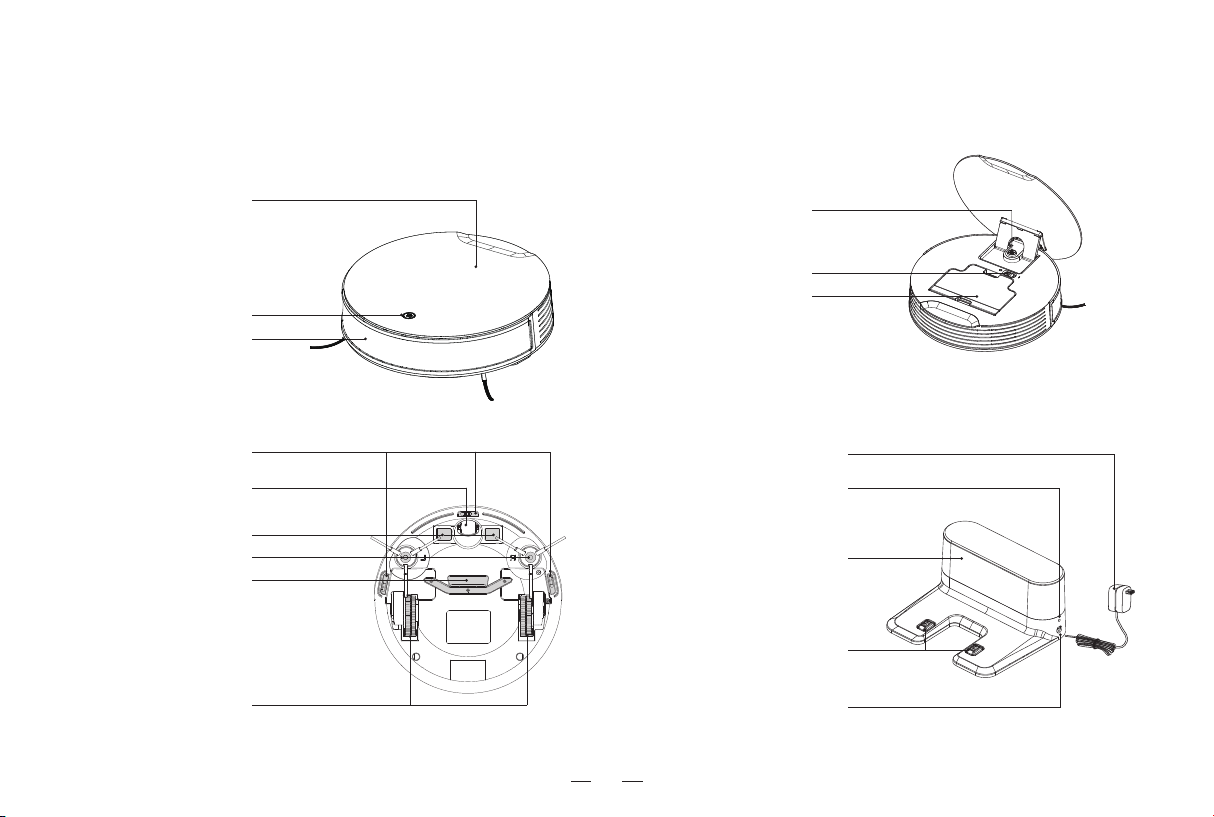
1. Product introduction / 1.2 Part Name
Pannel
Start/pause button
Anti-collision sensor
Docking StationBottom view
Internal viewFront view
Drive wheel
Anti-falling sensor
Suction mouth
Universal wheel
Charging electrode
Side brush
Power Switch
(I=ON.O=OFF)
Dust bin
Start/pause button
Charging electrode
Indicator light
Power adapter
Power adapter socket
Infrared signal transmitter
Inhaltsverzeichnis
Andere lefant Staubsauger Handbücher

lefant
lefant M201 Bedienungsanleitung

lefant
lefant M57 Bedienungsanleitung

lefant
lefant T8 Series Bedienungsanleitung

lefant
lefant LS1 Bedienungsanleitung

lefant
lefant M210P Bedienungsanleitung

lefant
lefant M201 Bedienungsanleitung

lefant
lefant M213 Bedienungsanleitung

lefant
lefant F1 Bedienungsanleitung

lefant
lefant M2 Bedienungsanleitung

lefant
lefant M2 Bedienungsanleitung
Beliebte Staubsauger Handbücher anderer Marken

Bissell
Bissell LittleGreen Proheat 1425 Series Bedienungsanleitung

Panasonic
Panasonic MC-YL637S147-AE Bedienungsanleitung

NEFF
NEFF N17XH10 0 Series Bedienungsanleitung

LG
LG A9 Series Bedienungsanleitung

Oreck
Oreck Cordless Captura BK51700 Series Bedienungsanleitung

Kogan
Kogan KAVACROBVWA Bedienungsanleitung


