
Levoit VortexIQ 40 Bedienungsanleitung

VortexIQ™ 40 Cordless
Stick Vacuum
Model: LSV-VF401-AUS
Questions or Concerns?
Please contact us MonFri, 9:00 am5:00 pm PST/PDT
USER MANUAL

2
Table of Contents
Package Contents
Specifications
Safety Instructions
Getting to Know Your Vacuum
Control Panel
Using Your Vacuum
Care & Maintenance
Cleaning
Storage
Troubleshooting
Warranty Information
Customer Support
2
2
3
5
6
7
10
13
15
16
18
19
Package Contents
1 ×Vacuum Body
1 ×Stick
1 ×Vacuum Head
1 ×Telescoping Crevice Tool
1 ×2-in-1 Dusting Brush
1 ×Charging Dock with Accessory Holder
3 ×Screws
3 ×Wall Anchors
1 ×Charger
1 ×User Manual
1 ×Quick Start Guide
Specifications
Battery Type DC 25.9V, 2500mAh
Li-ion battery
Charging Input AC 100–240V,
50/60Hz 0.5A
Charging Time 4–5 hours
Dimensions 9.8 × 9.1 × 46.1 in /
25 × 23 × 117 cm
Weight 7.1 lb / 3.2 kg
Dust Bin Capacity 2.5 cups / 0.6 L
Runtime 40 minutes (Low)
Rated Power 400W
Suction Power 130AW

3
• Do not leave the vacuum unattended while it is
on. Unplug from outlet when not charging and
before servicing.
• Do not use outdoors or on wet surfaces.
• The vacuum is not a toy. Do not allow children to
play with the vacuum.
• Close supervision is necessary when the vacuum is
used by persons (including children) with reduced
physical, sensory, or mental capacities, or lack of
experience and knowledge, unless they have been
given supervision or instruction on how to use the
vacuum and understand the hazards involved.
• Only use the vacuum as described in this manual.
• Do not use your vacuum if it is damaged or not
working correctly, or if the charger or plug is
damaged. Do not try to repair it yourself. Contact
Customer Support (see page 19).
• Do not handle the charger or vacuum with
wet hands.
• Do not put any object into any opening. Do
not use the vacuum with any opening blocked.
Keep free of dust, lint, hair, or anything that may
reduce air flow.
• Keep hair, loose clothing, fingers, and all body
parts away from openings and moving parts.
• Use extra care when cleaning on stairs.
• Do not vacuum the following or use where they
may be present:
WARNING – To reduce the risk of fire, electric shock, or injury:
When using this vacuum, basic precautions should always be followed, including the following:
READ ALL INSTRUCTIONS
• Large or sharp objects such as glass shards
• Flammable or combustible liquids such as
solvents or detergents
• Inflammable or explosive substances such as
gasoline or alcohol
IMPORTANT SAFETY
INSTRUCTIONS
• Risk of injury. Roller brush may start unexpectedly.
Remove the main body before cleaning or servicing.
• Prevent unintentional starting. Ensure the switch is
in the “O” position before picking up or carrying
the vacuum. Carrying the vacuum with your finger
on the switch may cause accidents.
• Always turn the vacuum o before connecting
or disconnecting the stick, nozzles, brushes, or
vacuum head.
• Do not vacuum anything that is burning or smoking,
such as cigarettes, matches, or hot ashes.
• Do not use without dust bin and filters in place.
• Do not point the vacuum at any person or animal
while it is on.
• Store the vacuum on a small stand or flat surface,
or hang it from the wall.
• Do not use aftermarket or third-party
accessories with the vacuum. Only use the
accessories provided.

4
SAFETY INSTRUCTIONS (CONT.)
• Do not pull or carry the vacuum by the charging
cable, use the cable as a handle, close a door on
the cable, or pull the cable around sharp edges or
corners. Do not run any appliance over the cable.
• Do not pull on the cable to remove it from the
outlet. Only use the plug to pull it out from
the outlet.
• Never place the charger or its cable near any
heat source.
• Keep the charging cable out of areas where
people walk often. Place the cable where it will
not be tripped over.
• Do not use the charger to charge other appliances
besides this vacuum.
• Only recharge the vacuum with the charger
specified by Arovast Corporation. A charger
that is suitable for one type of appliance may
create a risk of fire when used with another
battery pack. To request a new charger, contact
Customer Support (see page 19).
• Only use the battery pack specifically designed for
this vacuum. Use of any other battery packs may
create a risk of injury and fire. To request a new
battery, contact Customer Support (see page 19).
• When the battery pack is not in use, keep it away
from other metal objects, like paper clips, coins,
keys, nails, screws, or other small metal objects
that can make a connection from one terminal to
another. Shorting the battery terminals together
may cause burns or a fire.
Battery & Charger
WARNING: Read all safety warnings and instructions. Failure to follow the warnings and
instructions may result in electric shock, fire, and/or serious injury.
• Under abusive conditions, liquid may be ejected
from the battery. Avoid contact. If contact
occurs, flush with water. If liquid contacts eyes,
immediately flush with water and seek medical
help. Liquid ejected from the battery may cause
irritation or burns.
• Do not use the battery pack or vacuum if they
are damaged or modified. Damaged or modified
batteries may exhibit unpredictable behavior
resulting in fire, explosions, or risk of injury.
• Have servicing performed only by a qualified repair
person using identical replacement parts. This will
ensure that the safety of the vacuum is maintained.
• Do not modify or attempt to repair the vacuum or
the battery pack except as indicated in the manual.
• Do not expose the battery pack or vacuum to fire
or excessive temperatures. The battery used in
this device may present a risk of fire or chemical
burn if mistreated. Do not disassemble, short
contacts, heat above 140°F (60°C), or incinerate.
• Follow all charging instructions and do not
charge the battery pack or vacuum outside of the
temperature range specified in the instructions.
Charging improperly or at temperatures outside
of the specified range may damage the battery
and increase the risk of fire.
SAVE THESE INSTRUCTIONS
NOT FOR COMMERCIAL USE
HOUSEHOLD USE ONLY

5
GETTING TO KNOW YOUR VACUUM
A. Control Panel
B. HEPA-Type Pre-Filter
C. Vacuum Body Release Button
D. Stick
E. Vacuum Head Release Button
F. Vacuum Head
G. Roller Brush Cushion
H. Roller Brush
I. LED Lights
J. Roller Brush Release Button
K. Telescoping Crevice Tool
L. 2-in-1 Dusting Brush
M. Charger
N. Charging Port (Dock)
O. Charging Dock with Accessory Holder
P. Dust Bin
Q. Dust Bin Release Button
R. Metal Filter
S. Vacuum Body
T. On/O Trigger
U. Handle
V. Battery Release Button
W. Charging Port (Body)
X. Battery Indicator Lights
Y. HEPA-Type Main Filter
A
B
C
G
E
D
K
L
R QS
H
P
X
W
Y
V
F
J
I
T
UO
N
M

6
CONTROL PANEL
A. Auto Mode Button
• Press to turn on Auto Mode (see
Auto Mode, page 9).
• Automatically adjusts power to match
the amount of dust.
• Increase or decrease power manually
to exit Auto Mode.
B. Increase/Decrease Power
• Press or to manually increase
or decrease suction power.
C. Dust Level Indicator
• Indicates the level of dust detected
by the dust sensor.
D. Power Level Indicator
• Indicates the level of vacuum
suction power.
E. Auto Mode Indicator
• Indicates when Auto Mode is active.
F. Airflow Blockage Indicator
• Indicates that the vacuum airflow is
blocked.
G. Roller Brush Blockage Indicator
• Indicates that the roller brush is
blocked (see Cleaning the Roller
Brush, page 15).
C D
E
F
G
B
A

7
USING YOUR VACUUM
1. Attach the vacuum head or nozzle
attachment to the bottom of the stick and
attach the vacuum body to the top of the
stick [Figure 1.1].
Figure 1.1
Battery Level Battery Indicator
70–100% 3 lights
50–70% 2 lights
20–50% 1 light
0–20% 1 flashing light
Note: There is a clicking sound when the
parts are properly joined together.
Note: Fully charge the battery before
first use.
2. Charge the vacuum (see page 10).
3. Press the On/O Trigger to turn the
vacuum on.
4. Press to use Auto Mode, or press
or to manually control suction
power.
5. Press the On/O Trigger to turn the
vacuum o.
Battery Indicator Light Chart
(During Use)
Nozzle Attachments
Your vacuum comes with nozzle attachments
to help you tackle almost any cleanup job.
Telescoping Crevice Tool
• Press button to extend the crevice
nozzle [Figure 1.2].
• Use to clean hard-to-reach places.
• Good for reaching small cracks and
crevices in furniture, the corners of a
room, or a car.
Figure 1.3
Figure 1.2
2-in-1 Dusting Brush
• Press button to slide bristles up/down
and switch between upholstery brush
and duster [Figure 1.3].
• Use upholstery brush to clean soft
furnishings and upholstery.
• Use bristles to dust and clean hard
surfaces.

8
USING YOUR VACUUM (CONT.)
Nozzle Attachments (cont.)
To use a nozzle attachment:
1. Press and hold the Vacuum Body
Release Button and gently pull
the vacuum body from the stick
[Figure 1.4].
Figure 1.4
Figure 1.5
Figure 1.6
Figure 1.7
2. Slide the crevice tool or dusting brush
onto the vacuum body [Figure 1.5].
3. Optionally, leave the stick attached
to the vacuum body and press the
Vacuum Head Release Button to
remove the vacuum head. Then,
attach the nozzle or brush to the end
of the stick [Figure 1.6].
Note: You can also attach the vacuum body
directly to the vacuum head [Figure 1.7].

9
Auto Mode utilizes DPC Technology™
(Dynamic Power Control Technology), which
uses infrared sensors to automatically detect
the amount of dust and debris that is traveling
through the vacuum, and then adjusts the
suction power to accommodate the amount
of dust. If there is more dust, the suction
power will be higher, and if there is less dust,
the suction power will be lower.
Auto Mode
USING YOUR VACUUM (CONT.)
Dust Level Power Level
1
2
3
4
5
10
CARE & MAINTENANCE
Battery Installation
Your vacuum uses a 2500mAh Li-ion
battery. On a full charge, the battery lasts
approximately 40 minutes on power level 1.
Use the included charger/charging dock to
charge the vacuum.
Charging the Vacuum
Note:
• To maintain the life of the battery, store
the vacuum in a cool, dry place.
• Store the battery in a semi-charged
state (at least half charged).
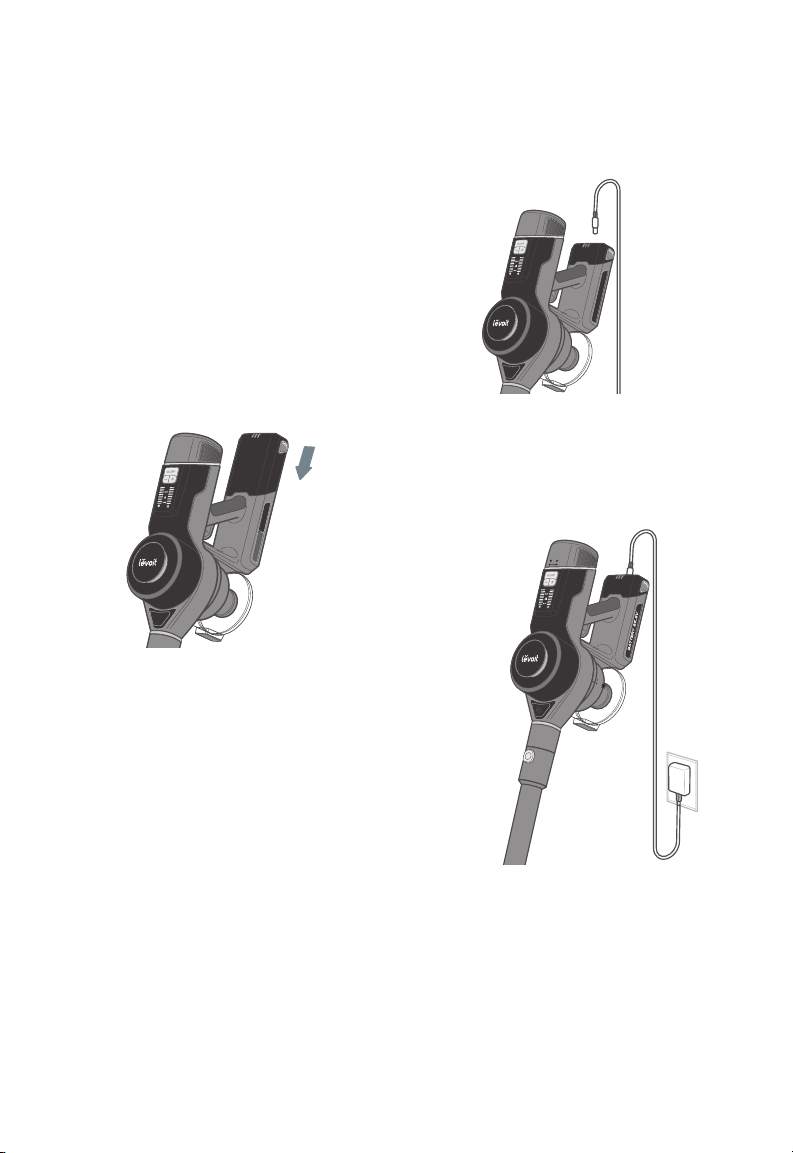
1. Turn the vacuum o. Press the Battery
Release Button and remove the battery.
2. To reinstall, slide the battery into the slot
in the vacuum body [Figure 2.1]. There
will be a clicking sound when the battery
is properly installed.
1. Insert the charger into the charging port
on the vacuum body [Figure 2.2].
Figure 2.1
Figure 2.2
Figure 2.3
Note: Make sure the vacuum is turned o
before charging. Note: Charging time is about 4–5 hours.
2. Plug the charger into an outlet. The
battery indicator lights will blink while
charging [Figure 2.3].
3. When the vacuum is fully charged, the 3
battery indicator lights will turn solid and
turn o after 1 minute.
Andere Handbücher für VortexIQ 40
1
Inhaltsverzeichnis
Andere Levoit Staubsauger Handbücher


Beliebte Staubsauger Handbücher anderer Marken

Bissell
Bissell LittleGreen Proheat 1425 Series Bedienungsanleitung

Panasonic
Panasonic MC-YL637S147-AE Bedienungsanleitung

NEFF
NEFF N17XH10 0 Series Bedienungsanleitung

LG
LG A9 Series Bedienungsanleitung

Oreck
Oreck Cordless Captura BK51700 Series Bedienungsanleitung

Kogan
Kogan KAVACROBVWA Bedienungsanleitung


