Port A Cool PACJS250 Bedienungsanleitung

PORTACOOL
JETSTREAM
OWNER’S
MANUAL
PACJS240, PACJS250,
PACJS260, PACJS270

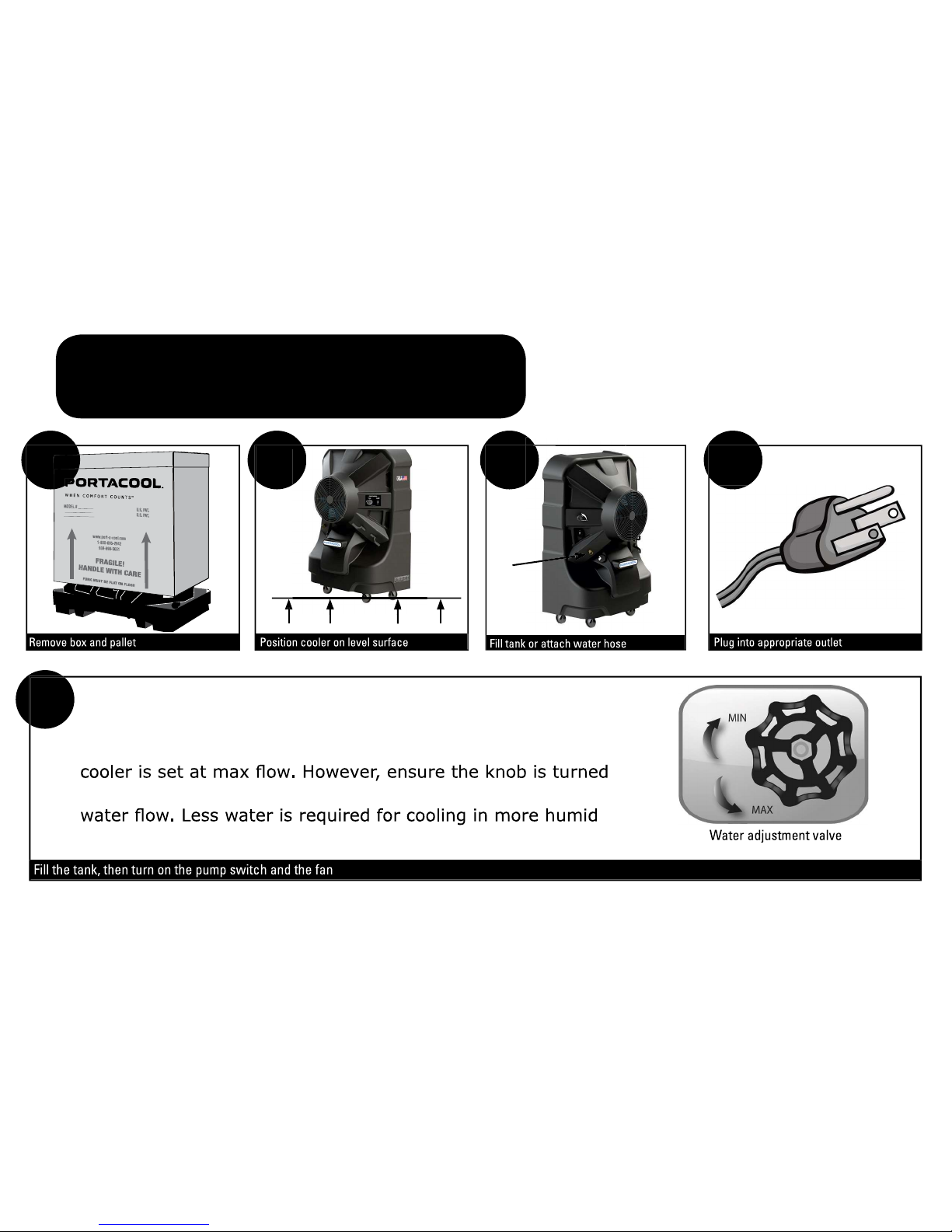
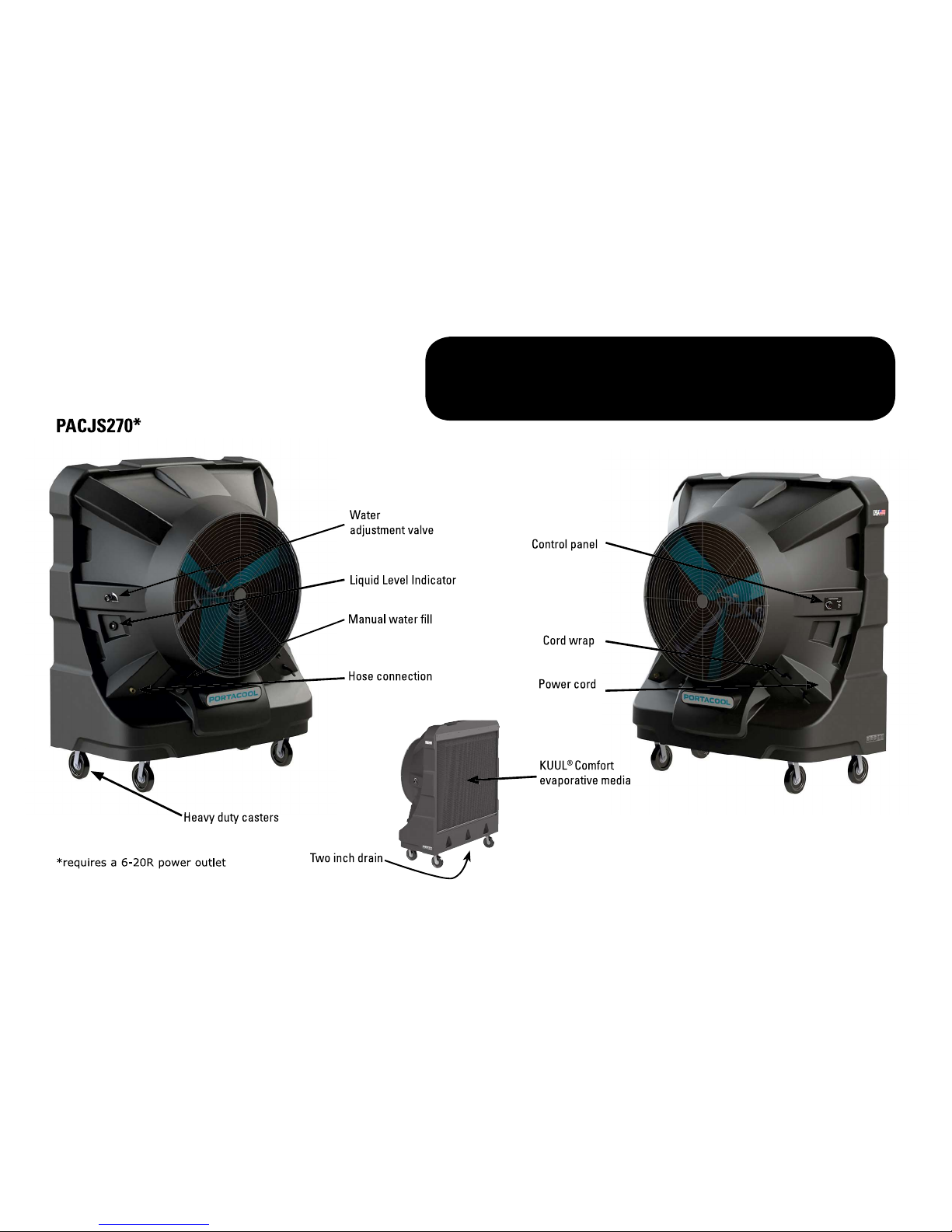
For setup, KUUL
®
evaporative media should appear wet before
starting the fan. Check the water gauge to monitor water level in
tank. The water adjustment valve on each portable evaporative
completely to the right before use. Turn to the left to increase
environments.
2 4
5
1 3
QUICK SETUP

SAFETY
OPERATION WARNINGS
SAFE OPERATION
1) Not for use by children
2) Not for use by persons with reduced physical, sensory, or mental capabilities
3) Not for use by persons who have not reviewed the owner’s manual and familiarized themselves with the operation of the cooler
• Read the cooler’s instructions, owner’s manual and labels before
operating.
• Do not operate evaporative cooler unless all media is securely
in place.
35 feet), ensure that the pump is continuously running in
order to saturate and wet KUUL® evaporative media.
• Never wash the cooler’s housing with a garden hose; water
may harm the motor or electrical system.
• Remove the plug from the electrical receptacle by pulling on
the plug and not the cord.
• Test the GFCI/GLCI receptacle or breaker monthly to ensure it
is functioning properly.
• Do not operate any cooler with a damaged cord or plug.
• If the cord or plug become damaged in any way, entire cord should
be replaced.
be made using authorized Portacool Replacement Parts.
• Do not run cord under carpeting. Do not cover cord with throw
rugs, runners or similar coverings. Arrange cord away from
• Always unplug the electric cord to the evaporative cooler
before performing inspections or repairs.
• Plug into outlet of appropriate current and voltage capacity.
• Do not step on or roll over power cord with heavy or sharp
objects.
• The use of extension cords with your cooler is not recommended.
- Use properly grounded 14 AWG or greater for PACJS240-260.
- Use properly grounded 12 AWG or greater for PACJS270.
- Extension cord must not exceed 50 feet in length; and
- Extension cord must be properly grounded.
replacement parts.
• If the cooler is damaged or malfunctions, do not continue to
operate it. Refer to the warranty, troubleshooting or FAQ
sections of this Owner’s Manual, Technical
@ .com.

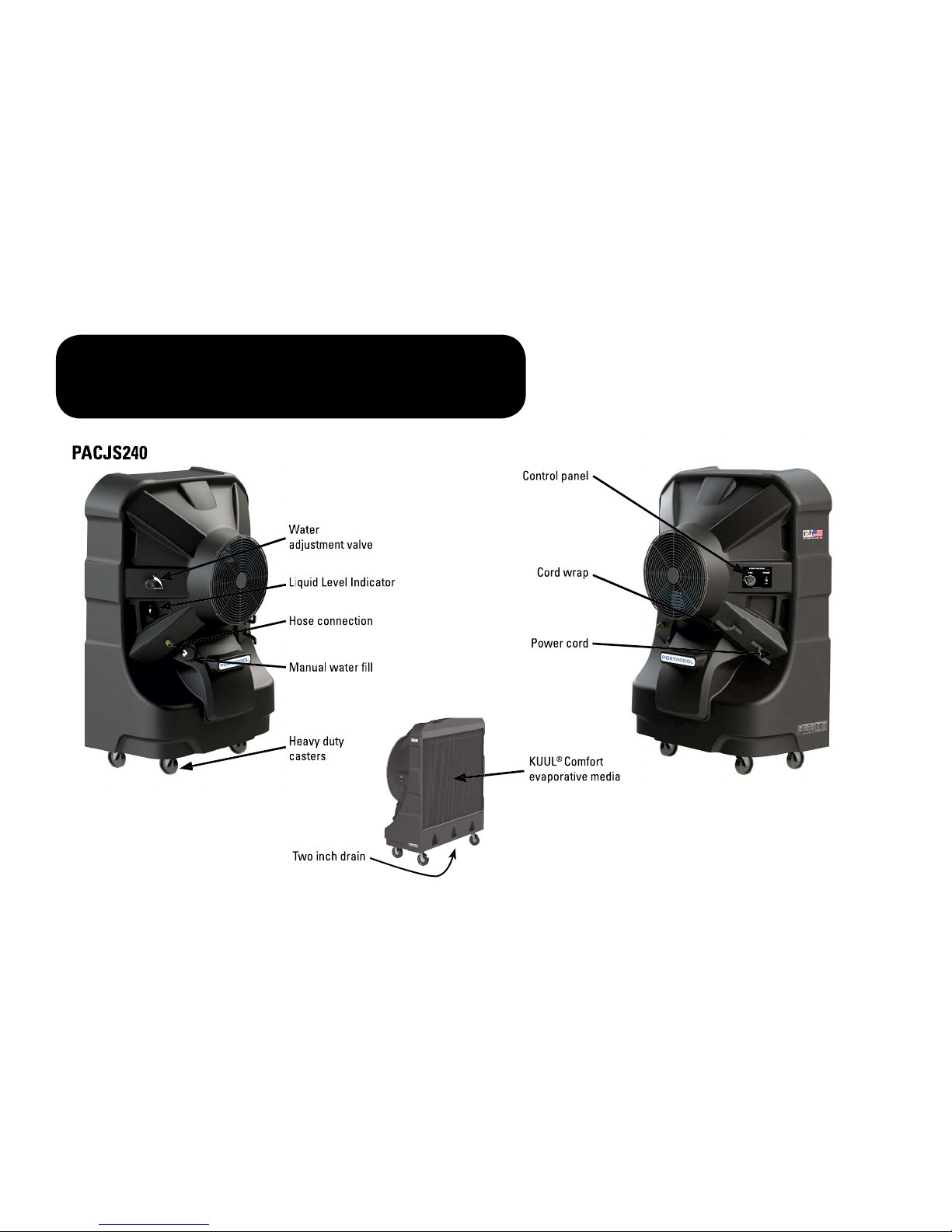
OVERVIEW

OVERVIEW

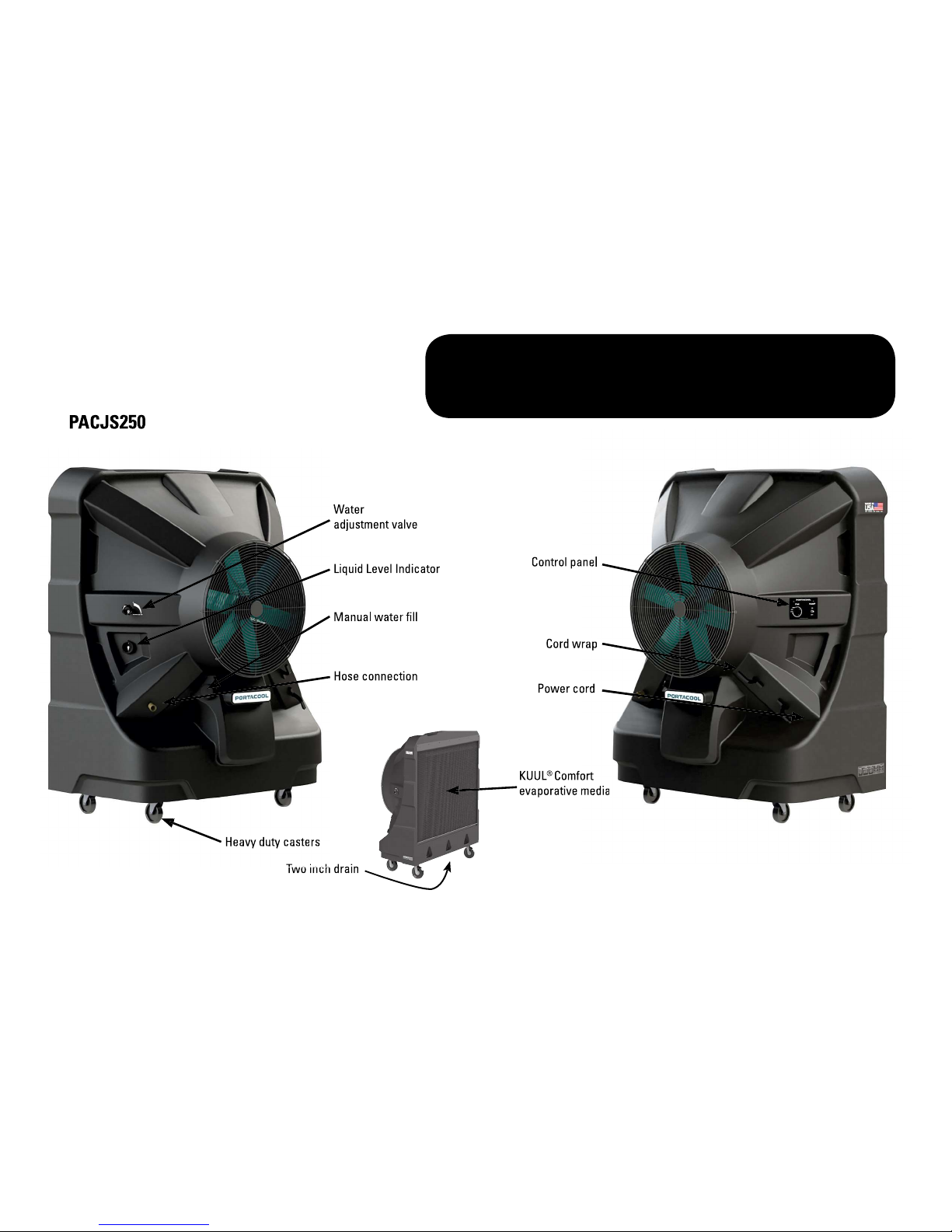
OVERVIEW

OVERVIEW

PLACEMENT
1) Make sure there is a clear, unobstructed path in front of the evaporative cooler to provide maximum airflow.
2) If the evaporative cooler is positioned on a raised platform, ensure the platform is stable, well constructed, and will not allow the
cooler to tip over and that it allows for the full weight of the evaporative cooler including a tank full of water. The cooler must be
level and in the upright position. The casters should also be locked to prevent the cooler from moving.
with media facing the wall. This allows the unrestricted flow of warm air to the KUUL
®
evaporative media side of the cooler. When
using multiple coolers in close proximity, be sure to aim each evaporative cooler so the air flows complement each other to achieve
maximum cooling capacity.
STARTING THE PUMP AND ADJUSTING THE WATER FLOW
Once the tank is full of water, moving the pump switch to the “ON” position on the control panel will turn on the pump. When initially turning on
the pump, the level in the water tank will drop suddenly and restart the flow of supply water. This is a normal condition, as the cooling media
New KUUL
®
It is important to ensure that the water flow to the media is properly adjusted when first starting the water flow in the evaporative cooler.
leave the media saturated with water, but not flooded. Media should appear wet. When properly adjusted, one or two dry streaks will appear
across surface of the KUUL
®
evaporative media.
When turning the evaporative cooler off at the end of the day or week, the pump should be turned off about 15 minutes before the fan to allow
the KUUL
®
evaporative media to dry.
STARTING THE PORTACOOL EVAPORATIVE COOLER
START UP

1)
Keep the evaporative cooler clean to ensure peak operating performance.
DAILY MAINTENANCE
The pump should be turned off approximately
15 minutes
before the fan is turned off. This will allow the KUUL
®
evaporative media
to dry out and extend the life of the media. This also helps control the growth of mildew, mold, bacteria, and other odor-causing
elements.
WEEKLY MAINTENANCE
The cooler should be shut down and the tank should be drained once a week. Closing the water adjustment valve and removing
the drain plug will accomplish this. Once the tank is drained and the power disconnected, the KUUL
®
evaporative media may be
removed to allow cleaning of the tank. Dust may collect in the tank over time. Replace media in correct airflow direction, referring
to the label on the media.
STORAGE
1) Drain all water from the tank and wipe clean, ensuring the KUUL
®
evaporative media and tank are completely dry.
3) Cover the evaporative cooler completely to prevent dust build-up and store in a dry area. This also helps to prevent damage to
the KUUL
®
evaporative media. Optional dust covers are available from your distributor or at www.portacoolparts.com.
MAINTENANCE
additional parts can be found at www.wholesale-pricing.com

TROUBLESHOOT
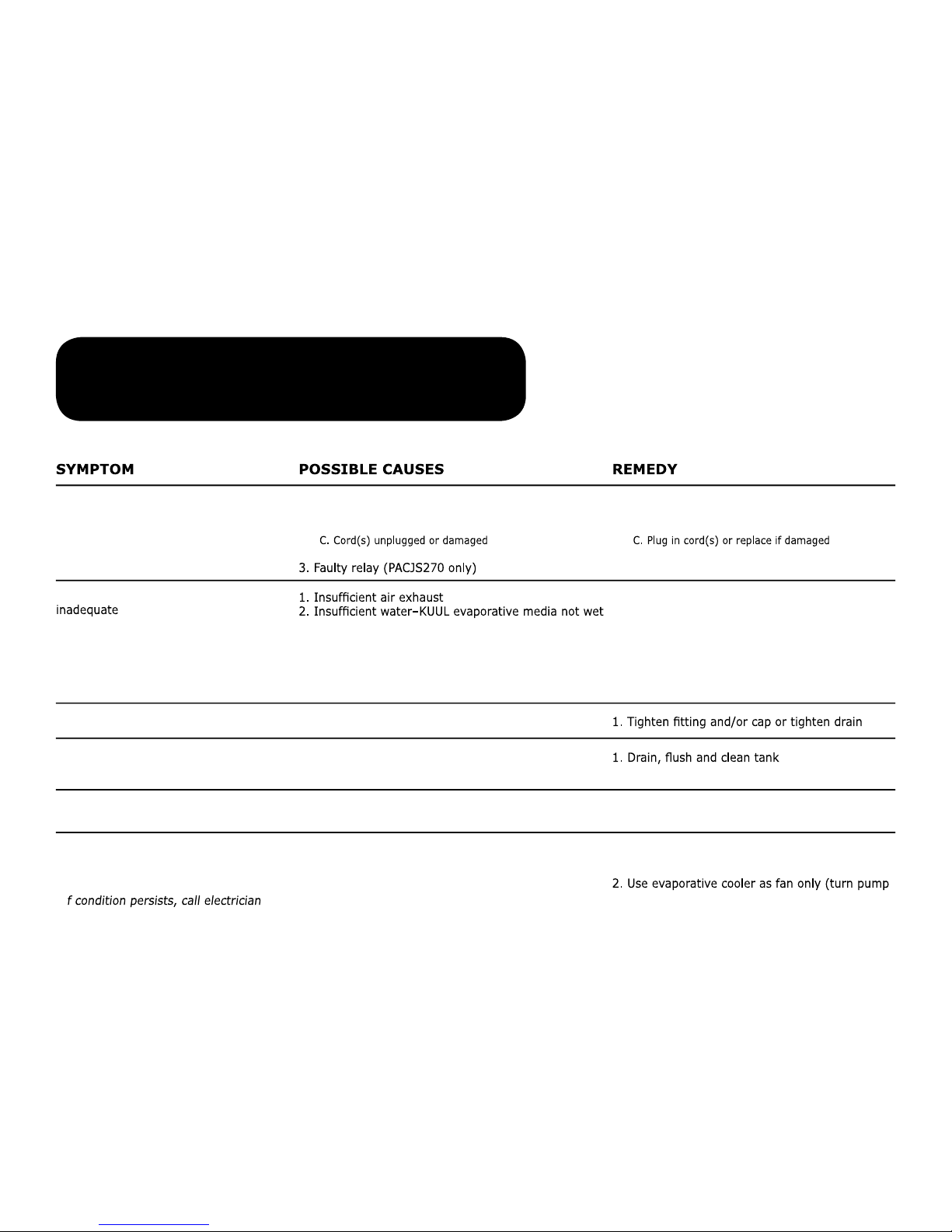
1. Check power
A. Reset breaker*
B. Reset GFCI*
2. Replace motor
3. Replace relay
1. Open windows or doors
2. Check water distribution system
A. Clean or replace evaporative media
B. Check water level
C. Make sure evap cooler is level, clean spray bar
D. Clean or replace pump
E. Check for leaks and correct
2. Replace media
3. Turn on pump before starting fan
1. Check and tighten where needed
2. Inspect and adjust, or replace fan blade
1. Make sure media is properly positioned in the
frames and evaporative cooler is level
off) or discontinue use until outdoor humidity drops
3. Tighten connection or replace hose
1. No electrical power to cooler
A. Circuit breaker tripped
B. GFCI tripped
2. Motor overheated and/or frozen
A. KUUL evaporative media plugged
B. Dry streaks on KUUL evaporative media
C. Large dry spots on KUUL evaporative media
D. Pump not working
E. Loose water connections
1. Drain bushing/cap not tight
1. Stale or stagnant water in tank
2. Media mildewed or clogged
3. Media not wetted before cooler is turned on
1. Loose parts
2. Fan blade rubbing shroud
1. Too much water delivered to evaporative media
2. Outdoor humidity is too high or it is raining
3. Leaking hose
Evaporative cooler fails to start or
deliver air
Evaporative cooler starts but air delivery
Water draining from evaporative cooler
Musty or unpleasant odor
Knocking, shaking, or rattling sounds
Water droplets in the discharge air
stream
Turn off all power to the cooler before attempting to troubleshoot any of the following symptoms. For problems not
listed, please contact customer support.
*I
Dieses Handbuch passt für folgende Modelle
7
Inhaltsverzeichnis
Andere Port A Cool Zubehör Handbücher