sparklike Handheld Bedienungsanleitung

1SPARKLIKE HANDHELD — INSTRUCTIONS MANUAL
SPARKLIKE HANDHELD
INSTRUCTIONS MANUAL
GAS FILL ANALYZER FOR
WINDOWS AND DOOR

2SPARKLIKE HANDHELD — INSTRUCTIONS MANUAL
Contents
WARNINGS.................................................................3
2 Delivered with Sparklike Handheld ........................................ 4
3 How does it work? ....................................................... 4
4 How to use Sparklike Handheld ............................................5
4.1 Startingupforthersttime ...........................................5
4.2 How to use Sparklike Handheld encoder button..........................5
5 How to charge the battery................................................ 6
6 Using Sparklike Handheld LCD Screen .................................................7
6.1 Start Up .............................................................7
6.2 Loggingandstoringmeasurements. ....................................7
6.3 Howtocreatealogle................................................8
6.4 Howtoerasethelastloggedmeasurement .............................8
6.5 HowtoturnofftheLOGmode ........................................ 9
6.6 Display contrast ..................................................... 9
6.7 Gas type, Argon or Krypton ..........................................10
6.8 Sparklike Handheld only calibrated for Argon...........................10
6.9 ChangecalibrationmodetoKrypton ..................................10
6.10ChangecalibrationmodebacktoArgon ............................... 11
6.11 Enabling the PC Connection. .......................................... 11
6.12Settingtimeanddate ................................................12
6.13 Sensor test..........................................................12
6.14Informationdisplay. ..................................................12
7 Thingstoconsiderwhentakingameasurement.............................13
7.1 High voltage ........................................................13
7.2 Light ...............................................................13
7.3 Inbrief,factorstoconsiderwhenmeasuring............................14
8 Howtoperformameasurement...........................................14
8.1 Restrictions .........................................................16
9 Troubleshooting Sparklike Handheld.......................................17
9.1 Errorswhenmeasuring ...............................................17
10 How to connect to a PC ..................................................18
11 How to install Sparklike Handheld PC software (Win XP).....................19
11.1 Installing the USB <-> Serial Converter. ................................19
12 Installing the PC software ............................................... 24
13 HowtondandsettherightCOMportfromthePC. ....................... 28
14 How to use Sparklike Handheld PC software...............................30
15 Troubleshooting the PC software. ........................................ 34
16 Registering as a Sparklike device user .................................... 35
17 Annual Calibration of Sparklike Handheld with Sparklike CARE . . . . . . . . . . . . . . 36
18 Checking the calibration................................................. 37
18.1 Calibrationcheckwithpre-lledIGunits.............................. 37
18.2Checkingthecalibrationwithpremixedgas. .......................... 39
19 AppendixA:SparklikeArgonCalibration ..................................40
19.1 Accuracyofthedevice: .............................................40
20AppendixB:SparklikeKryptonCalibration .................................41
20.1KryptonAccuracyLimits.............................................41
22AppendixC:Technicalspecications ..................................... 42
23AppendixD:Assuranceofconformity .................................... 43
1

3SPARKLIKE HANDHELD — INSTRUCTIONS MANUAL
WARNINGS!
• Theinstrumentuseshighvoltage.TheinstrumentshouldNEVERbe
usednearcomputersnorothersensitiveelectronicdevices.
• Personswithheartconditionsorwhousepacemakersshouldnotuse
thisinstrument.
• Thehighvoltagedischargeshouldneverbedirectedathumansorat
animalseitherdirectlyorthroughaconductivematerialsuchaswires
ormetalstructures.
• SparklikeHandhelddeviceisdesignedtomeasureONLYinertgas
combinationssuchasArgon,KryptoncombinedwithnaturalAir
(78%Nitrogen,20,9%Oxygen,0,9%Argon+<1%othernaturalAir
components)locatedwithininsulatingglassunits.
• SparklikeHandheldshouldNEVERbeusedtomeasureanyammable
substancesnorbeusedinanyammableenvironment.Alsomakesure
theinsulatingglassunitdoesnotcontainanyammablesubstances.
(Asanexampleofsuchsubstances,Isopropanol,Alcohol,Acentone,
Xylen, Thinner).
• Theinstrumentshouldneverbeusedinwetorinhumidconditions.
• Neverusetheinstrumentwhilestandingonunsteadysurfaces.
• Theinstrumentisaprecisionmeasuringinstrumentandshouldbe
handled accordingly. HANDLE WITH CARE!
• Make sure that the front optics of the device is not scratched nor
contaminatedwithdirt.
• Donotcleanthefrontoptics.Contactmanufacturerbeforeinterfering
withthefrontopticsinanyway.Thecalibrationsmightbevoidincase
of interfering.
• Thedeviceisnotwaterproof.Donotcleannorletthedevicecomein
contactwithliquidsofanyform.Theoutershellofthedevicemightbe
cleanedwithaslightlymoisttissue(notoptics).Donotuseanykindof
cleaningsubstancesotherthanthosesuggestedbythemanufacturer.
• Alwaysturnoffthepowerwheninstrumentisnotinuse.
• Keepngersandotherbodypartsclearofthehighvoltagearea
when in use. Do not keep the device connected to your PC nor other
electronicdeviceswhileperformingmeasurements.
• Donotallowthebatterytodischargecompletelybeforerecharging.
• Do not open Sparklike Handheld casing. In such case calibration is void
and no safety guarantee can be granted.
• Donotpenetratethecasingwithanymetallicobjectnorotherobjects.
• Do not use any other battery charger than the charger provided by the
manufacturer.
• Donotchargethebatterybyanyothermeansthanwiththecharger
provided.
• Do not use any other power source for Sparklike Handheld than the
battery provided.

4SPARKLIKE HANDHELD — INSTRUCTIONS MANUAL
1. Sparklike Handheld Device
2. Neck strap
3. CD with software and
instructions
4. Calibration data and fast
instructions
5. Battery
6. USB Cable
7. Battery charger and power cord
8. Carry case
9. Protective cap
3 How does it work?
A high voltage spark (1) is ignited
inside the IG unit (A). This high
voltage spark causes the argon
atomtoemitlighttoaspectrometer
(2),whichmeasuresthelight.A
microprocessor(3)interpretsthe
informationofthespectrometerand
calculates an argon percent, which it
outputs to a display (4).
2 Delivered with Sparklike Handheld
(1)
A
(2)
(3)
(4)

5SPARKLIKE HANDHELD — INSTRUCTIONS MANUAL
1. Open the battery hatch 2. Insert the battery
3. Connect the battery
cable to the socket
4. Power the device on us-
ing the ON/Off switch
4 How to Sparklike Handheld
4.1 Startingupforthersttime
5. Device settings will be
displayed on the screen.
6. The device is now ready
for use.
4.2 How to use Sparklike Handheld encoder button
Pressdownto:
1. Enter MENU
2.Conrmaselection
Turnto:
1. Scroll in the MENU
2.Namealogle
Note!
Read all
warnings before
the device is taken
in use.

6SPARKLIKE HANDHELD — INSTRUCTIONS MANUAL
5 How to charge the battery
SparklikeHandheldusesaLi-ionbatteryasmainpowersupply.Thebatterycan
only be charged when connected to Sparklike Handheld. The device is also provid-
ed with a integrated back up battery that enables Sparklike Handheld to contain all
datastoredandmaintainingacurrenttimeanddateevenifthemainbatteryruns
out.SparklikeHandheldbatteryisdesignedsothatitwillbepossibletoperform
measurementsforapproximately8hoursbeforethebatteryrunsout.Thisisnatu-
rallydependingonthefrequencyofuse.Thechargingtimeforanemptybatteryis
approximately2hours.
1. Connect the provided charger to
Sparklike Handheld.
2. A red light on the charger
modulewilllightwhenthebatteryis
being charged. See picture
3. The light will turn green when the
battery is fully charged.
4.Chargingtimeisapproximately
2h hours.
5. CHARGING ... Will be displayed
when the battery is charged.
NOTE!
UseONLYthebatterychargerprovidedbythemanufacturer.
Ifanyotherchargerisused,itmaycausethebatteryto
EXPLODE.
NOTE!
Thecharginglevelmustbelessthan16.2V(canbeeseenon
the screen) for the charger to start the charging process.
NOTE!
Li-ionbatterieshasamuchshorterlifecyclethanexpectedfor
thedeviceitselfanditmightbethattheuserhastoreplace
thebatteryaftersometime.

7SPARKLIKE HANDHELD — INSTRUCTIONS MANUAL
6 Using Sparklike Handheld LCD Screen
6.1 Start Up
1. When the device is
initially powered on, Spark-
like Handheld will run a
short, self-diagnosis.
2. Once the self-diagnosis
hasbeencompleted,the
display will show the de-
viceinformationscreen.
3.Theinformationscreen
shows:
• Revision of the software
• Last calibration date
•Currenttime
• Battery charge status
4. Device is now ready to
use
5. When the button is
pressedforthersttime
afterstartup,themeasure-
mentresultwillshow.
6.Thecurrenttimeand
battery charge status can
be seen on the screen.
7. The LCD display will also
indicateifthemeasure-
menthasnotbeenre-
cordedtothelogmemory.
(See, “How to create a log
le”)
6.2 Loggingandstoringmeasurements.
SparklikeHandheldhastheabilitytolog(store)approximately
1900measurements.
Loggingthedataenables:
a.Tostoreeachmeasurementsetasaseparatelogle
b.Tostoreanumberofdifferentloglescontainingseveralmeasurements.
(Oneloglecancontainseveralmeasurements)
c.Tomeasurealongtheday,reviewandeditthedataatalaterstage
d.Tonameindividuallogles(onlynumberscanbeused)
Start Up

8 SPARKLIKE HANDHELD — INSTRUCTIONS MANUAL
1.Fromthemainmenu,
scroll by turning the en-
coder button to the LOG
ON/OFFmenu
2. Pressing down on the
encoderbuttonwillmake
the selection and the
display will show the
DATALOGGINGmenu.
3. When a new log is cre-
ated, the DATALOGGING
menuwillautomatically
advancetheloglenum-
ber by one.
4. Turning the encoder
button will increase or
decreasethelognumber.
Press down on the encoder
buttontoconrmaselec-
tion.
5.“LOGGING,”followed
bythelognumber,willbe
displayed under a reading
when the logging feature is
enabled.
6.3 Howtocreatealogle
NOTE!Therecanbeseverallogleswiththesamename.
6.4 Howtoerasethelastloggedmeasurement
Whenthelogmodeisonandameasurementhasbeentakenbuttheoperatorfeels
thatthemeasurementwasanerrormeasurement,itispossibletoerasethismea-
surement.ThisisdonetopreventfaultyloglesonthePC.
1.Themeasurementisnot
satisfactory.
2. Press and hold the encoder
button for at least 2 seconds.
3. The log value will be deleted
permanently.

9SPARKLIKE HANDHELD — INSTRUCTIONS MANUAL
6.5 HowtoturnofftheLOGmode
1.Fromthemainmenu,
scroll by turning the en-
coder button to the LOG
ON/OFFmenu.
2. Pressing down on the
encoderbuttonwillmake
the selection and the
display will show, “DATA-
LOGGINGOFF”.
NOTE!WhenSparklikeHandheldisconnectedtothePCandthelogleshave
beenretrieved,thelogmemorywillbedeletedfromSparklikeHandhelddevice.
UsingSparklikeHandheldsoftwareistheonlywaytocompletelyemptythe
memory.Thisshouldbedoneperiodicallytopreventthememoryfromexceeding
it’smaximumstoragecapacity.
1.Fromthemainmenu
scroll, by turning the
encoder button, to the
DISPLAYMODEmenu.
2. Select this by pressing
the encoder button once.
3. Turn the encoder but-
tontoadjustthecontrast
of the screen to desired
level.
4. Press down the encoder
toconrmchoiceandexit
displaymode.
6.6 Display contrast
4. With datalogging
turnedoff,“NOTLOGGED”
will be displayed after
everymeasurement.
5.Tocreateanewlogle
withanewname,repeat
theprocedureexplained
in 11.

10 SPARKLIKE HANDHELD — INSTRUCTIONS MANUAL
6.7 Gas type, Argon or Krypton
Sparklike Handheld can be calibrated for both Argon and Krypton. The calibration
isdonebythemanufacturerandtheuserhasthereforetoinformthemanufacturer
aboutthiswhenorderingadevice.ThedevicecomesstandardwithaArgoncali-
bration.
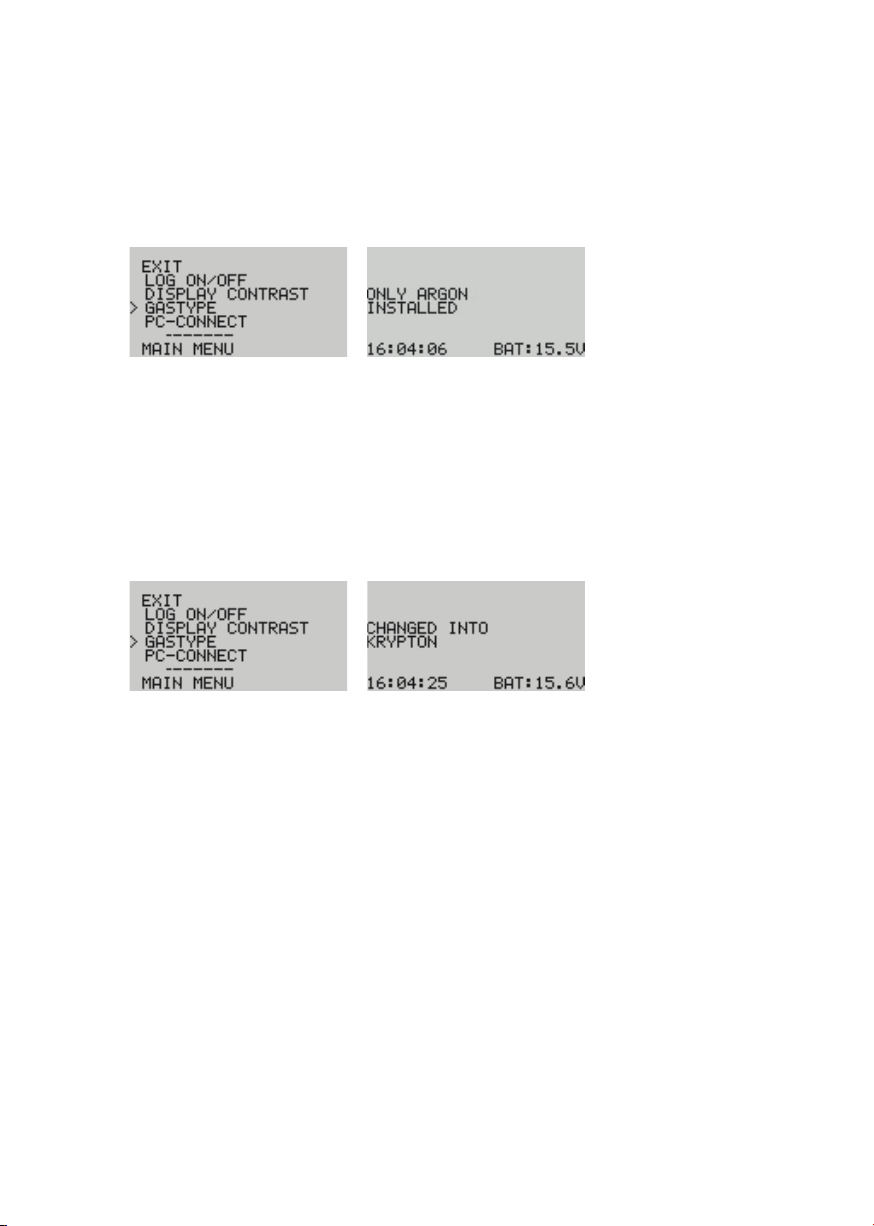
6.8 Sparklike Handheld only calibrated for Argon.
1.Fromthemainmenu
scroll, by turning the
encoder button to the
GASTYPEmenu
2. Select by pressing the
encoder button once.
3. A screen will display that
only an Argon calibration
is installed.
4. The display will return to
mainmenu.
6.9 ChangecalibrationmodetoKrypton
1.Fromthemainmenu
scroll, by turning the
encoder button to the
GASTYPEmenu
2. Select by pressing the
encoder button once.
3. A screen will display that
the calibration has been
changed to krypton.
4.Whenmeasuringthe
measurementheaderwill
beKr:
Kr 94,2%
indicatingthatthemea-
surementisinKrypton
mode.
Inhaltsverzeichnis
Andere sparklike Messgerät Handbücher

sparklike
sparklike GASGLASS HANDHELD V2 Bedienungsanleitung

sparklike
sparklike GasGlass Bedienungsanleitung

sparklike
sparklike Handheld 3.0 Bedienungsanleitung

sparklike
sparklike Laser Portable 2.1 Bedienungsanleitung

sparklike
sparklike Laser Portable 2.1 Bedienungsanleitung

sparklike
sparklike Laser Portable 2.0 Bedienungsanleitung

sparklike
sparklike Handheld 3.0 Bedienungsanleitung

sparklike
sparklike Handheld 3.0 Bedienungsanleitung

sparklike
sparklike Laser Portable 2.0 Bedienungsanleitung

sparklike
sparklike Handheld 3.0 Bedienungsanleitung