
Suunto Tank POD Bedienungsanleitung

SUUNTO TANK POD
USER GUIDE
2021-01-19

1. Safety................................................................................................................................................................3
2. Important notices..........................................................................................................................................7
3. Getting started.............................................................................................................................................. 8
3.1. Installing Type A air restrictor.........................................................................................................8
3.2. Installing Type B air restrictor........................................................................................................8
3.3. Tank POD alignment........................................................................................................................9
3.4. Pairing Suunto Tank POD............................................................................................................. 10
3.5. Unpairing Suunto Tank POD........................................................................................................12
3.6. Product compatibility..................................................................................................................... 14
3.7. Pre-checks.........................................................................................................................................14
4. Care and support........................................................................................................................................ 16
4.1. Handling guidelines........................................................................................................................ 16
4.2. Getting support............................................................................................................................... 16
4.3. Disposal and recycling.................................................................................................................. 16
5. Reference......................................................................................................................................................17
5.1. Technical specifications................................................................................................................. 17
5.2. Compliance...................................................................................................................................... 18
5.3. Trademark.........................................................................................................................................18
5.4. Patent notice....................................................................................................................................18
5.5. International Limited Warranty.................................................................................................... 18
5.6. Copyright.......................................................................................................................................... 19
Suunto Tank POD
2

1. Safety
Types of safety precautions
WARNING: - is used in connection with a procedure or situation that may result in
serious injury or death.
CAUTION: - is used in connection with a procedure or situation that will result in
damage to the product.
NOTE: - is used to emphasize important information.
TIP: - is used for extra tips on how to utilize the features and functions of the device.
WARNING: All computers experience failures. It is possible that this device may suddenly
fail to provide accurate information during your dive. Always use a backup dive device and
only dive with a buddy. Only divers trained in proper use of diving equipment should use this
dive device! YOU MUST READ the leaflet and user guide for your dive computer before use.
Failure to do so may lead to improper use, serious injury or death.
NOTE: Make sure your Suunto dive computer always has the latest software with
updates and improvements. Check before every dive trip from www.suunto.com/support, if
Suunto has released a new software update to your device. When it is available, you must
install it before diving. Updates are made available to improve your user experience and are
part of Suunto´s philosophy of continuous product development and improvement.
Before you dive
Make sure that you fully understand the use, displays and limitations of your dive instruments.
If you have any questions about this manual or dive instrument, contact your Suunto dealer
before diving. Always remember that YOU ARE RESPONSIBLE FOR YOUR OWN SAFETY!
Before leaving on a dive trip, inspect your dive computer thoroughly to make sure everything
is functioning properly.
At the dive site, perform your manual pre-checks on each device before entering the water.
Dive Computer Pre-check
Ensure that:
1. Suunto Tank POD is in the correct dive mode and the display is working as expected.
2. Altitude setting is correct.
3. Personal setting is correct.
4. Deep stops are set correctly.
5. Unit system is correct.
6. Compass is calibrated. Start the calibration manually in the menu under General »
Compass » Calibrate to also confirm that the dive computer audible sounds are working.
After successful calibration, you should hear a sound.
7. The battery is fully charged.
Suunto Tank POD
3

8. All primary and backup gauges for time, pressure and depth, both digital and mechanical,
are showing correct, consistent readings.
9. If Suunto Tank PODs are in use, check that Suunto Tank POD is properly installed and the
tank valve is open. Please see the Suunto Tank POD User Guide for detailed information
and proper use.
10. If Suunto Tank PODs are in use, check that connections are working and gas selections
are correct.
NOTE: For Suunto Tank POD related information please see the instructions provided
with the product.
Safety precautions
WARNING: ONLY TRAINED DIVERS SHOULD USE A DIVE COMPUTER! Insucient
training for any kind of diving, including freediving, may cause a diver to commit errors, such
as incorrect use of gas mixtures or improper decompression, that may lead to serious injury
or death.
WARNING: You must read the printed quick guide and online user guide for your dive
computer. Failure to do so may lead to improper use, serious injury or death.
WARNING: THERE IS ALWAYS A RISK OF DECOMPRESSION SICKNESS (DCS) FOR ANY
DIVE PROFILE EVEN IF YOU FOLLOW THE DIVE PLAN PRESCRIBED BY DIVE TABLES OR A
DIVE COMPUTER. NO PROCEDURE, DIVE COMPUTER OR DIVE TABLE WILL PREVENT THE
POSSIBILITY OF DCS OR OXYGEN TOXICITY! An individual’s physiological makeup can vary
from day to day. The dive computer cannot account for these variations. You are strongly
advised to remain well within the exposure limits provided by the instrument to minimize the
risk of DCS. As an added measure of safety, you should consult a physician regarding your
fitness before diving.
WARNING: YOU ARE ADVISED TO AVOID FLYING ANY TIME THE COMPUTER COUNTS
DOWN THE NO-FLY TIME. ALWAYS ACTIVATE THE COMPUTER TO CHECK THE REMAINING
NO-FLY TIME PRIOR TO FLYING! Flying or traveling to a higher altitude within the no-fly time
can greatly increase the risk of DCS. Review the recommendations given by Divers Alert
Network (DAN). There can never be a flying-after-diving rule that is guaranteed to completely
prevent decompression sickness!
WARNING: If you have a pacemaker, we recommend you do not scuba dive. Scuba
diving creates physical stresses on the body which may not be suitable for pacemakers.
WARNING: If you have a pacemaker, consult a doctor before using this device. The
inductive frequency used by the device may interfere with pacemakers.
WARNING: Allergic reactions or skin irritations may occur when product is in contact with
skin, even though our products comply with industry standards. In such event, stop use
immediately and consult a doctor.
Suunto Tank POD
4

WARNING: Not for professional use! Suunto dive computers are intended for recreational
use only. The demands of commercial or professional diving may expose the diver to depths
and conditions that tend to increase the risk of decompression sickness (DCS). Therefore,
Suunto strongly recommends that the device not be used for any commercial or professional
diving activities.
WARNING: USE BACKUP INSTRUMENTS! Ensure that you use backup instrumentation,
including a depth gauge, submersible pressure gauge, timer or watch, and have access to
decompression tables whenever diving with a dive computer.
WARNING: For safety reasons, you should never dive alone. Dive with a designated
buddy. You should also stay with others for an extended time after a dive as the onset of
possible DCS may be delayed or triggered by surface activities.
WARNING: PERFORM PRE-CHECKS! Always check that your dive computer is functioning
properly and has the correct settings before diving. Check that the display is working, the
battery level is OK, tank pressure is correct, and so forth.
WARNING: Check your dive computer regularly during a dive. If you believe or conclude
that there is any problem with any computer function, abort the dive immediately and safely
return to the surface. Call Suunto Customer Support and return your computer to an
authorized Suunto Service Center for inspection.
WARNING: THE DIVE COMPUTER SHOULD NEVER BE TRADED OR SHARED BETWEEN
USERS WHILE IT IS IN OPERATION! Its information will not apply to someone who has not
been wearing it throughout a dive, or sequence of repetitive dives. Its dive profiles must
match that of the user. If it is left on the surface during any dive, the dive computer will give
inaccurate information for subsequent dives. No dive computer can take into account dives
made without the computer. Thus, any diving activity up to four days prior to initial use of the
computer may cause misleading information and must be avoided.
WARNING: DO NOT EXPOSE ANY PART OF YOUR DIVE COMPUTER TO ANY GAS MIX
CONTAINING MORE THAN 40% OXYGEN! Enriched air with greater oxygen content presents
a risk of fire or explosion and serious injury or death.
WARNING: DO NOT DIVE WITH A GAS IF YOU HAVE NOT PERSONALLY VERIFIED ITS
CONTENTS AND ENTERED THE ANALYZED VALUE INTO YOUR DIVE COMPUTER! Failure to
verify tank contents and enter the appropriate gas values where applicable into your dive
computer will result in incorrect dive planning information.
WARNING: Using a dive planner software such as in Suunto DM5 is not a substitute for
proper dive training. Diving with mixed gases has dangers that are not familiar to divers
diving with air. To dive with Triox, Heliox and Nitrox or all of them, divers must have
specialized training for the type of diving they are doing.
WARNING: Do not use Suunto USB Cable in areas where flammable gases are present.
Doing so may cause an explosion.
Suunto Tank POD
5

WARNING: Do not disassemble or remodel Suunto USB Cable in any way. Doing so may
cause an electric shock or fire.
WARNING: Do not use Suunto USB cable if cable or parts are damaged.
WARNING: You must only charge your device using USB adapters that comply with the
IEC 60950-1 standard for limited power supply. Non-compliant adapters are a fire hazard and
a risk to personal injury and might damage your Suunto device.
CAUTION: DO NOT allow the connector pins of the USB cable to touch any conductive
surface. This may short circuit the cable, making it unusable.
Emergency ascents
In the unlikely event that the dive computer malfunctions during a dive, follow the emergency
procedures provided by your certified dive training agency to immediately and safely ascend.
Suunto Tank POD
6

2. Important notices
For your safety, use the Suunto Tank POD with the provided Suunto Flow Restrictor. The
restrictor should only be removed for cleaning or changing scuba gear. The restrictor must be
re-installed before using Suunto Tank POD again.
Suunto recommends that the installation or removal of Suunto Tank POD is done by a Suunto
authorized dealer or trained dive expert. Improper tool use and over tightening could damage
scuba equipment.
Ensure there are no other people in close proximity when you pressurize scuba gear.
If Suunto Tank POD does not connect to your dive computer, you must uninstall the Tank
POD. Do not leave a non-functioning Tank POD attached to your scuba gear. Bring the non-
functioning unit to your nearest authorized Suunto dive dealer for inspection.
This product can be used together with Suunto EON Steel, EON Core, and D5 for wireless
transmission of tank pressure to the dive computer. One or more Tank PODs can be paired
with the dive computer for multi-gas diving.
Suunto Tank POD is intended for use with compressed air only. Do not use it with any other
type of scuba diving. The compressed air supply must comply with EU standard EN12021:2014
requirements.
This product may only be installed to scuba gear that complies with the air supply
requirements of standard EN12021 and the Personal Protective Equipment requirements of
standard EN250.
Suunto Tank POD
7
3. Getting started
To set up your Suunto Tank POD, make sure you use the proper air restrictor, pair your Tank
POD, aligning it with your dive computer and make the appropriate settings in your dive
computer for using gases. Follow the instructions in this user guide for the best results.
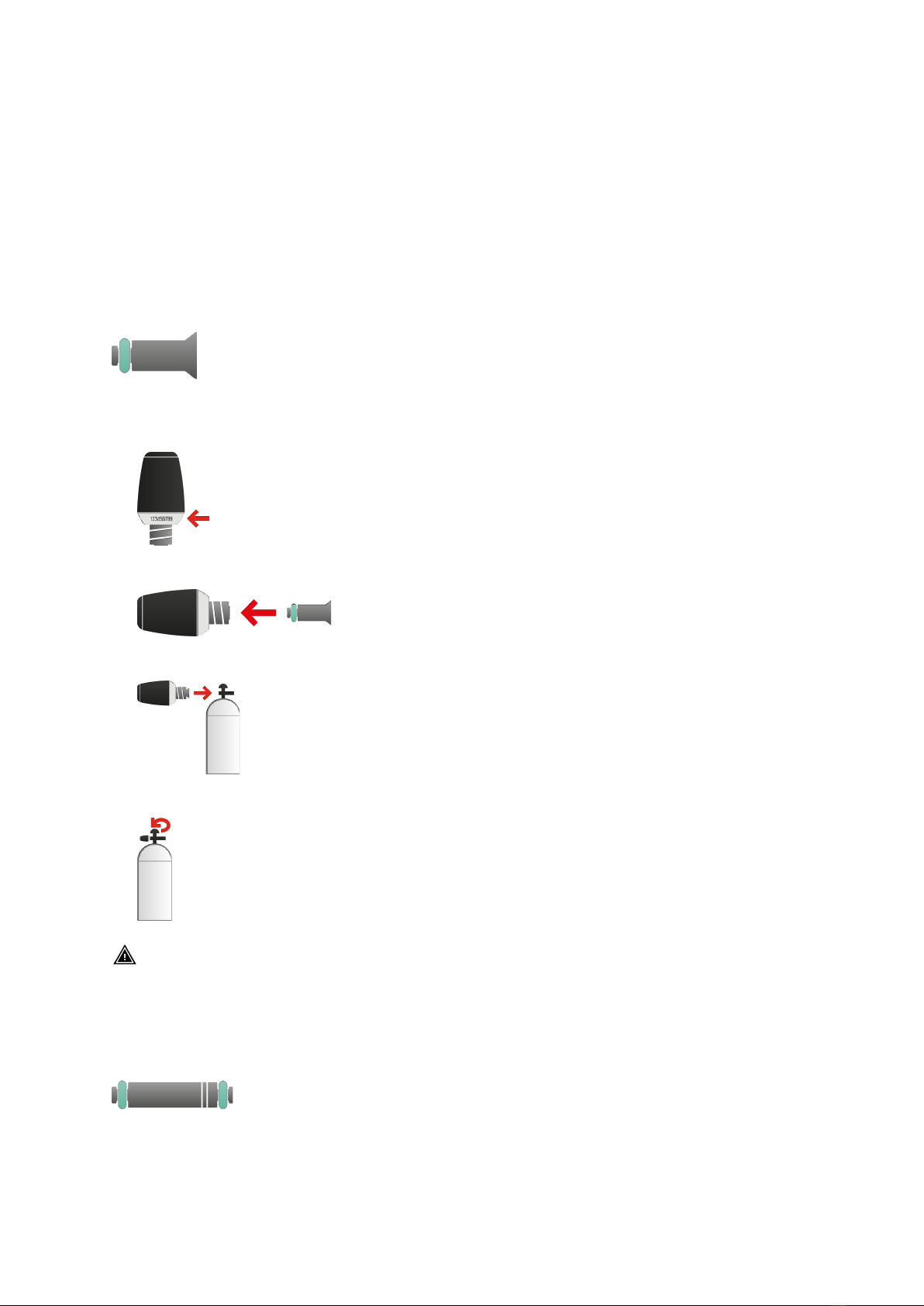
3.1. Installing Type A air restrictor
Type A air restrictor:
To install Suunto Tank POD directly to a first-stage high pressure port:
1. Write down the serial number on the metal base of the Tank POD (for pairing).
2. Insert the Type A flow restrictor into the Tank POD.
3. Attach the Tank POD to the first-stage high pressure port.
4. Slowly and steadily open the pressure valve. Look away as your gear is pressurized.
WARNING: The battery level indication shown when pairing the Tank POD is an
approximation only. The POD battery may deplete faster than the indication suggests.
3.2. Installing Type B air restrictor
Type B air restrictor:
To install Suunto Tank POD to high pressure hose extension to first-stage high pressure port:
1. Write down the serial number on the metal base of the Tank POD (for pairing).
Suunto Tank POD
8
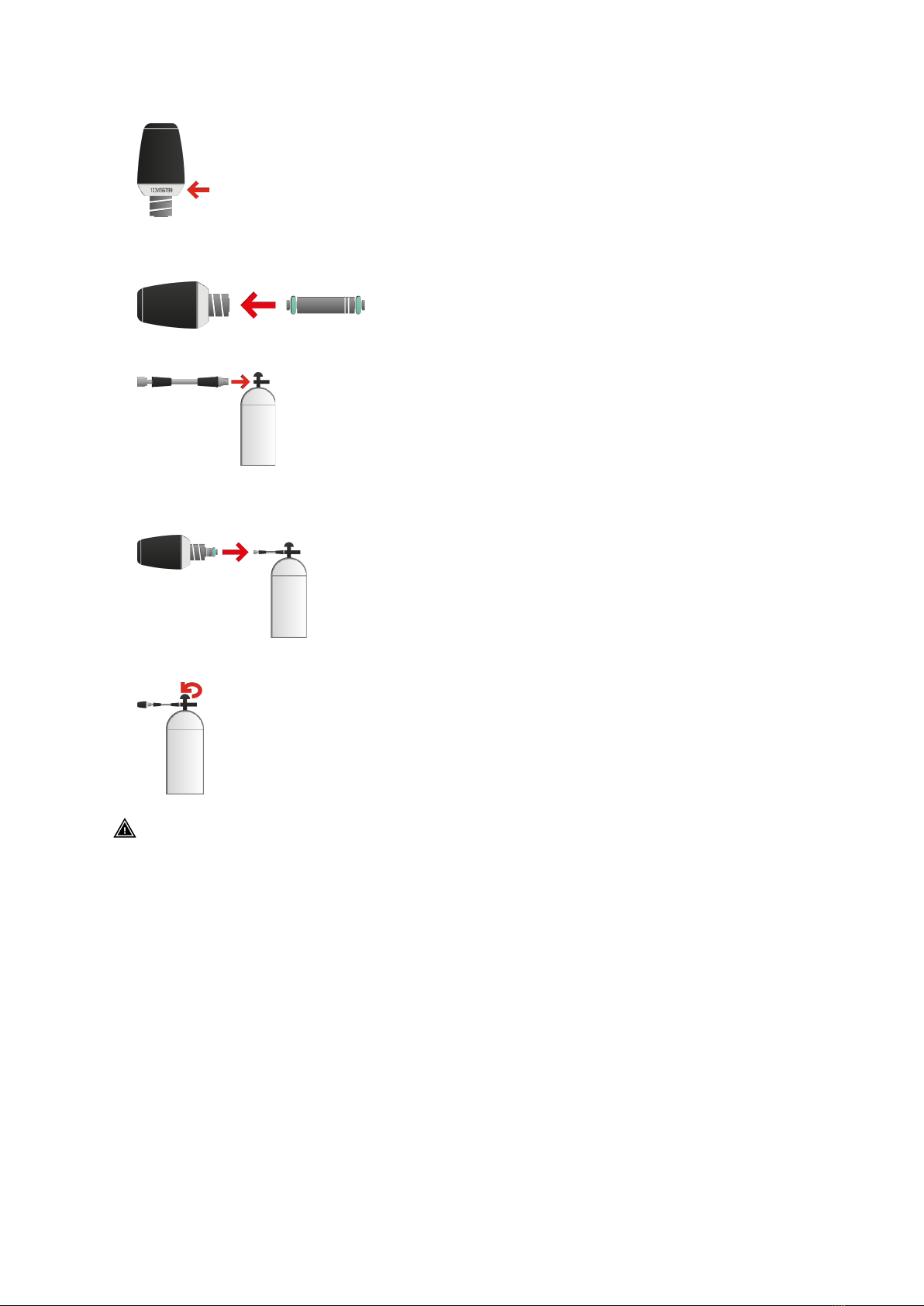
2. Insert the smooth end of Type B flow restrictor into the Tank POD. The grooved end
should remain visible.
3. Attach the high pressure hose extension to the first-stage high pressure port.
4. Attach the Tank POD to the end of the high pressure hose extension, ensuring the
grooved end of the restrictor is inserted into the hose.
5. Slowly and steadily open the pressure valve. Look away as your gear is pressurized.
WARNING: The battery level indication shown when pairing the Tank POD is an
approximation only. The POD battery may deplete faster than the indication suggests.
3.3. Tank POD alignment
When 3.4. pairing your Suunto Tank POD make sure you hold your dive computer and the
Tank POD in one of the following ways to achieve best results:
Suunto Tank POD
9
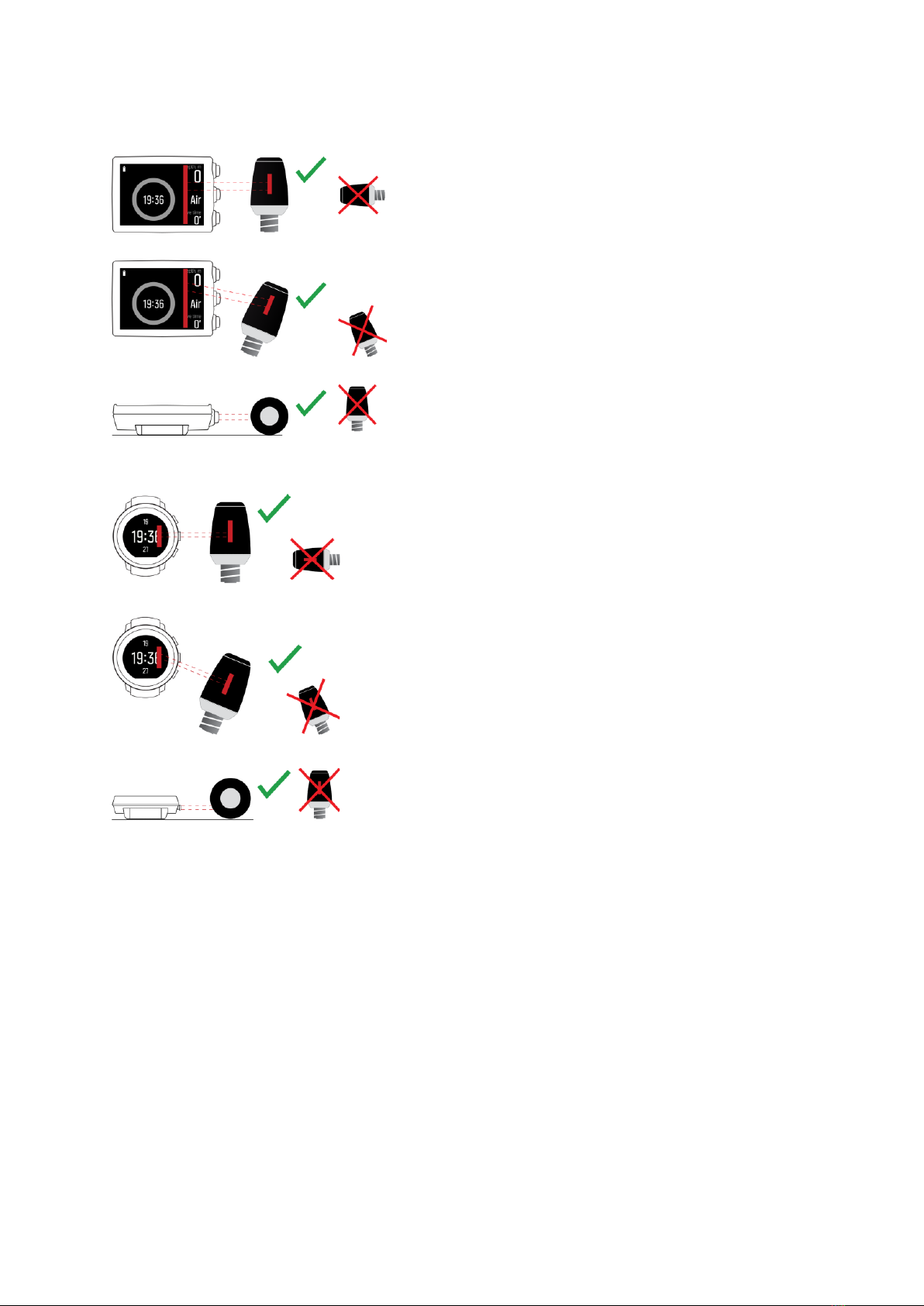
For EON Core and Steel
For D5
3.4. Pairing Suunto Tank POD
For EON Core and Steel
To pair a Suunto Tank POD:
1. After installing the Tank POD and opening the valve, wait for green LED on Tank POD to
flash.
2. If your dive computer has a blank screen, press any key to activate it.
3. Use proximity pairing: Hold your dive computer close to the Tank POD. Make sure you
follow the instructions in 3.3. Tank POD alignment.
4. After a few seconds, a menu pops up on the screen showing the Tank POD serial number,
battery status and the tank pressure. From the menu, select the correct gas for that Tank
POD.
Suunto Tank POD
10
Andere Handbücher für Tank POD
4
Inhaltsverzeichnis
Andere Suunto Zubehör Handbücher


