
Third Dimension GapGun MX+ Service-Handbuch

© Third Dimension Confidential Document D11-678 V1.04
SPC3d6.0
CONNECTIVITY GUIDE
ADMINISTRATOR GUIDE
CONNECTING GAPGUN MX+ TO SPC3D6

GapGun MX+/SPC3d6 Connectivity Guide
© Third Dimension Confidential Document D11-678
SPC3d6.0
Copyright © 2011 Third Dimension
All rights reserved.
You must not reproduce or distribute any part of
this publication in any form or by any means,
electronic or mechanical, without prior permission
in writing from Third Dimension. This includes
photocopying, recording or any other information
storage or retrieval system.
This version produced on 20 March 2012

GapGun MX+/SPC3d6 Connectivity Guide
© Third Dimension Confidential Document D11-678
SPC3d6.0
CONTENTS
1Introduction ............................................................................................................................................................................... 1
2Entering Administrator Mode .................................................................................................................................................... 2
3GapGun MX+ Default Comms Settings ...................................................................................................................................... 5
4Options for Connecting GapGun MX+ to SPC3d6 ...................................................................................................................... 8
4.1 Connecting via Wi-Fi.......................................................................................................................................................... 8
4.2 Connecting via LAN Cable.................................................................................................................................................. 8
4.3 Connecting via DHCP ......................................................................................................................................................... 8
5Connecting the GapGun MX+ Via WiFi....................................................................................................................................... 9
5.1 Open SPC3d6 ..................................................................................................................................................................... 9
5.2 Waistpack Settings ............................................................................................................................................................ 9
5.3 Your Computer Settings .................................................................................................................................................... 9
5.4 Point-to-Point Connection............................................................................................................................................... 12
5.5 Connect Wi-Fi to GapGun Waistpack .............................................................................................................................. 13
5.6 GapGun MX+ Now Connected Via Wi-Fi ......................................................................................................................... 15
6Connecting the GapGun MX+ Via LAN Cable ........................................................................................................................... 16
6.1 Waistpack Settings .......................................................................................................................................................... 16
6.2 Open SPC3d6 ................................................................................................................................................................... 17
6.3 Your Computer Settings .................................................................................................................................................. 17
6.4 GapGun MX+ Now Connected Via LAN Cable ................................................................................................................. 20
7Connecting the GapGun MX+ Via DHCP................................................................................................................................... 21
7.1 Open SPC3d6 ................................................................................................................................................................... 21
7.2 DHCP Not Enabled ........................................................................................................................................................... 22
7.3 Enable DHCP .................................................................................................................................................................... 23
7.4 GapGun MX+ Now Connected Via DHCP LAN Connection .............................................................................................. 26
8Troubleshooting connection problems .................................................................................................................................... 27
8.1 Possible Problems and Reasons ...................................................................................................................................... 27

GapGun MX+/SPC3d6 Connectivity Guide
© Third Dimension Confidential Document D11-678
SPC3d6.0
8.2 Resolving Connectivity problems .................................................................................................................................... 28
9Calibration File ......................................................................................................................................................................... 30
9.1 Calibration File Error........................................................................................................................................................ 30
9.2 Copy Cal File to your SPC3d Folder.................................................................................................................................. 32
10 Ping........................................................................................................................................................................................... 33
11 Contact Third Dimension.......................................................................................................................................................... 34
12 Notes ........................................................................................................................................................................................ 35

GapGun MX+/SPC3d6 Connectivity Guide
© Third Dimension Confidential Document D11-678
SPC3d6.0
Page left intentionally blank

GapGun MX+/SPC3d6 Connectivity Guide
© Third Dimension Confidential Document D11-678 Page 1
SPC3d6.0
1INTRODUCTION
This manual will guide you through the connectivity options available with you GapGun MX+. You will need to contact your
company IT department to find out which options are permissible within your company.
A basic knowledge of PC configuration, IP address configuration and Windows Control Panel are required to use this manual.

GapGun MX+/SPC3d6 Connectivity Guide
© Third Dimension Confidential Document D11-678 Page 2
SPC3d6.0
2ENTERING ADMINISTRATOR MODE
SHORTCUTS SCROLL
These icons are in the top right corner of the GapGun MX+
handle screen. Tap on the small ‘scroll’ icon to enter the
‘Shortcuts’ menu.
SHORTCUTS MENU
From within the Shortcuts menu you can select ‘User Level’;
this will lead you to the User Level selection menu.
USER LEVEL MENU
Here you can see the 3 different User Levels available. Tap on
‘Administrator’ to enter into ‘Admin Mode’.
OPERATOR
The operator functions are covered in the following manuals;
D11-603 Roaming Mode Operator Guide
D11-608 Direct Link Mode Operator Guide
D11-635 Data Transfer Operator Guide
ADMINISTRATOR
This is covered in this document;
D11-655 Admin Mode Administrator Guide
SUPPORT
This option is reserved for Third Dimension only.

GapGun MX+/SPC3d6 Connectivity Guide
© Third Dimension Confidential Document D11-678 Page 3
SPC3d6.0
ADMINISTRATOR PASSWORD REQUIRED
To enter the Administrator Mode you are required to enter a
password. This password id not to be disclosed to the
operators as any changes made within Admin Mode will affect
the operation of the GapGun MX+.
ADMINISTRATOR PASSWORD ENTRY
Enter the digits 4 3 2 1 and then tap ‘OK’.
NOW IN ADMIN MODE
Notice how the screen is now a darker grey colour. This is an
indication that you are in Admin Mode. During all your time in
Admin mode the screen will be a darker grey. Once you exit
Admin Mode the screen will return to its lighter colour.
Tap ‘Now in Admin mode’ to continue.

GapGun MX+/SPC3d6 Connectivity Guide
© Third Dimension Confidential Document D11-678 Page 4
SPC3d6.0
USER LEVEL = ADMINISTRATOR
Now the Administrator Icon has a tick in it. To go back into
Operator Mode tap on the ‘Operator’ icon from here. Else
continue into Administrator Mode.
NEW USER LEVEL ICON
You will notice a new icon in the top right corner. The small
green figure allows you to return to the previous screen shot
from anywhere whilst in Admin Mode.
ADMIN MENU
Tap on ‘Admin menu’ to enter into the Admin options
available.
Or pull the trigger.
GapGun MX+/SPC3d6 Connectivity Guide
© Third Dimension Confidential Document D11-678 Page 5
SPC3d6.0
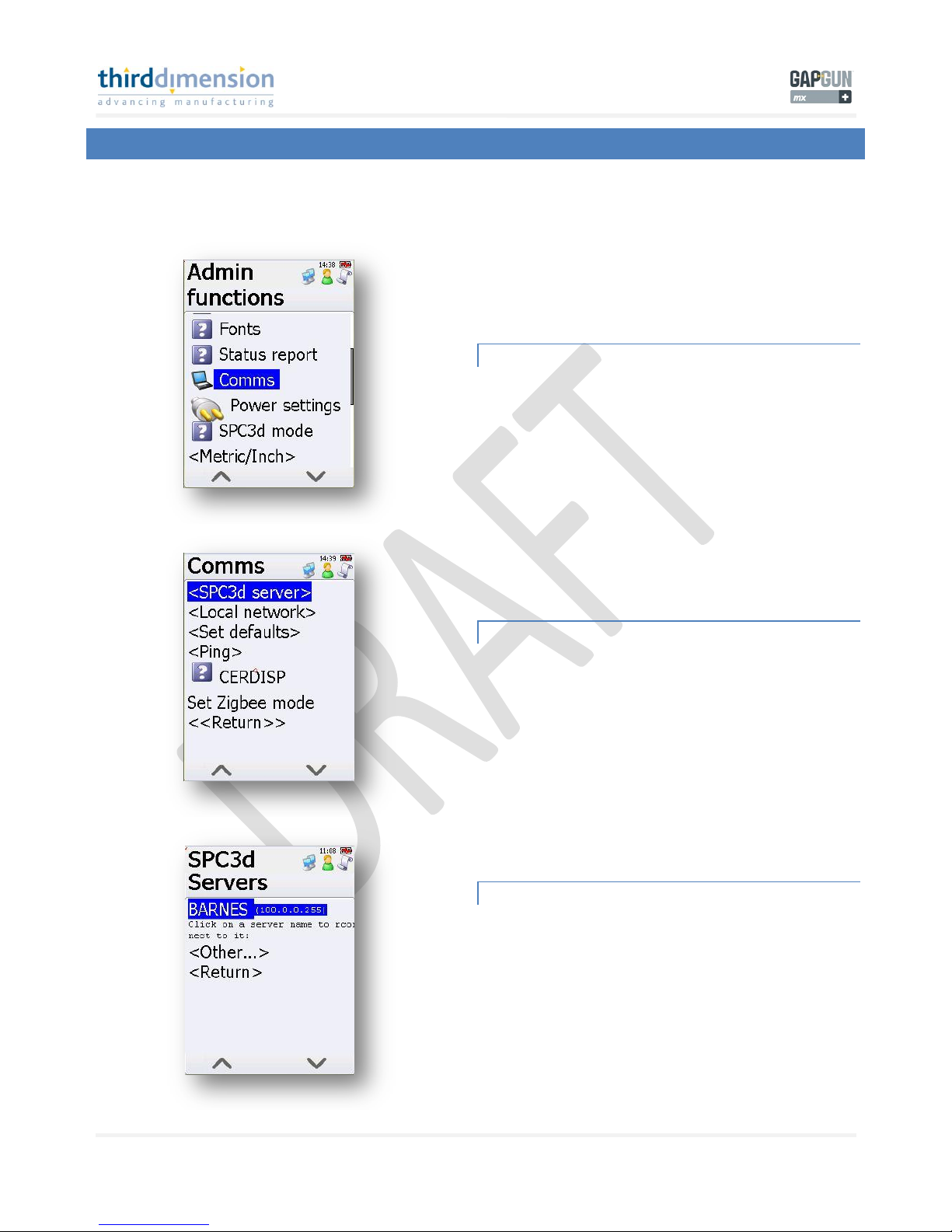
3GAPGUN MX+ DEFAULT COMMS SETTINGS
Your GapGun MX+ will have been shipped with default settings. Please navigate to check these settings and familiarise yourself
with the menu structure for GapGun Server and IP settings.
COMMS MENU
Once in the Admin Menu scroll down to find the ‘Comms’ icon.
Tap on this to enter ‘Comms’.
SPC3D SERVER
You will need to setup the SPC3d server for the GapGun MX+
to look for.
Tap on ‘SCP3d server’.
AVAILABLE COMPUTER SERVERS MENU
Here you can edit the SPC3d server address. The default
setting is;
100.0.0.255
You do not need to edit this.
By tapping on ‘Other’ you can enter an address of your choice.
Inhaltsverzeichnis
Andere Third Dimension Messgerät Handbücher


