
WiT BWT901CL Bedienungsanleitung


BWT901CL | manual v0707 | http://wiki.wit-motion.com/english
- 2 -
Tutorial Link
Google Drive
Link to instructions DEMO:
WITMOTION Youtube Channel
BWT901CL Playlist
If you have technical problems or cannot find the information that you need in the
provided documents, please contact our support team. Our engineering team is
committed to providing the required support necessary to ensure that you are
successful with the operation of our AHRS sensors.
Contact
Technical Support Contact Info
Application
● AGV Truck
● Platform Stability
● Auto Safety System
● 3D Virtual Reality
● Industrial Control
● Robot
● Car Navigation
● UAV
● Truck-mounted Satellite Antenna Equipment

BWT901CL | manual v0707 | http://wiki.wit-motion.com/english
- 3 -
Contents
Tutorial Link................................................................................................................... - 2 -
Contact............................................................................................................................ - 2 -
Application......................................................................................................................- 2 -
Contents..........................................................................................................................- 3 -
1 Introduction............................................................................................................... - 5 -
1.1 Warning Statement......................................................................................- 6 -
1.2 LED Status.......................................................................................................- 6 -
2 Use Instructions with PC...................................................................................... - 8 -
2.1 Connection Method...................................................................................... - 8 -
2.1.1 Serial Connection............................................................................. - 8 -
2.1.2 USB-HID Connection.................................................................... - 10 -
2.1.3 PC’s Bluetooth Connection......................................................... - 11 -
2.2 Software Introduction.............................................................................. - 12 -
2.2.1 Main Menu.........................................................................................- 12 -
2.2.2 Menu of Configuration..................................................................- 13 -
2.3 Calibration.....................................................................................................- 17 -
2.3.1 Accelerometer Calibration.......................................................... - 17 -
2.3.2 Magnetic Field Calibration.......................................................... - 19 -
2.3.3 Gyroscope Automatic Calibration............................................ - 21 -
2.3.4 Reset Z-axis Angle........................................................................ - 22 -
2.3.5 Reset Height to 0........................................................................... - 23 -
2.4 Configuration............................................................................................... - 24 -
2.4.1 Return Content............................................................................... - 24 -
2.4.2 Output Rate......................................................................................- 25 -
2.4.3 Baud Rate..........................................................................................- 25 -
2.4.4 Data Recording............................................................................... - 26 -

BWT901CL | manual v0707 | http://wiki.wit-motion.com/english
- 4 -
2.4.5 Data Playback..................................................................................- 28 -
2.4.6 Standby and Wake Up................................................................. - 30 -
2.4.7 Placement Direction......................................................................- 31 -
2.4.8 Bandwidth......................................................................................... - 32 -
2.4.9 6-axis/ 9-axis Algorithm............................................................. - 34 -
3 Use Instructions with Android Phone............................................................- 35 -
3.1 APP Installation...........................................................................................- 35 -
3.2 Connection....................................................................................................- 36 -
3.2.1 APP Pairing........................................................................................- 36 -
3.2.2 Phone’s Bluetooth Pairing...........................................................- 38 -
3.3 Calibration.....................................................................................................- 40 -
3.3.1 Acceleration Calibration...............................................................- 40 -
3.3.2 Magnetic field calibration............................................................- 41 -
4 Multiple Connection..............................................................................................- 42 -
4.1 Download Link.............................................................................................- 42 -
4.2 Connection Instructions.......................................................................... - 42 -
5 MCU Connection.................................................................................................... - 43 -
5.1 Arduino...........................................................................................................- 43 -
5.2 STM32.............................................................................................................- 43 -
5.3 Raspberry pi.................................................................................................- 43 -
5.4 C#.................................................................................................................... - 43 -
5.5 C++................................................................................................................. - 44 -
5.6 Matlab............................................................................................................. - 44 -

BWT901CL | manual v0707 | http://wiki.wit-motion.com/english
- 5 -
1 Introduction
The BWT901CL is a multi-sensor device detecting acceleration, angular
velocity, angle as well as magnetic filed. The robust housing and the small
outline makes it perfectly suitable for industrial retrofit applications such as
condition monitoring and predictive maintenance. Configuring the device
enables the customer to address a broad variety of use cases by interpreting
the sensor data by smart algorithms.
BWT901CL’s scientific name is AHRS IMU sensor. A sensor measures 3-axis
angle, angular velocity, acceleration, magnetic field. Its strength lies in the
algorithm which can calculate three-axis angle accurately.
BWT901CL is an CE standard accelerometer. It is employed where the highest
measurement accuracy is required. BWT901CL offers several advantages over
competing sensor:
• Heated for best data availability: new WITMOTION patented zero-bias
automatic detection calibration algorithm outperforms traditional
accelerometer sensor
• High precision Roll Pitch Yaw (X Y Z axis) Acceleration + Angular Velocity +
Angle + Magnetic Field output
• Low cost of ownership: remote diagnostics and lifetime technical support by
WITMOTION service team
• Developed tutorial: providing manual, datasheet, Demo video, free software
for Windows computer, APP for Android smartphones , and sample code for
MCU integration including 51 serial, STM32, Arduino, Matlab, Raspberry Pi,
communication protocol for project development
• WITMOTION sensors have been praised by thousands of engineers as a
recommended attitude measurement solution

BWT901CL | manual v0707 | http://wiki.wit-motion.com/english
- 6 -
1.1 Warning Statement
Putting more than 5 Volt across the sensor wiring of
the main power supply can lead to permanent damage
to the sensor.
VCC cannot connect with GND directly, otherwise it
will lead to the burning of the circuit board.
For proper instrument grounding: use WITMOTION
with its original factory-made cable or accessories.
Do not access the I2C interface.
Do not change the baud rate because
WITMOTION BLUETOOTH sensor’s baud rate is
fixed.
For secondary developing project or integration:
use WITMOTION with its compiled sample code.
1.2 LED Status
LED
Status
Remark
Red
Flashing
Charging
Blue
Flashing
Pairing process
Keeping still
Successful pairing


BWT901CL | manual v0707 | http://wiki.wit-motion.com/english
- 8 -
2 Use Instructions with PC
2.1 Connection Method
PC software is only compatible with Windows system.
BWT901CL Playlist
2.1.1 Serial Connection
Step 1. Connect the sensor with a serial converter
PIN Connection:
VCC - 5V
TX - RX
RX - TX
GND - GND
(When connecting with computer, VCC-5V is recommended.)

BWT901CL | manual v0707 | http://wiki.wit-motion.com/english
- 9 -
Recommended tools:
3-in-1 converter 6-in-1 converter TTL serial cable
Step 2. Unzip the software and install the driver CH340 or CP2102
(Depending on which accessory for usage.)
Link to tutorial of 3-in-1 serial converter/ TTL serial cable (CH340 driver)
Link to tutorial of 6-in-1 serial converter (CP2102 driver)
Step 3. Insert the converter to computer and confirm the “com port” in device
manager
Step 4. Open the software(Minimu.exe)
Data will appear after auto-search finishes
Notice: If not successful, please operate manually
Choose the com port and baud rate 115200, data will be shown on the software.
BWT901CL | manual v0707 | http://wiki.wit-motion.com/english
- 10 -
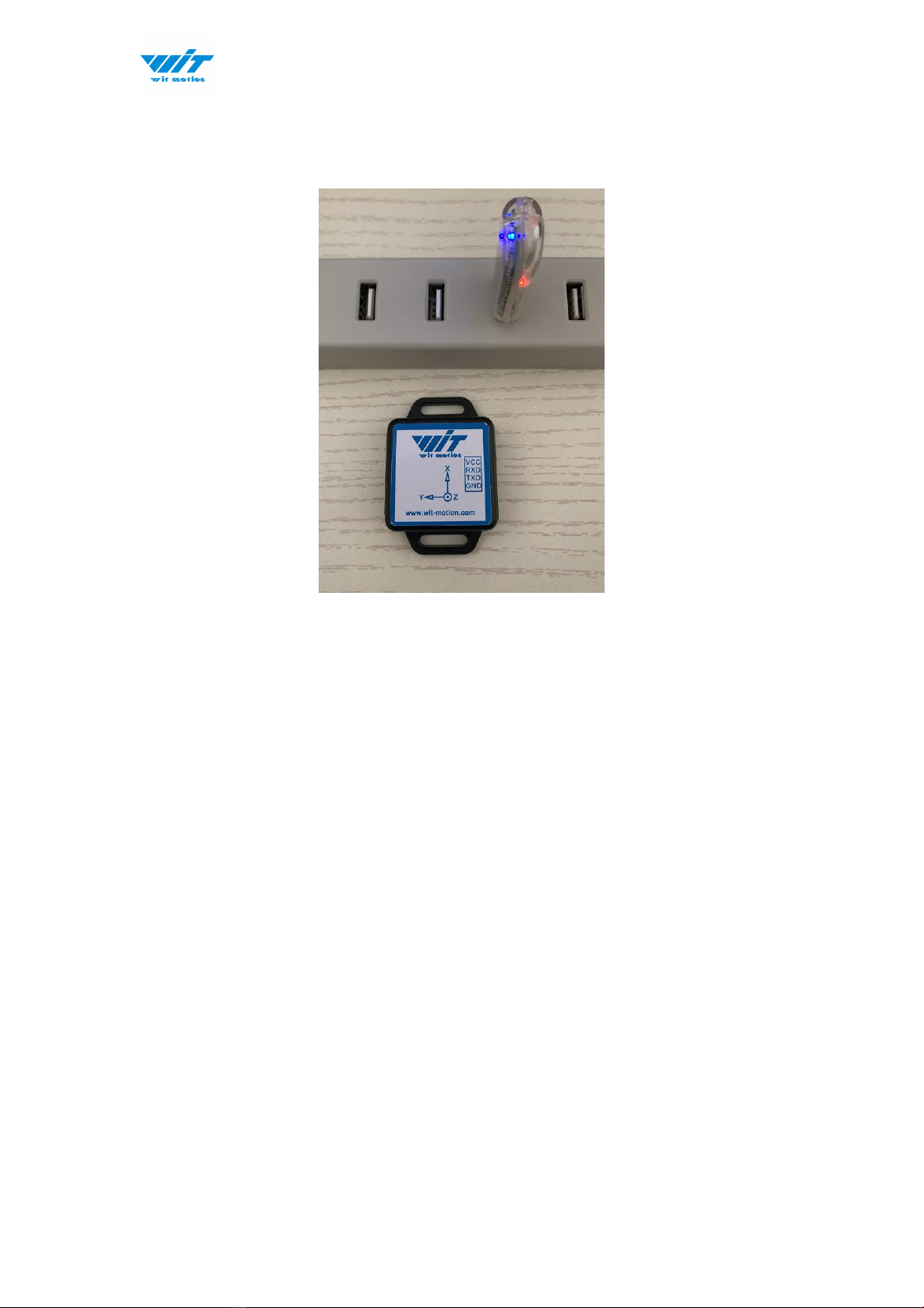
2.1.2 USB-HID Connection
Step 1. Insert the USB-HID adapter into USB slot of computer
Step 2. Turn on the sensor after red light of HID adapter flashes
Step 3. Wait till the sensor's blue LED light remains on--means pairing
succeeded
Step 4. Open the software, Minimu.exe
Step 5. Data will appear once the auto-search finishes
Inhaltsverzeichnis
Andere WiT Zubehör Handbücher

WiT
WiT BWT901 Bedienungsanleitung

WiT
WiT WT901BLECL Bedienungsanleitung

WiT
WiT WT901BLECL 5.0 Bedienungsanleitung

WiT
WiT WT9011DCL-BT5.0 Bedienungsanleitung

WiT
WiT WT901C Bedienungsanleitung

WiT
WiT WTVB01-BT50 Bedienungsanleitung

WiT
WiT WT901SDCL Bedienungsanleitung
WiT
WiT WT901BLE Bedienungsanleitung

WiT
WiT WT901SD Bedienungsanleitung

WiT
WiT WT901B Bedienungsanleitung


