Chance-i USA DiViS Bedienungsanleitung

1 DiViS
www.DiViSDVR.com
1. Specification of DiViS 3
2. Installation Notes 5
3. Driver Installation 6
4. Program Installation 8
5. Configuration 11
5.1. Disk Tool 12
5.2. User Admin 13
5.3. System 14
5.4. Camera 18
5.4.1. General 18
5.4.2. Scheduling 19
5.4.3. Color & Motion 21
5.5. Sensor 23
5.6. Backup 24
5.7. Event Setup 25
6. Main 28
7. Search 31
8. Utility 37
8.1. Backup 37
8.2. Backup Viewer 39
8.3. Auth Tool 40
8.4. AVI Viewer 40
8.5. Log Viewer 41
Appendix
1. DVR management 42
2. DB Tool 44
3. Direct Web 46
4. MC (Media Control) Setup 48
5. Text Data Search 51
INDEX

2 DiViS
www.DiViSDVR.com
DVR (Digital Video Recorder) technology replaces the use of existing analog technology, like
VHS tapes and VCR’s, by being able to store images in digital formats that are superior in
both convenience and quality.
One of the many problems with analog tapes is the limited searching capabilities they provide.
Searching for a certain event or time period in an analog tape is both tedious and inefficient.
Now, with the introduction of DVR, it has become easier, among other things, to find the
images you want: simply enter the time and date into the computer and data is retrieved in
seconds. No more mundane searches or manual tracking of tapes.
With VCRs, preservation of recorded data, especially sensitive recordings, was difficult to
do. DVR provides several options (DAT, CD, DVDs) in permanently preserving large
amounts of data in digital formats, maintaining the integrity of the video for far longer periods
than any analog tape.
The DVR also works in conjunction with sensors to operate security systems: relays can
close shutters or ring sirens when motion sensors are triggered, for instance.
In addition, our DVR makes it possible to modify DVR settings and retrieve recorded data
remotely through a network or the Internet.
Reliability, convenience in searching and storing, and flexibility to meet various demands for
surveillance systems are what make us proud in offering the next generation DVRs.
Various features briefly introduced here are just some of the features of a constantly evolving
technology.
We are always striving to innovate and create new ideas to meet demands from all areas of
the globe.
E-mail: [email protected]
Tel: 949-833-1010
Fax: 949-833-1015
www.divisdvr.com
Forward

3 DiViS
www.DiViSDVR.com
1~32 Camera Inputs / Output
Up to 32 camera inputs are available on screen for digital handling.
Normal input condition: 75 Ohm, 1 Volt ( p-p )
1~16 Sensor Inputs
Up to 16 sensors can be linked to the system.
External DC 12 Volt power must be provided to the sensor input from outside.
1~4 Digital Outputs (Relay Outputs)
Digital Outputs can be used to activate things like shutters and sirens, and activation can be linked to sensor
and motion detection.
Sound Recording and Two-Way Communication Capabilities
Sound can be recorded with video images. Two-way communication is possible between DiViS main and
DiViS Net.
Display Features (w/ Multi-Viewing)
Multi-Viewing allows 1, 4, 6, 9, 10, or 16 different camera shots to be displayed onscreen at the same time.
Other display features include enlarging all displayed cameras or just one. 32 channel viewing can be
attained with specially configured cards.
PAN/TILT/ZOOM/FOCUS Capabilities
Each connected camera can be manipulated through the DiViS main program as long as each camera
supports such capabilities. This feature can be controlled remotely.
Auto Rebooting System
When DiViS detects an error or malfunction within the system, it will automatically reboot the system in order
to correct it.
Motion Detection and Sensor Trigger
Detection features make it possible to record images only when movement is detected, preserving volume
space and maximizing the use of physical storage space.
1. Specification of DiViS

4 DiViS
www.DiViSDVR.com
Scheduled Recording
Scheduling allows the administrator to record images only during designated time periods, if so desired.
Every combination of scheduling is available in the DiViS program.
Manual and Auto Backup
Data can be preserved through various formats (DAT, CD, or DVD) and data from specific cameras and/or
time periods can be specifically isolated for backup as well. Much like scheduled recording, backup of data
can be scheduled as well.
Digitalized Video Search
Recorded data features digital playback for each camera simultaneously or one at a time. Playback features
include advanced search features and image extracting, which allows portions of existing video to be
extracted and saved as a separate file.
Network Support (PSTN, TCP/IP, LAN , Modem Protocol Support)
DiViS supports network access, which allows administrators to login to DiViS main and remotely access all
the features provided locally.
Integration with Text data from External Devices
Data from external devices (POS, Access Control, ATM, etc) can be recorded with DVR video images. Text
Search allows to search data from external devices with DVR video image when event occurs. This will raise
the level of integrity and security.
Specification
Feature CAP, LIVCAP, ACAP MPG
Camera Input 1~32Port(NTSC/PAL) 1~16Port(NTSC/PAL)
Sound Input 1, 2, 4, 16 Port
Sensor Input 1~16 Port
Relay Output 1~4 Port 1~8 Port
Composite Output 1 Port (NTSC/PAL, Split or Switching) 1~2Port (NTSC/PAL, Switching)
Image Format S/W MPEG-4 H/W MPEG-4
Recording Mode Watch, Normal, Motion Detection, Sensor, Scheduled Recording
Remote Control Full remote control PSTN, ISDN,ADSL, LAN and TCP/IP
Back-up DAT, CD, DVD
PAN/TILT/ZOOM/FOCUS RS-232/422/485 Interface
Note: 32 channel products are consisted with Master and Slave boards, which controls 16 channels of video each.
MPG48016 is consisted with 2 of 24008 boards.

5 DiViS
www.DiViSDVR.com
- Recommend to use Intel Chipset mother board.
I) It might be incompatible with mobile system or special system motherboards.
Type CAP MPG ACAP LIVCAP xxxN32
Intel 865 / 875 Chipset Motherboard
Asus Yes Yes Yes Yes No
Gigabyte Yes Yes Yes Yes No
Intel*Yes Yes Yes Yes No
MSI Yes No Yes Yes No
Intel 915 / 945 Chipset Motherboard
Asus Yes Yes Yes Yes Yes
Gigabyte Yes Yes Yes Yes Yes
Intel Yes Yes Yes Yes Yes
MSI Yes No Yes Yes Yes
*Intel 865GBF Model is not recommended
Note: Please contact technical support for the list of compatible motherboard. It is required to follow the
recommendation, due to the variable capability of motherboards.
- Recommend Intel Pentium 4 2.4 or higher for CPU.
I) CPU that is lower than Intel Pentium 4 2.4 can reduce the recording frame rate.
II) Recommend Intel Pentium 4 3.0 or higher for 32 channel.
- Recommend 512MB or above system memory.
I) Less than 512MB of memory may bring down the overall system performance.
II) Recommend 1GB or more for 32 channel board.
- Recommend ATI Redeon 9000 or higher. (Radeon X1K series are not compatible.)
I) Recommend ATI Express 300 or higher for xxxN32 board. (Radeon X1K series are not compatible.)
II) Intel onboard Extreme Graphic II or GMA 950. However, using integrated video controller may drop frame
rate for 32 channel models.
- Recommend 80GB or larger hard driver.
I) Install the latest Service Pack when using 160GB or larger hard drive.
II) Recommend Serial ATA type (SATA) hard drive for 32 channel.
- Recommend Windows XP.
- Disable screen saver and Standby mode.
I) Turn off System Standby mode.
II) Turn off Screen saver.
III) Turn off all the energy saving feature.
2. Installation Notes

6 DiViS
www.DiViSDVR.com
Drivers for DiViS CAP, DiViS ACAP, DiViS LIVCAP
and, DiViS MPG can be installed by “installer.exe”,
which determines DVR model and installs proper
Driver. When Hardware Wizard message shows up
before the installation, click “Cancel” to close.
Open Driver folder in CD-Rom and run “Installer”.
Click “Next”.
3. Driver Installation

7 DiViS
www.DiViSDVR.com
Following is a chart of device list. (Depending on model, different device(s) will be displayed)
Model Device List
CAP series DVR Capture
LIVCAP series DVR Live Capture
ACAP series DVR ACapture Device
MPG series DVR MPEG 4
Click “Install”.
The above picture shows up when installation is completed. Click “Reboot” to restart the
system. It is required to reboot the system to complete installation of drivers.

8 DiViS
www.DiViSDVR.com
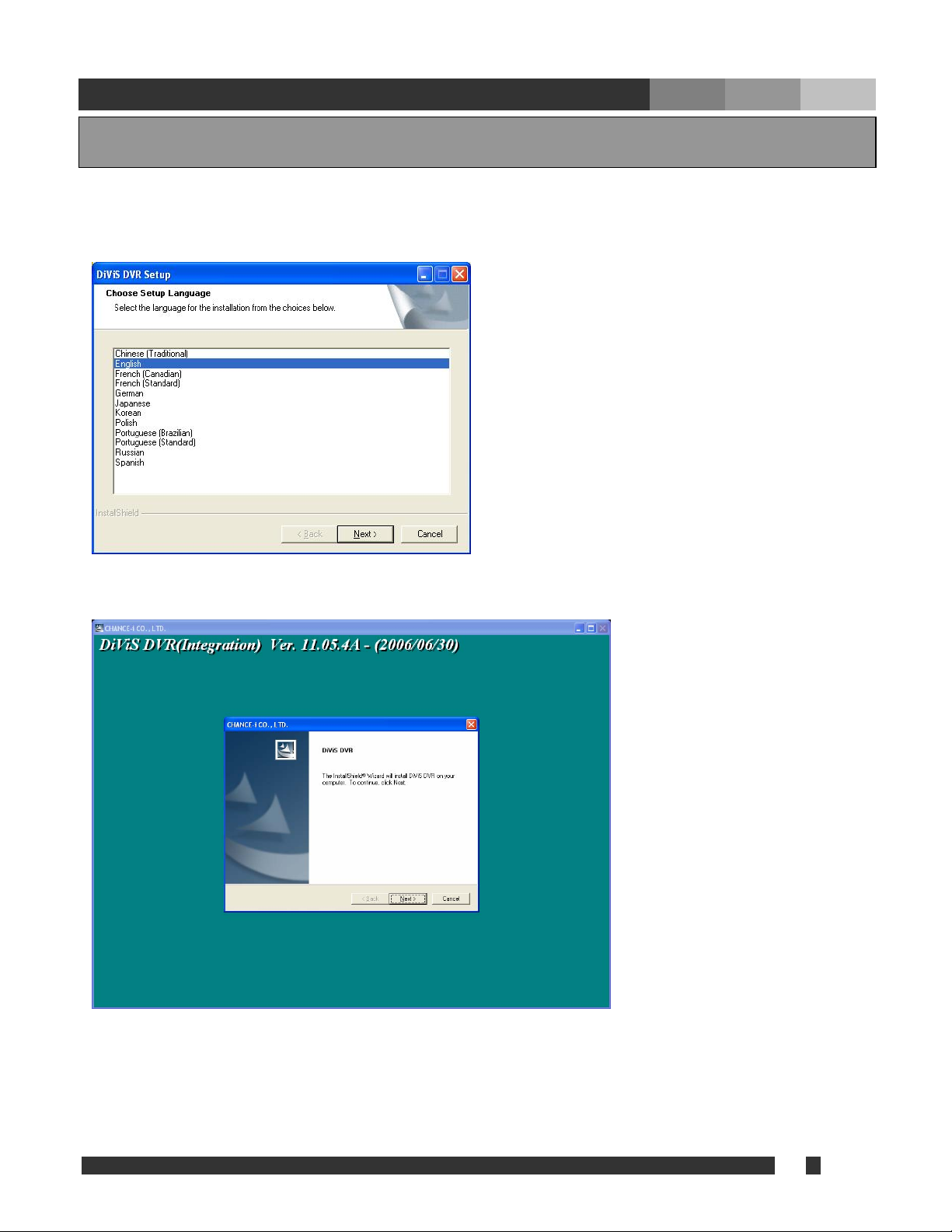
Run “Setup.exe”.
(Choose the language for the software to be installed.)
Click “Next”.
Choose the proper media format (NTSC or PAL) and continue by clicking “Next.”
The last letter of version indicates the type of board.
i.e.) CAP – C, LIVCAP – L, ACAP-A, MPG - M
4. Program Installation

9 DiViS
www.DiViSDVR.com
• USER NAME: Make Top Admin user name.
• PASSWORD: Make Top admin password.
• Confirm P/W: Confirm the password.
Note: Once the Top Admin user created, it cannot be modified from User Admin Setup. To
change user name or password for Top Admin user, please refer to the page 52, Appendix
1.DVR Management.
Once setup of the software has been complete, the system will need to be restarted to allow
the settings to take effect.
Inhaltsverzeichnis