deXlan 47200 Bedienungsanleitung

047200 - DVR BUILT IN LCD MONITOR
USER’S MANUAL VER V1.3
THE MOST STABLE AND RELIABLE REAL STAND-ALONE DIGITAL VIDEO RECORDER

•INDEX
• CHAPTER 1 (Specification & System Organization)
1. Specification ----------------------------------------------------------------------------------------------------- 3
2. Recording File Size ------------------------------------------------------------------------------------------- 4
3. Product Contents List ----------------------------------------------------------------------------------------- 5
4. System Configuration ----------------------------------------------------------------------------------------- 6
• CHAPTER 2 (Panel Function)
1. Front Panel ------------------------------------------------------------------------------------------------------ 7
2. Rear Panel ------------------------------------------------------------------------------------------------------ 8
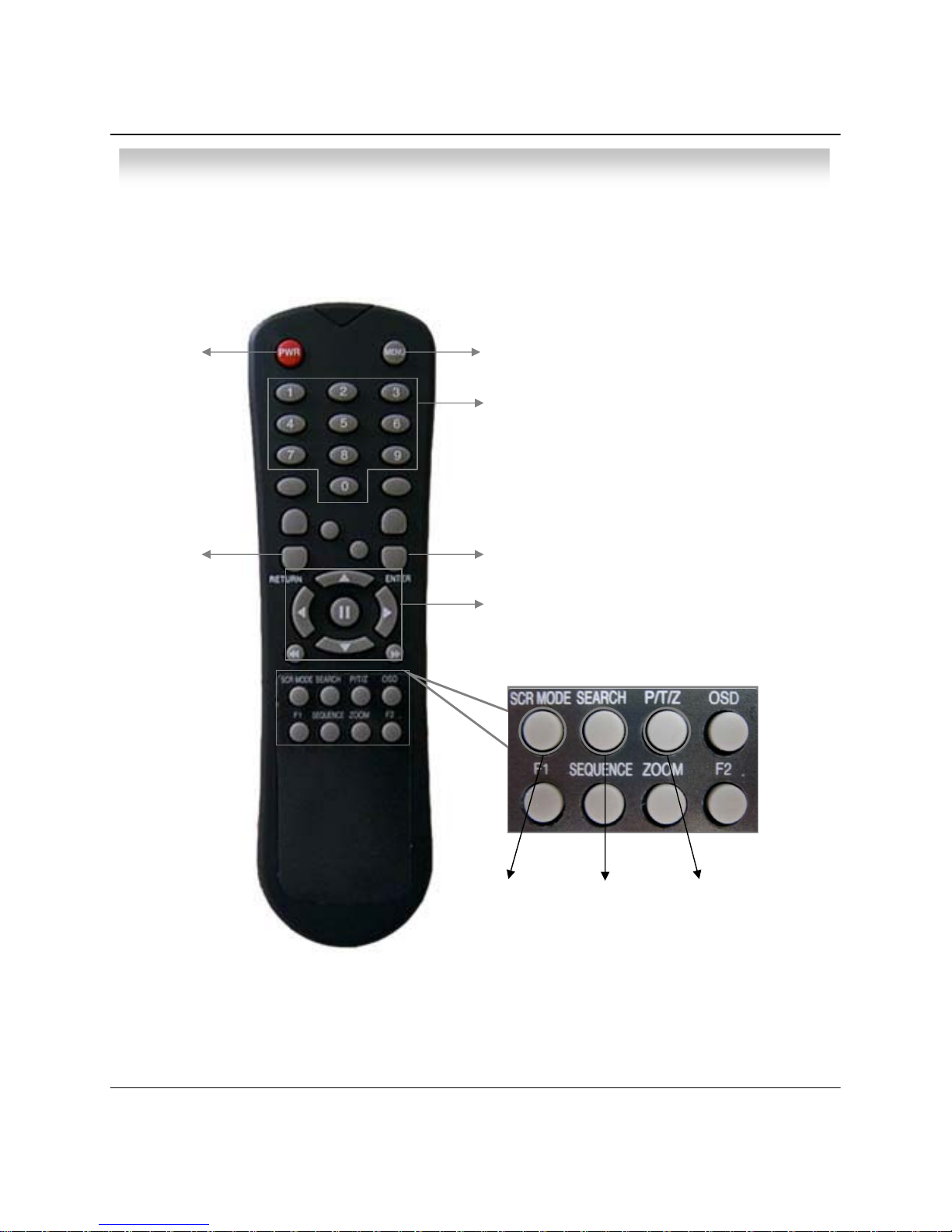
3. Remote Controller --------------------------------------------------------------------------------------------- 9
• CHAPTER 3 (Installation)
1. 8pin RJ 45 Modular Jack ----------------------------------------------------------------------------------- 10
2. Video Out ------------------------------------------------------------------------------------------------------- 10
3. Camera Selection -------------------------------------------------------------------------------------------- 10
4. Network Connection ----------------------------------------------------------------------------------------- 10
5. Alarm/Relay/PTZ Connection ----------------------------------------------------------------------------- 10
6. Power Connection ------------------------------------------------------------------------------------------- 10
7. Finishing Installation ---------------------------------------------------------------------------------------- 10
※Hard Disk Format ----------------------------------------------------------------------------------------------- 11
• CHAPTER 4 (Display)
1. System Power ON ------------------------------------------------------------------------------------------- 12
2. Screen View Selection ------------------------------------------------------------------------------------- 12
3. Change Screen Mode -------------------------------------------------------------------------------------- 13
4. Control PTZ/Focus ------------------------------------------------------------------------------------------ 13
5. Speaker Volume Control --------------------------------------------------------------------------------- 14
6. System Power OFF ----------------------------------------------------------------------------------------- 14
• CHAPTER 5 (SEARCH)\
⊙Go to Search Mode ----------------------------------------------------------------------------------------- 15
1. Search by Date/Time --------------------------------------------------------------------------------------- 15
2. Search by Event ---------------------------------------------------------------------------------------------- 16
• CHAPTER 6 (MENU)
⊙Go to Menu ---------------------------------------------------------------------------------------------------- 18
⊙Initial Menu ---------------------------------------------------------------------------------------------------- 18
1. Display ---------------------------------------------------------------------------------------------------------- 19
2. Record ---------------------------------------------------------------------------------------------------------- 19
3. Camera --------------------------------------------------------------------------------------------------------- 24
4. Audio ------------------------------------------------------------------------------------------------------------ 25
5. Alarm ------------------------------------------------------------------------------------------------------------ 26
6. System ---------------------------------------------------------------------------------------------------------- 27
• CHAPTER 7 (CLIENT)
1. Remote Program Installation ----------------------------------------------------------------------------- 32
2. Monitoring Mode --------------------------------------------------------------------------------------------- 35
3. Search Mode ------------------------------------------------------------------------------------------------- 38
4. Setup ----------------------------------------------------------------------------------------------------------- 45
• CHAPTER 8 (DDNS Connection)
1. DDNS Connection ------------------------------------------------------------------------------------------- 47
•OPTIONAL
1. Optional Cable ----------------------------------------------------------------------------------------------- 48

3
• Specification & Configuration
1. Specification
More than 500 TV LinesResolution
15.0” TFT LCD Panel
Type
LCD 0.297mm(H) x 0.297mm(V)
Pixel Pitch
1024(H) x 768(V), RGB Vertical Stripe
Pixel Arrangement
S-Video
Composite BNC x 4
Camera Connector Mini Din x 4
1 Input
VGA Input
M : N Mapping
Sensor / Camera / Alarm I/O
1 Input
Audio Input
3~5 Kbyte @ 352 x 240 (PAL : 352 x 288)
5~10 Kbyte @ 720 x 240 (PAL : 704 x 288)
NTSC : 352 x 240, 704 x 240, 704 x 480
20~65℃/ 20~95% RH
Storage Temperature and Humidity
5~50℃/ 20~80% RH
Operating Temperature and Humidity
4 Input / 1 Output
Sensor / Alarm
RS-485
P/T/Z Control & Port
10 / 100 Base – TX Ethernet
LAN
Depends on connection Status, Almost Real Time Monitoring
1 Connection (1 or 4CH Video)
Transmission Speed and No. of Connection
4CH NTSC / PAL
Video Input
120fps (NTSC) / 100fps(PAL)
Display Speed
1/4 Channel Mode
Screen Modes
120 / 100 fps
352x240 / 352x288
Recording Speed 60 / 50 fps704x240 / 740x288
30 / 25 fps
704x480 / 740x576
PAL : 352 x 288, 704 x 288, 704 x 576
Recording Resolution
MPEG4 (Optimized)
Compressing Method
6~16 Kbyte @ 720 x 480 (PAL : 704 x 576)
Byte Size per Image
Continuous, Motion Detection, and Sensor Activated, Time Recording
Recording Modes
Setting Recording Schedule per Camera
Recording Schedule
Supports the setting of Motion Sensitivity per Camera
Motion Detection
Remote Live Viewing, Remote Playback and Remote File Copy
Remote Transmission
Remote Pan / Tilt / Zoom / Focus / Iris
Remote Control
Auto-Rebooting, Auto-Scan and Recovery of Data
System Recovery After Power Failure
IR Remote Controller
System Operation
DC 12V, 5A (Adaptor Included)
Power
350(W) X 315(H) x 55(D)mm
Dimension
6.3 Kg
Weight
Remote Viewer (4CH)
Remote S/W
RTOSOS
Unlimited HDD Space
HDD
32 bit DSP
CPU
Hardware

4
22.3
17.8
14.3
10.7
7.1
13.2
10.5
8.4
6.3
4.2
8.5
6.6
5.4
4.1
2.7
6.3
5.0
4.0
3.0
2.0
Day
18.8
15.1
12.1
9.0
5.8
10.8
8.6
6.9
5.2
3.3
7.4
5.9
4.7
3.5
2.3
5.5
4.4
3.5
2.6
1.7
Day
17.2
13.8
11.0
8.3
5.3
11.0
8.8
7.0
5.3
3.4
7.5
6.0
4.8
3.6
2.3
5.7
4.6
3.7
2.8
1.8
Day
20.0
16.0
12.9
9.6
6.4
12.1
9.6
7.7
5.8
3.9
7.5
6.0
4.8
3.6
2.4
5.4
4.3
3.4
2.6
1.7
Day
16.1
12.9
10.3
7.7
5.1
9.6
7.7
6.2
4.2
3.1
6.0
4.8
3.9
2.9
1.9
4.8
3.9
3.1
2.4
1.5
Day
15.9
12.7
10.2
7.6
5.1
10.3
8.3
6.6
5.0
3.3
6.9
5.5
4.4
3.3
2.2
5.2
4.1
3.3
2.5
1.7
Day
48404241374080G
Highest
726267625760120G
968489827479160G
1201051101039498200G
151132137130115125250G
65545658465380G
High
988486866978120G
13011311511594106160G
159141144144115132200G
204178180180144166250G
101798193747980G
Standard
151125127139100120120G
201165168185149158160G
252206211230185199
200G
317259264290230247250G
17113912715412312280G
Low
257216199230184182120G
343290264310247245160G
427362331384310305200G
535451412480386382250G
Hour
352x240/30fps
Hour
704x576/6fps
PAL
Hour
704x288/12fps
HourHourHour
352x288/25fps720x240/15fps720x480/7fps
NTSC
HDDQuality
131.25
137.5
115
140
150
135
Highest
Average Bit Rate (Kbyte/sec)
LowStandardHighLowStandardHighHighest
3660961.223.24.5CIF/30FPS (352x240 )
N
T
S
C4575120358102CIF/15FPS (720x240 )
45.5701056.5101520D1/7FPS (720x480)
32.555851.32.23.44.6CIF/25FPS (352x288 )
P
A
L4070102.53.25.68.2112CIF/12FPS (704x288 )
111621
Average Frame Size (Kbyte)
D1/7FPS (704x576) 43.7568.751007
FPS / Resolution
PALNTSC
25704x57630720x480
50704x28860720x240
100352x288120352x240
Max FPSResolutionMax FPSResolution
• Specification & Configuration
2. Recording File Size

5
• Specification & Configuration
3. Product Contents List
Please Confirm the Contents When You Open the Package.
①Basic Contents
DVR Monitor
Remote Controller
User’s Manual Remote Client Program
Installation CD AAA Battery X 2
DC 12V Adaptor Power CableRJ-45 Modular Jack
Cable X 4 (BNC/RCA)
80G HDD default

6
•Specification & Configuration
4. Configuration

7
• Panel Function
1. Front Panel
Tip
①POWER : System Power On/Off
②MENU : Used when changing the menu of SYSTEM SETUP.
③ENTER : It is used as the SELECT key.
④RETURN : Cancel setup or return previous mode.
⑤SEARCH : Go to search mode for searching recorded video.
⑥SCRMEDE : Select screen division mode or rotation mode.
⑦PTZ/FOCUS : Go to camera PTZ/Focus control
⑧LED Indicator : Indicate present system situation
(POWER : SYSTEM On/Off , RECORD : Record On/Off,
NETWORK : Client Network connect , ALARM : Alarm sensor)
⑨Search controller : Searching recorded video or control menu & PTZ/Focus
▲,▼, button are for volume control function .
⑩Channel select button : Select channel or input password
⑪Remote controller sensor input
• The Soft Button of power is styled to prevent failure by wrong operation.
• When Remote Controller Sensor Input is blocked by something, it may cause
remote controller do not work properly.
• Initial Password for all “Administrator, User, Network” is 1234.
①②③④
⑤⑥⑦
⑩
⑪
1 2 3 4
⑨
⑧

8
• Panel Function
2. Rear Panel
①8 pin RJ 45 Modular Jack : Video In + Audio In + RS-485 + Camera Power ( Max.)
②Video Out : BNC Out
③Camera select switch : NTSC / PAL
④Ethernet (TCP/IP) : Connect Port for LAN Cable
(It is possible for user to connect the DVR by Remote Client program.)
⑤Alarm/Relay/RS-485 : Connect Port for Sensor & Relay, PTZ
⑥Power : DC 12V, 5A (For observation kit with camera (DIN Cable) : 8A adaptor is needed)
Tip • After installation, please connect the power.
• Please use static power adaptor to operate it.
②③④⑤⑥①

9
POWER:
System
On/Off
MENU: Open Menu
RETURN:
Cancel Setup
or Return to
Previous Menu
ENTER: Apply Setup Change
Channel Select Button
(4ch Available, #1~4 Button)
Change Screen
Mode Open Search
Mode PTZ/IRIS Mode
• Unused Button's Description is Omitted.
• Remote Controller can Operate when Remote Controller Sensor Input Part Reacted.
• If there are many DVRs at the same place, they are reacted together when press remote controller.
Search Controller: Control Playback Option
(EX. Speed of Playback, Move on Menu, Control
PTZ/Focus, Volume)
• Description
3. Remote Controller

10
②③④⑤⑥①
•Installation
1. 8pin RJ 45 Modular Jack
Camera in (BNC/RCA/DIN)+ Audio in (RCA/DIN) + Power + RS-485
•Default : Camera (BNC) + Audio (RCA)
•Optional Cable Selection (refer to page. 48 )
2. Video Out
Connect DC Power Input Terminal and Static Adaptor
3. Camera Selection
Switch to change video mode NTSC/PAL
4. Network Connection
Connect Ethernet Terminal and Network Cable
5. Alarm/Relay/PTZ Connection
Connect Port for Sensor & Relay, PTZ
6. Power Connection
DC 12V, 5A (For observation kit with camera (DIN Cable) : 8A adaptor is needed)
①ALARM
Alarm Input - ‘IN1, IN2, IN3, IN4’ : Connect Sensor Input by Channel
‘GND’ : Connect Ground System
②RELAY
Alarm Output – ‘NO, NC’ : After Checking Alarm Output Type (Normal Open or Normal Close) and Connect to ‘NO, NC’
‘COM’ : Connect Remain Grounding Conductor
③RS-485
Connect PTZ Camera – ‘D+, D-’ : Connect PTZ Camera Control Line (+ , – Terminal)
PTZ 14 Pin Cable
⑨R+
⑩R-
⑪T+
⑫T-
RS485
D+
D-
IN1 IN2
ALARM RELAY RS-485
IN3 IN4 GND NO COM NC D+ D-
Dieses Handbuch passt für folgende Modelle
1
Inhaltsverzeichnis