
Kodicom KSR816 Bedienungsanleitung

•This manual is published by KODICOM Co, Ltd and contains information on KSR816 which
will enable you to use this product properly.
• If you require additional copies of this manual, please print the manual contained in the CD
provided with your purchase.
KKSSRR881166MMaannuuaall

Thank you for purchasing KODICOM KSR816 .
This DVR is produced by the most advanced KODICOM technology and its quality is
guaranteed by strict reliability and compatibility testing.
This KSR816 manual provides necessary information for the correct use of this product and
also contains some useful tips.
Please read this manual thoroughly before using KSR816 in order to prevent possible
breakdown due to any mishandling.
IInnttrroodduuccttiioonn

All copyrights of this manual are reserved by KODICOM CO., Ltd.
Copyright®œ 2003
It is prohibited to copy or republish this manual for commercial reasons.
It is prohibited to transfer this manual via online media such as, but not limited to, the Internet. It is
also prohibited to post, distribute, or translate this manual without KODICOM’S permission.
KODICOM is not held responsible if the DVR is damaged due to the system being handled
inappropriately by a user who is not aware of how to operate this product, or by a user who did not
refer to this manual before attempting to operate the product.
KODICOM reserves the right to change the contents of this manual without notice.
KODICOM reserves all copyrights of registered trademarks in this manual.
CCooppyyrriigghhtt
User’s guide for KSR816 DVR.
This manual applies to KSR816 DVR only.
This manual describes external features of the KSR816 DVR, part names, correct connection
methods for supported domes or Pan/Tilt receivers, control devices, peripheral devices, and
the system set up instructions. It should be noted that some features, figures, pictures and
references can only be applied to one model either KSR816.
•KODICOM can not be held responsible if the DVR is damaged due to non-compatible
devices being used with this product. If you have any doubts please check.
•KODICOM can not be held responsible if the DVR is damaged due to the product being
disassembled or modified by the user.
•If you wish to open the system casing to attempt to modify, repair, or upgrade the system, it
is recommended that you ask for a KODICOM engineer’s assistance by contacting either
your dealer or KODICOM head office.
•DigiNet and KSR816 are registered trademarks of Korea Digital Communication
(KODICOM).
•This product is qualified for both domestic and industrial use. This product is qualified under
the Radio Equipment Requirements of Korea and acquired international certification
including CE (Europe) and FCC (USA).
NNoottiiccee

Please beware of the following precautions before installing the DVR.
•Avoid positioning the KSR816 in any place where the unit may come into contact
with moisture, dust, or soot.
•Avoid placing in direct sunlight or near heating appliances.
•Keep the product away from electric shock or magnetic substances.
•Avoid temperature extremes (recommended operation temperature is between 0°C
and ~40°C).
•Do not place any conductive material through the ventilation grills.
•Keep the system turned off before installation.
•Ensure enough space is left for cable connections.
•Place the system on a solid surface with sufficient air ventilation. Avoid any surface
that vibrates.
•Placing the system near electronic devices such as radio or TV may cause breakdown
to the product.
•Do not disassemble the product without seeking assistance from KODICOM.
•Do not place any heavy object on the system.
CCaauuttiioonn
The following are warnings and cautions for the safety of the users and for the prevention of any
property damage. Please read below thoroughly.
Safety Warnings and Cautions
Warning and Caution signs
If you are not aware of this
warning, you may be seriously
injured or be killed.
If you are not aware of this
caution, you may be injured
or cause property loss.
Do not place any liquid container on the
system, such as water, coffee, or beverage.
If liquid is poured onto the system, it can
cause a system breakdown or cause fire.
Prevent power cable from being severely
bent or pressed by a heavy object.
This may cause fire.
Avoid any place with moisture, dust, or soot.
This can cause fire or electric shock. When pulling the power cable from the
plug, do so gently. Do not touch the
plug with wet hands and avoid using
the plug if the holes on the outlet are
too loose.
This may cause
fire or electric
shock.
Turn off the system before installing the
system. Do not plug in several electric
devices to the same outlet.
This may cause heating, fire, or electric
shock.
Clean the dust around the system on regular
basis. When cleaning the system, always use
dry cloth. Do not use wet cloth or other organic
solvents.
This may damage the
surface of the system
and can cause system
breakdown or electric
shock.

D not attempt to disassemble, repair, or
modify the system on your own. It is
extremely dangerous due to high voltage
running through the system.
This may cause fire, electric shock, or
serious injuries.
Install the system in a cool place without
direct sunlight and always maintain room
temperature. Avoid candle light and heat-
generating devices such as heater. Keep
the system away from places where
many people pass.
This may
cause fire.
Install the system on a plain surface with
sufficient air ventilation. Do not place the
system on elevated surface.
This may cause system breakdown or
serious injuries.
Keep at least 15cm between the back of
the system and a wall for the cables
connected into the system. Otherwise,
cables may be bent, damaged, or cut.
This may cause fire, electric shock, or
injuries.
When the system’s battery is deplete, you
must change it with the same or
equivalent type of battery specified by the
manufacturer. Depleted batteries should
be discarded according to manufacturer’s
instructions.
This may cause an explosion.
If the system’s HDD exceeded its life
span, you may not be able to recover any
data stored inside the HDD. If the video
on the system screen appears ‘damaged’
while playing a recording stored inside the
system’s HDD, it must be replaced with a
new one. Ask for an engineer’s assist
ance for HDD replacement from your
dealer.
KODICOM is not responsible for
deleted data caused by user’s
mishandling.
Check for any danger signs such as moist
floor, loosened or damaged power cable,
or unstable surface. If you encounter any
problems, ask for assistance from your
dealer.
This may cause fire or
electric shock.
The power outlet must be placed on a
ground, and the voltage range must be
within 10% of the voltage rate. Do not
use the same outlet with a hair dryer,
iron, refrigerator, or any heating
appliances.
This may cause fire, heating, an
electric shock.
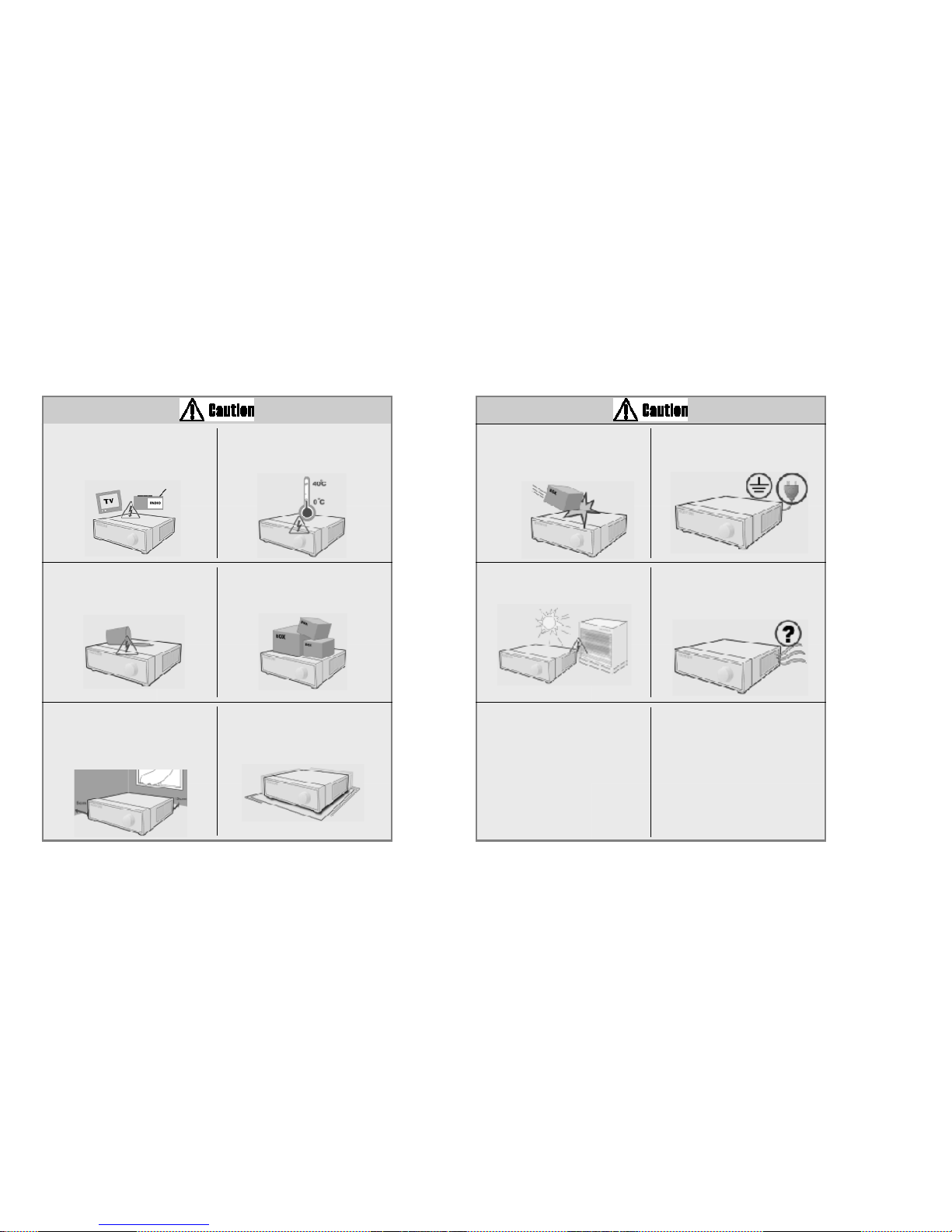
The system can be damaged from a
strong impact or vibration. Avoid throwing
objects within the vicinity of the system.
The outlet must be placed on the
ground.
Avoid direct sunlight or any heating
appliances.
•Recommended operating temperature
is over 0°C(32°F)
If there is strange sound or smell, unplug
the power cable immediately and contact
the service center.
•This may cause fire or electric shock.
Prevent any substances from being
inserted into the system.
This may cause system breakdown.
Do not place any heavy object on the
system.
This may cause system breakdown.
Install the system on a stable and
leveled surface..
The system may not operate properly.
Ventilate the air inside the system
operation room, and tighten the system
cover firmly.
•System breakdown may be cause by
inappropriate environment.
It is recommended to use AVR (Automatic
Voltage Regulator) for stable power
supply.
It is recommended to coil the core-ferrite
around the connector of the system to
avoid electromagnetic interference.
In order to maintain stable system
performance, have your system checked
regularly by the service center.
•KODICOM is not held responsible for
system breakdown caused by user’s
mishandling.
Do not install the system in a place with
high magnetic, electric wave, or wireless
devices such as radio or TV.
Install the system in a place without
magnetic objects, electric frequencies, or
vibration.
Install the system in a place with
appropriate moisture and temperature
level.
Avoid installing the system with high
(over 40°C) or
low (under 0°C)
temperature.
Install the system in a place with sufficient
air ventilation.
Keep at least 15cm distance between
the back of the system and a wall, and
at least 5cm distance between the side
of the system and a wall.

Power Set up
Connect with AC115V if AC
selector is as left picture.
Connect with AC230V if AC
selector is as left picture.
Do not overturn the product under use. Please check to make sure the following equipment are included when you purchased KSR816. If any
items are missing, contact your dealer.
Equipment
Mouse BNC Cable/
S-Video Cable
AUDIO Cable
CD
(Manual / Center)
Manual (Site/Center)
Power Cable
Remote Control
Monitor (Option)

CCoonntteennttss
Chapter 1. KSR816 Guide
1. System Overview
1.1 Front panel 3
1.2 Rear panel 7
1.3
Description of the Remote Controller
……………………………………………………………………………………1111
2. Surveillance mode
2.1 Screen Layout 12
2.2 Enabing full screen & sequence modes13
3. Menu operation
3.1 Using menu in live mode 14
3.2 Using menu on PAN/TILT mode 15
3.3 Using menu on playback mode 16
4. Pan/Tilt Camera
4.1 Switching to Pan/Tilt control mode 17
4.2 Pan/Tilt Camera Control18
4.3 Supported Pan/Tilt Camera list19
5. Search
5.1 Accessing Search mode 20
5.2 Search mode display 20
5.2.1 Graph color display 21
5.3 Selecting date and time 22
5.3.1 Selecting date 22
CCoonntteennttss
5.3.2 Selecting cameras and changing graph bar line 23
5.3.3 Audio Output24
5.3.4 Playback25
6. Backup
6.1 Saving backup into local drive 27
6.1.1 Still image backup 27
6.1.2 Video backup28
6.2 Saving backup using remote drive 32
6.3 Printing still image 35
7. System Setup
7.1 Accessing Setup mode 36
7.2 Setup menu 36
7.3 System Setup 38
7.3.1 Password 38
7.3.2 Site Information39
7.3.3 Software Upgrade41
7.3.4 Log Information 42
7.3.5 OSD / Dwell Time 45
7.3.6 System management 46
7.3.7 System Shutdown 52

7.4 Recording Setup 54
7.4.1 Recording Setup 54
7.4.2 Motion detection 55
7.4.3 Motion Link setting 56
7.4.4 Schedule57
7.4.5 Quality/Resolution 58
7.5 Camera Setup 59
7.5.1 Camera name 60
7.5.2 Sensor setting 61
7.5.3 Sensor/Control link 62
7.5.4 Sensor/Camera link 63
7.5.5 Spot Out/Camera link 64
7.6 Network Setup65
7.7 Backup Schedule 74
7.7.1 Adding Backup schedule 74
7.7.2 Deleting Backup schedule 80
8. Controls - Manual Control
8.1 Switching to Control Mode 81
Chapter 2. KSR816 Installation
1. Pan/Tilt Connection
CCoonntteennttss
2. Connecting LAN/PSTN Communication Lines
2.1 LAN, ISDN (with the Router), and Dedicated Line Connection 86
2.2 PSTN (telephone line) Connection (optional) 87
3. RX Receiver (KRE-303) Connection Diagram (optional)
3.1 Name of Each Part and Description89
4. External Sensor Connection (Input)
5. Control Port Connection (Output)
6. Adding HDD
6.1 Installing new HDD 92
6.2 Checking HDD Database 93
7. HDD Smart Check
7.1 HDD Smart Check 94
8. 외외부부저저장장장장치치설설정정
Appendix
1. Viewer for KDB data
2. Specifications
3. FAQ
4. Product Warranty

1. System Overview
2. Surveillance mode
3. Menu Operation
4. Pan/Tilt Camera
5. Search
6. Backup
7. System Setup
8. Controls - Manual Control
1. KSR816 Guide
Inhaltsverzeichnis
Andere Kodicom DVR Handbücher


