
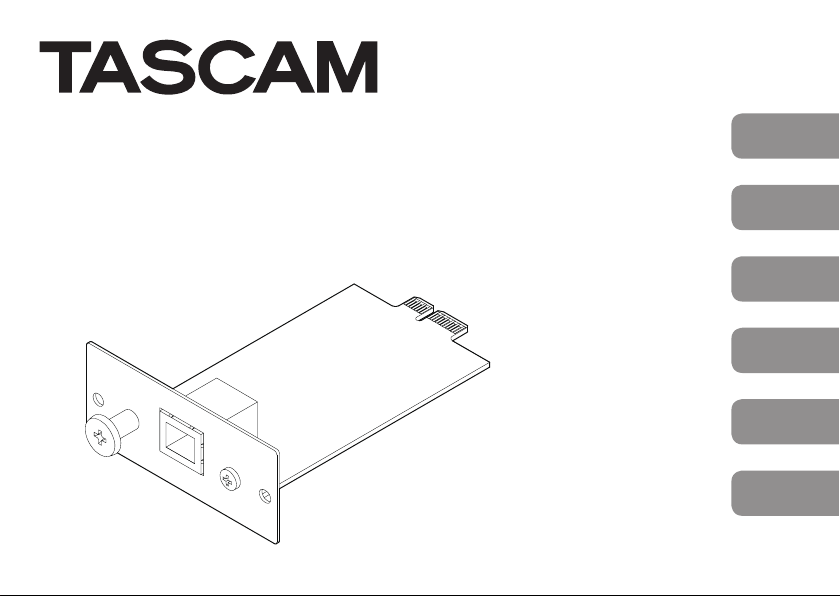
Tascam IF-DA2 Bedienungsanleitung
ENGLISH
FRANÇAIS
ESPAÑOL
DEUTSCH
ITALIANO
OWNER'S MANUAL
MODE D’EMPLOI
MANUAL DEL USUARIO
BEDIENUNGSANLEITUNG
MANUALE DI ISTRUZIONI
IF-DA2
Dante Interface CARD
D01311700A
2TASCAM IF-DA2
https://tascam.jp/jp/
〒206-8530 東京都多摩市落合1-47
TEAC AMERICA, INC.
http://tascam.com/
Phone: +1-323-726-0303
1834 Gage Road, Montebello, California 90640
USA
• TASCAM is a trademark of TEAC CORPORATION,
registered in the U.S. and other countries.
• Audinate®, the Audinate logo and Dante are
trademarks of Audinate Pty Ltd.
www.audinate.com/patents.
• Other company names, product names and
logos in this document are the trademarks
or registered trademarks of their respective
owners.
TEAC MEXICO, S.A. de C.V.
http://teacmexico.net/
Phone: +52-55-5010-6000
Río Churubusco 364, Colonia Del Carmen, Deleg-
ación Coyoacán, CP 04100, México DF, México
TEAC UK LIMITED
http://tascam.eu/
Phone: +44-8451-302511
Meridien House, Ground Floor,69 - 71, Clarendon
Road, Watford, Hertfordshire, WD17 1DS, UK
TEAC EUROPE GmbH
http://tascam.eu/
Phone: +49-611-71580
Bahnstrasse 12, 65205 Wiesbaden-Erbenheim,
Germany
TEAC SALES & TRADING(SHENZHEN) CO.,
LTD
Phone: +86-755-88311561~2
Room 817, Block A, Hailrun Complex, 6021
Shennan Blvd., Futian District, Shenzhen 518040,
China
TASCAM IF-DA2 3
OWNER'S MANUAL
IMPORTANT SAFETY PRECAUTIONS
This device complies with Part 15 of the FCC Rules. Operation is
subject to the following two conditions: (1) this device may not
cause harmful interference, and (2) this device must accept any
interference received, including interference that may cause
undesired operation.
INFORMATION TO THE USER
This equipment has been tested and found to comply with
the limits for a Class B digital device, pursuant to Part 15 of the
FCC Rules. These limits are designed to provide reasonable
protection against harmful interference when the equipment
is operated in a commercial environment. This equipment
generates, uses, and can radiate radio frequency energy and,
if not installed and used in accordance with the instruction
manual, may cause harmful interference to radio communica-
tions.
Operation of this equipment in a residential area is likely to
cause harmful interference in which case the user will be
required to correct the interference at his own expense.
CAUTION
Changes or modifications to this equipment not expressly
approved by TEAC CORPORATION for compliance could void
the user’s authority to operate this equipment.
For U.S.A.
For Canada
THIS CLASS B DIGITAL APPARATUS COMPLIES WITH CANADIAN
ICES-003.
This product complies with the European
Directives request and the other
Commission Regulations.
CE Marking Information
EN55103-2
a) Applicable electromagnetic environment: E1,E2,E3,E4
4TASCAM IF-DA2
Declaration of Conformity
Model Number: IF-DA2
Trade Name: TASCAM
Responsible party: TEAC AMERICA, INC.
Address: 7733 Telegraph Road, Montebello, California, U.S. A.
Telephone number: 1-323-726-0303
This device complies with Part 15 of the FCC Rules. Operation is
subject to the following two conditions: (1) this device may not
cause harmful interference, and (2) this device must accept any
interference recieved, including interference that may cause
undesired operation.
IMPORTANT SAFETY INSTRUCTIONS
8For European Customers
Disposal of electrical and electronic equipment
(a) All electrical and electronic equipment should be disposed
of separately from the municipal waste stream via desig-
nated collection facilities appointed by the government or
the local authorities.
(b) By disposing of the electrical and electronic equipment
correctly, you will help save valuable resources and prevent
any potential negative effects on human health and the
environment.
(c) Improper disposal of waste equipment can have serious
effects on the environment and human health as a result
of the presence of hazardous substances in electrical and
electronic equipment.
(d) The crossed out wheeled dust bin symbol
indicates that electrical and electronic equipment must be
collected and disposed of separately from household waste.
(e) The return and collection systems are available
to the end users. For more detailed information
about disposal of old electrical and electronic
equipment, please contact your city office, waste
disposal service or the shop where you purchased
the equipment.

TASCAM IF-DA2 5
Introduction
Thank you very much for purchasing a TASCAM IF-DA2 Dante
interface card.
Before connecting and using this card, please take time to read
this manual thoroughly to ensure you understand how to properly
set it up and connect it, as well as the operation of its many useful
and convenient functions. After you have finished reading this
manual, please keep it in a safe place for future reference.
You can also download this Owner's Manual from the TEAC Global
Site (http://teac-global.com/).
Features of these cards
iCapable of sending and receiving uncompressed digital audio
signals
44.1/48/96 kHz, 24-bit: 2 channels
Models compatible for installation
Before installing this card, check the TEAC Global Site (http://
teac-global.com/) for the latest information about the models in
which it can be installed.
Contents
IMPORTANT SAFETY PRECAUTIONS ..................................................... 3
IMPORTANT SAFETY INSTRUCTIONS.................................................... 4
Introduction .................................................................................................. 5
Features of these cards.............................................................................. 5
Models compatible for installation....................................................... 5
Installation procedure overview............................................................ 6
Included items.............................................................................................. 6
Using the TEAC Global Site ...................................................................... 6
User registration .......................................................................................... 6
Updating the firmware.............................................................................. 6
Notes about Dante...................................................................................... 7
Names and functions of parts................................................................. 7
Rear panel.......................................................................................................................7
Connecting to a Dante network ............................................................ 8
LAN cables used for connections .......................................................... 8
Using Dante Controller.............................................................................. 9
Dante Controller overview...................................................................................9
Audio routing settings............................................................................................9
Changing sampling frequencies and bit depths with Dante
Controller.....................................................................................................................10
Specifications..............................................................................................12
Ratings...........................................................................................................................12
Input/output ratings.............................................................................................12
Other............................................................................................................................... 12
Dimensional drawings......................................................................................... 12

6TASCAM IF-DA2
Installation procedure overview
iFor installation procedures, see the Owner’s Manual for the unit
in which you will install the card.
iBefore installing or removing this card, disconnect the power
cord from the unit it is installed in.
iSecurely tighten the attachment screws on the right and the
left of the card before use.
Included items
This product includes the following items.
Keep the box and packing materials for transportation in the
future.
Please contact TASCAM Customer Support (see back cover) if any
of these items are missing or have been damaged during trans-
portation.
iMain unit.................................................................................................................. × 1
iFerrite core...............................................................................................................x 1
iCable bands............................................................................................................ x 2
iOwner’s Manual (this document) including warranty................ × 1
Using the TEAC Global Site
You can download this Owner’s Manual and the Reference
Manual necessary for this unit from the TEAC Global Site (http://
teac-global.com/).
1. Open the TEAC Global Site (http://teac-global.com/).
2. In the TASCAM Downloads section, click the desired
language to open the Downloads website page for that
language.
NOTE
If the desired language does not appear, click Other
Languages.
3. Click the product name in the “Search by Model Name”
section to open the Downloads page for that product.
4. Select and download the Owner’s Manual and the Reference
Manual that are needed.
User registration
Customers in the USA, please visit the TASCAM website (http://
tascam.com/) to register as a user online.
Updating the firmware
The firmware of this card can be updated to add functions to it.
Check the TEAC Global Site (http://teac-global.com/) for details
about the latest firmware and update procedures.
TASCAM IF-DA2 7
Notes about Dante
Dante is a transmission protocol developed by Audinate. Using
networks based on gigabit Ethernet standards, it enables multi-
channel (512 IN/512 OUT) transmission and high precision, for
example.
Check the Audinate website for details about Dante.
https://www.audinate.com/
iThis card includes a Dante module circuit board made by
Audinate. See“Software Licensing”on page 63 for details
about the open source software used by the Dante module
circuit board.
Names and functions of parts
This card has RJ-45 connectors that support 100Mbps Ethernet.
Use LAN cables to connect these connectors to other devices that
support Dante or a Dante network.
Rear panel
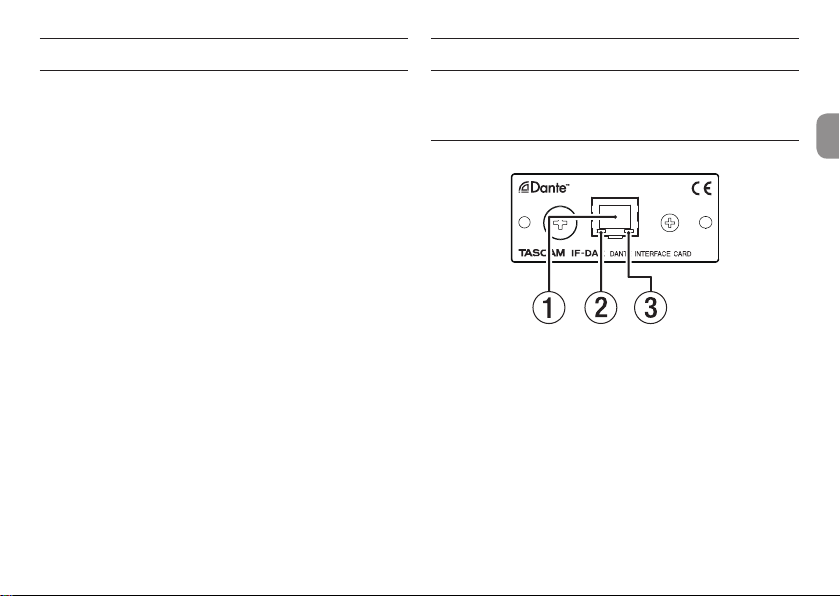
1 RJ-45 connector
This is the main Dante transmission connector.
Use this to connect to a Dante network all the time.
2 Link status/activity indicator
Green indicates that a link is established between the
devices.
Blinking indicates that signals are being transmitted between
the devices.
3 100Mbps link status indicator
Orange indicates that a 100Mbps Ethernet link has been
established.
8TASCAM IF-DA2
Connecting to a Dante network
In order to set up and use this card, you must also set up the
Ethernet network that it is connected to, a computer that runs
Dante Controller and other devices that support Dante.
8LAN cables used for connections
Use LAN cables that are category 5e or faster.
Both crossover and straight cables can be used.
CAUTION
This unit is not compatible with 100Mbps Ethernet
switching hubs. Always use switching hubs that support
Layer 2 and Gigabit Ethernet.
Even though this product is 100Mbp, the speed require-
ments of the Dante System as a whole normally neces-
sitate the use of Gigabit Ethernet Switches.
NOTE
iSet the computer to set the IP address automatically.
iRestarting the computer might be necessary if a previous
network setting is still active on the computer.
LAN cables used for connections
Use LAN cables that are category 5e or faster.
Both crossover and straight cables can be used.
CAUTION
We recommend using an STP cable (shielded LAN cable)
to prevent electromagnetic interference.
When using a UTP cable (unshielded LAN cable), attach
the included ferrite core to the cable.
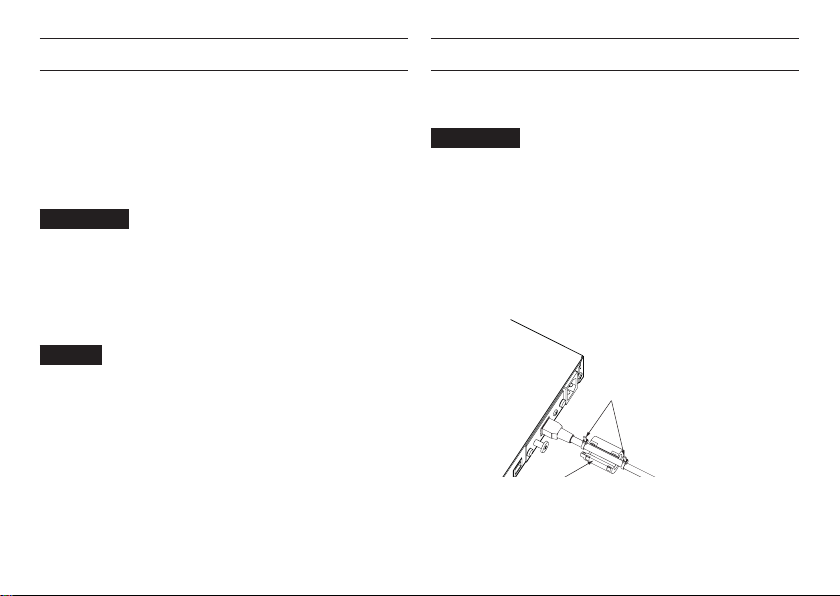
Attach the ferrite core to the LAN cable as shown in the illus-
tration.
Use the included cable bands to attach the ferrite core to the LAN
cable at a position 20–50 mm from its plug.
Attach cable bands
Place ferrite core between
TASCAM IF-DA2 9
Using Dante Controller
Dante Controller overview
This card uses the Dante Controller application, which is available
at the Audinate website, to connect with other devices that
support Dante.
Download the latest version of the Dante Controller application
and an operation manual from the Audinate website.
Audinate download page
https://www.audinate.com/products/software/dante-controller
Make at least the following settings using a computer that has
Dante Controller installed.
iSet the audio routing.
iAdjust the sampling frequency and bit depth of each Dante
device.
NOTE
Settings made using Dante Controller are stored in the
built-in memory of each Dante device.
Unless settings are modified, connections will not change
even if Dante Controller is quit or the computer is discon-
nected from the Dante network.
Audio routing settings
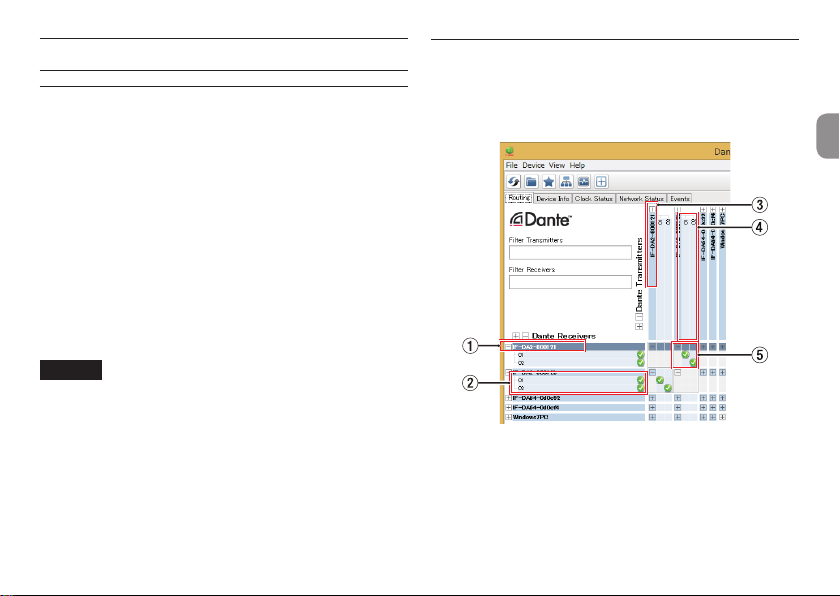
When Dante Controller is launched, the Network View screen
shown below will open.
On this screen, you can set and monitor conditions related to the
Dante network.
1Receiving device name
This is the name of a receiving device on the Dante network.
10 TASCAM IF-DA2
2Receiving device channels
These are the names of the channels of the receiving device
on the Dante network.
3Transmitting device name
This is the name of a transmitting device on the Dante
network.
4Transmitting device channels
These are the names of the channels of the transmitting
device on the Dante network.
5Audio routing
Route the audio channels of the transmitting and receiving
devices that you want to connect here.
Left-click the intersection of the channels you want to
connect on the matrix to connect them.
NOTE
While pressing the computer keyboard Ctrl key, left-click
the “-” at the intersection of device names to connect all
connectable channels at once.
Changing sampling frequencies and bit
depths with Dante Controller
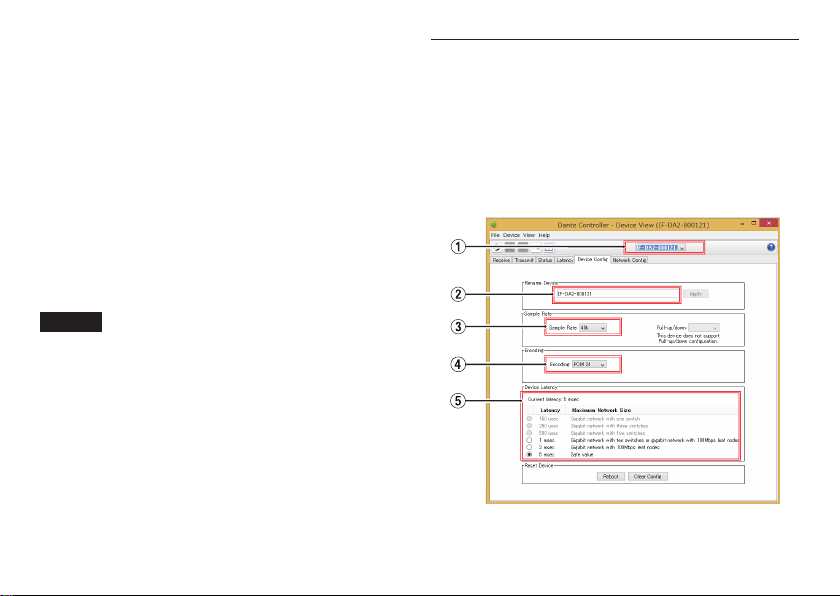
Double-click a device name on the Network View screen to open
the Device View screen.
On this screen, you can set and monitor conditions related to
devices on the Dante network.
Click the Device Config tab to open the page where you can
change the sampling frequency, bit rate and other settings of the
device selected in 1shown in the illustration below.
Inhaltsverzeichnis
Sprachen:
Beliebte PCI-Karte Handbücher anderer Marken


Conrad Electronic
Conrad Electronic 97 46 71 Bedienungsanleitung

Micro Innovations
Micro Innovations USB650A Bedienungsanleitung

KTI Networks
KTI Networks KF-310 Bedienungsanleitung

Asus
Asus SpaceLink WL230 Bedienungsanleitung

SIIG
SIIG SC2475 Bedienungsanleitung

TRENDnet
TRENDnet TEW-703PI Bedienungsanleitung

Belkin
Belkin F5D7000F Bedienungsanleitung

Pericom
Pericom PI7C7100 Bedienungsanleitung

ADLINK Technology
ADLINK Technology cPCI-3548 Bedienungsanleitung

Digium
Digium TE200 Series Bedienungsanleitung

Allo.com
Allo.com 2nd Gen E1/T1/J1 Bedienungsanleitung

Western Digital
Western Digital FireWire PCI Adapter Bedienungsanleitung