
XRPlus XRS 1000 Series Bedienungsanleitung

USER’S MANUAL
XRS 1000 Series
Stand Alone Type
Digital Video Recorder
This manual is written based on 1016

User’s Manual
( 2 )
CHAPTER 1
Specification & System organization
1. Product Contents List -------------------------------------------------------- 4
2. System Organization --------------------------------------------------------- 5
CHAPTER 2
Description
1. Front Panel --------------------------------------------------------------- 6
2. Rear Panel --------------------------------------------------------------- 6
3. Remote Controller ---------------------------------------------------------- 7
CHAPTER 3
Display
1. System Power ON ---------------------------------------------------------- 8
2. Screen Division and Auto Rotation--------------------------------------------- 9
3 PTZ/FOCUS Control -------------------------------------------------------- 10
4. System Power OFF --------------------------------------------------------- 10
CHAPTER 4
Search
Go to Search Mode --------------------------------------------------------- 11
1. Search by Time ---------------------------------------------------------- 11
2. Search by Event ----------------------------------------------------------- 12
Index

User’s Manual
( 3 )
CHAPTER 5
MENU
Go to Menu -------------------------------------------------------------- 13
Go to System Setup -------------------------------------------------------- 13
1. Display ------------------------------------------------------------------ 14
2. Camera ----------------------------------------------------------------- 19
3. Sound ------------------------------------------------------------------- 22
4. System ------------------------------------------------------------------ 23
5. Event/Sensor ------------------------------------------------------------- 29
6. Disk Management ---------------------------------------------------------- 31
Go to Record Menu -------------------------------------------------------- 32
1. Recording Operation -------------------------------------------------------- 32
2. Continuous/Motion Record Schedule ---------------------------------------- 33
3. Alarm Record Schedule ----------------------------------------------------- 34
Go to Archiving ----------------------------------------------------------- 35
1. CD-RW and USB Back up --------------------------------------------------- 35
CHAPTER 6
CLIENT
Remote Program Install ----------------------------------------------------- 36
1. Function Introduction ------------------------------------------------------- 38
2. Local Setup ------------------------------------------------------------------ 39
3. Monitoring --------------------------------------------------------------- 47
4. Search ------------------------------------------------------------------ 51
5. Web Client --------------------------------------------------------------- 58
Index

User’s Manual
( 4 )
1. Product contents List
①Basic Contents
Remote Controller Remote Client
Program Install CD AAA Battery X 2
Power Cable
②Option Contents
HDD
Specification & Organization
Please Confirm the Contents When open Package.
XRS 1000 Series

User’s Manual
( 5 )
2. System Organization
NETWORK
Camera #1-16
Alarm Sensor #1-4 Relay Out
VCR VGA
Monitor AV Monitor
Remote Client PC Image Printer
Video In
Video Out
TCP/IP
Alarm Input/Out
Remote
Controller
(It is not supported at the XRS 2016)
Backup
AVI Backup
WEB Client
USB
XRS 1000 Series
Specification & Organization

User’s Manual
( 6 )
①Power : System Power On/Off
②Led indicator : Indicate Present System Status information. (POWER, RECORD, NETWORK, Alarm)
③USB PORT: USB port for use the USB memory stick and USB HDD Backup.
1. Front Panel
Description
①② ③
①②③④⑤⑥⑦⑧⑨
⑩⑪
①Video In : BNC Port for Connection of DVR & Camera. (16 Camera Connectable)
② Spot Out : Output Spot-out Video to AV Monitor.
③ Audio Out : Output Audio Data.
④ Alarm : Connect Port for Sensor
⑤ Relay : Connect Port for Panic & ARI
⑥ RS-485 : Connect Port for PTZ
⑦ Ethernet (TCP/IP) : Port for Cross cable. (Possible to Remote Surveillance.)
⑧VGA OUT : Output Video to a Computer Monitor by Connected VGA (Option)
⑨ AC Power
⑩ Monitor Out : Output DVR Video to AV Monitor.
⑪ Audio In : Audio Input Terminal Related with #1~16 Camera.
2. Rear Panel
User’s Manual
( 7 )
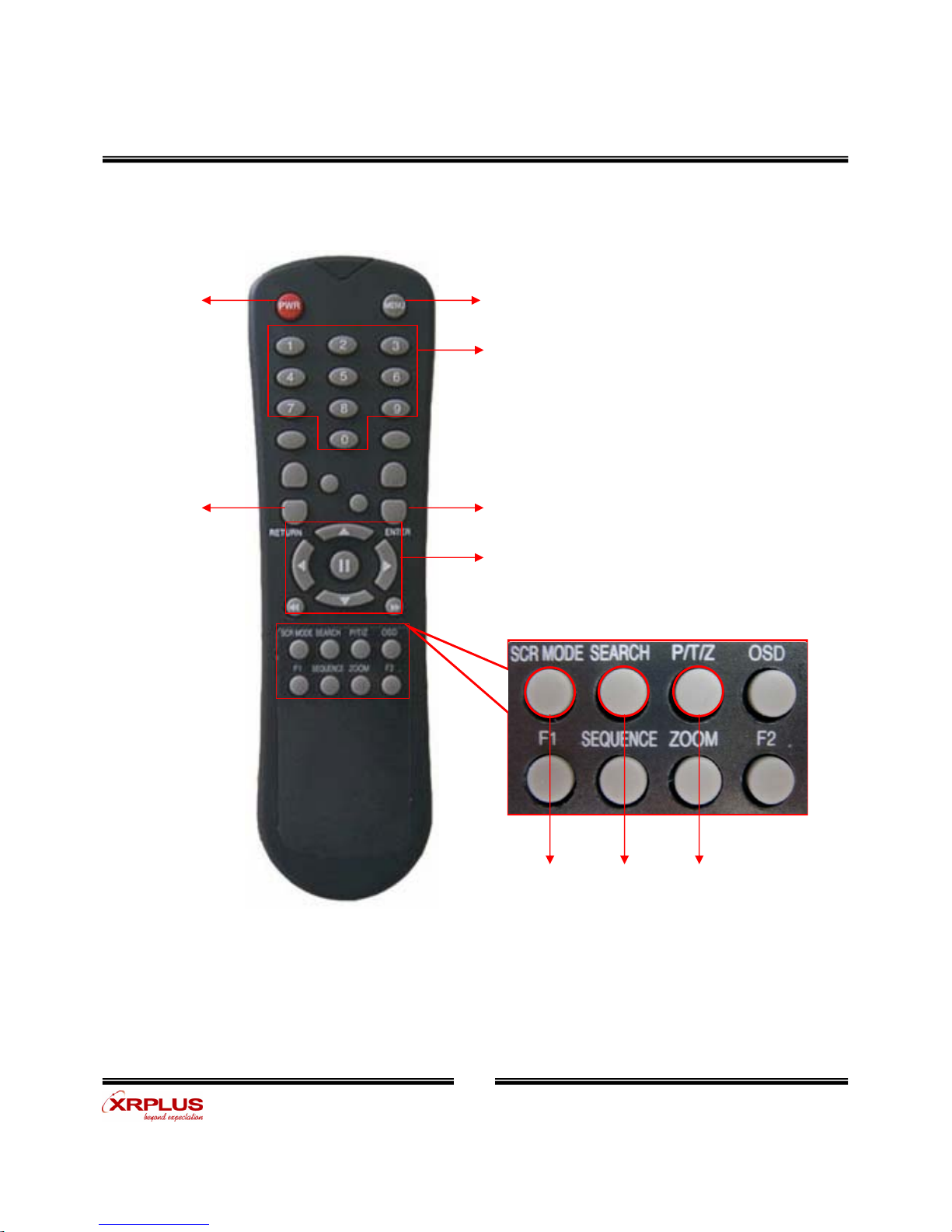
POWER
System
ON/OFF
MENU: Open Menu
RETURN
Cancel Setup
or Return to
Previous
ENTER: Apply Setup Change
Channel Selection Button
(16ch Available, #1~4 Button)
Change Screen
Mode Open
Search Mode PTZ/IRIS Mode
• Unused Button’s Description is Omitted.
• Every Button is Operated Same as Front Panel Button.
• Remote Controller can Operate when Remote Controller Sensor Input Part Reacted Each Other.
※If there are many DVR at the same place, they are reacted together when press remote controller.
Search Controller : Control Playback Option,
Menu Movement, PTZ/Focus Control
3. Remote Controller
Description

User’s Manual
( 8 )
Check System Condition at LED
POWER : Showing System On/Off
RECORD : Showing Record On/Off
NETWORK : Showing Client Connection Status
1. System Power ON
• Press Power Button to Start System
• After Checking Hard Disk, Need input Password to Operation [Default Password 1234]
• Initial Screen View Mode is Quad Division Mode and Recording Mode
Picture for Power On after Finishing Installation
• Each Channel Indicate Camera Name & Recording Status
• Present Time & Date Indicate at Monitor Central Lower Side
Display

User’s Manual
( 9 )
2. Screen Division and Auto Rotation
•Screen Division changes with 'SCR MODE' button on Remote controller
•pressing 'SCR MODE' or 'SEQUENCE‘buttons to see one screen division mode
(all the channels on screen with full screen division mode)
Display
Auto Rotation or Full Screen
4 Screen Division
6 Screen Division
9 Screen Division
8 Screen Division
13 Screen Division
User’s Manual
( 10 )
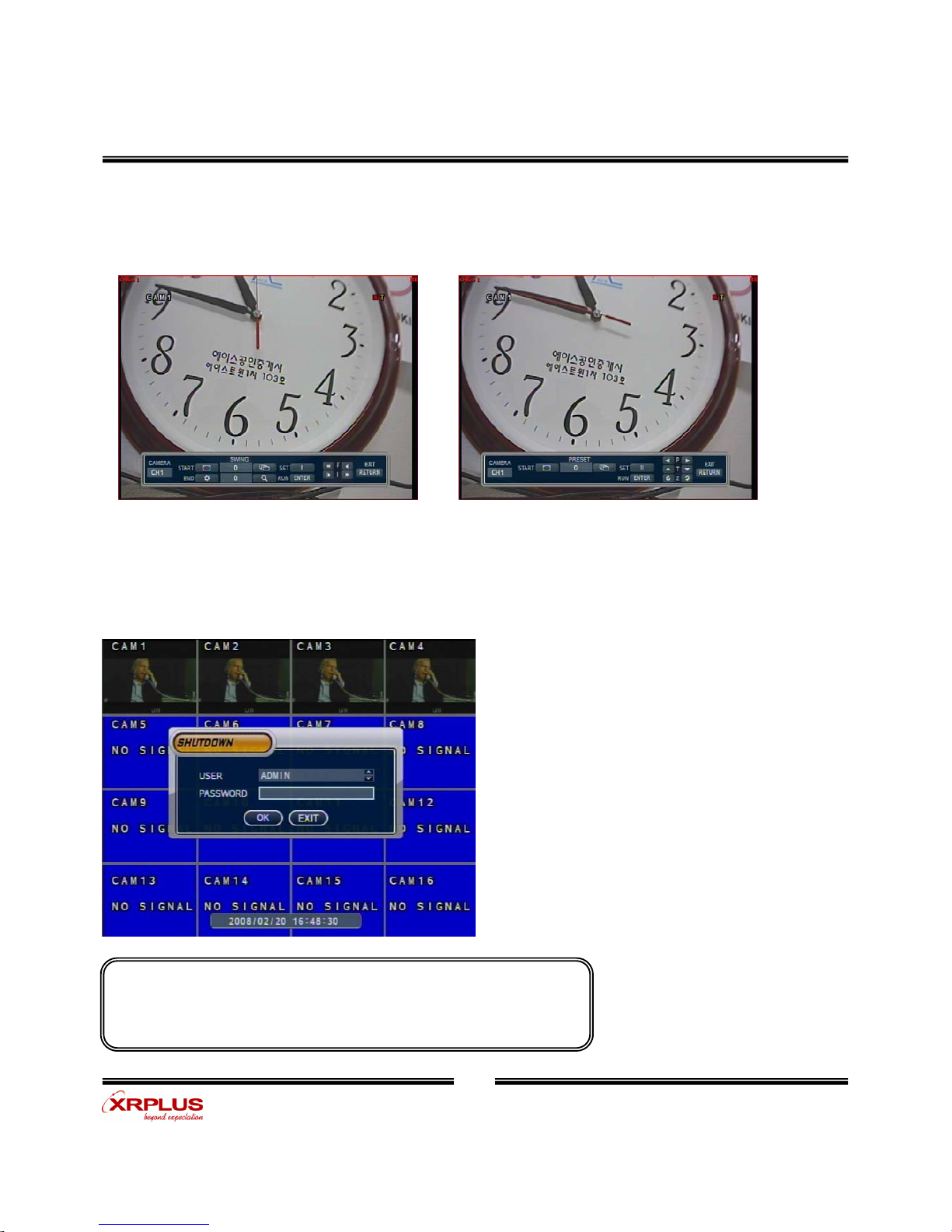
• Each icon mean the button of front keyboard.
• Control each function by front keyboard.
3. PTZ/FOCUS Control
• Control Camera PTZ (Pan/Tilt/Zoom)
• Press PTZ Button to Open PTZ Menu
4. System Power Off
• Press Power Button to System Off
• Input Password and Press Enter to Shutdown System
System Log-On Possible ID : ‘Administrator’, ‘Manager’, ‘User’
Administrator: All Function Access (System On, Shutdown, Setup, Search)
Manager: System On and Search
User: System On
Display
• F: Focus I: IRIS
Inhaltsverzeichnis
Andere XRPlus DVR Handbücher


